



Double Doppler
Members
-
Joined
-
Last visited
Everything posted by Double Doppler
-
Certain, all the mandatory checks run
-
It’s super strange because I’ve since reverted to 1365 and there’s no lightbar issues whatsoever, seems to only be with the latest patch and certain vehicle models
-
No problem, thank you for helping anyway
-
I’m using a custom DLC folder because constantly keeping up with patchday switches is really obnoxious and I have a lot of mods I use to keep the game interesting for my viewers. It’s worked with no issues so far, only thing is this recent issue which is really strange. Seems not to be slot specific but more model specific since the same car has the same issue when placed in another slot.
-
UPDATE: said vehicles cause crashes too when getting too close or spawning them
-
I’m using my own dlc folder with overwrite setting higher than the latest dlc, and both the hi and regular are in the vehicles.img
-
How did you fix it?
-
https://gyazo.com/d05a7a5463a7f188e1204dbcc267d1a1
-
Nope, no prevail. Pasted the data from the working slots to the defective ones and the issue is still there
-
Unfortunately, removing AdvancedHook.asi has no effect
-
Excellent idea and mod, however with the latest version of GTA and RAGE the plugin crashes and refuses to load other plugins. All other RAGE plugins load fine. Below is a crash report if that helps: ---- ASI Support 0.3.1 crash report ---- Generated on 14/12/2018 21:11:59 -- Thrown exception -- System.IO.EndOfStreamException: Unable to read beyond the end of the stream. at System.IO.__Error.EndOfFile() at System.IO.BinaryReader.ReadByte() at AsiSupport.ASI.AsiPlugin.ConvertAsi() at AsiSupport.ASI.AsiLoader.LoadPlugin(AsiPlugin plugin) at AsiSupport.ASI.AsiLoader.LoadAllPlugins() at AsiSupport.Support.Initialize() at AsiSupport.Support.Tick() at PursuitLib.RPH.RPHPlugin.Run() -- AsiSupport state -- Initialized: False Pointer to RetVal: 2AA71A9A920 Last native called: 0 -- Loaded plugins -- *None* Also, the relevant lines in the RPH log upon crash: [14/12/2018 19:46:46.360] ASI Support For RAGE Plugin Hook: [19:46:46] [INFO] Intializing AsiSupport version 0.3.1... [14/12/2018 19:46:46.360] ASI Support For RAGE Plugin Hook: [19:46:46] [INFO] Using PursuitLib 0.9.3 [14/12/2018 19:46:46.360] ASI Support For RAGE Plugin Hook: [19:46:46] [INFO] Using PursuitLib.RPH 0.1.0 [14/12/2018 19:46:46.368] ASI Support For RAGE Plugin Hook: [19:46:46] [INFO] All required files are available. [14/12/2018 19:46:46.388] ASI Support For RAGE Plugin Hook: [19:46:46] [INFO] Initializing AsiLoader... [14/12/2018 19:46:46.512] ASI Support For RAGE Plugin Hook: [19:46:46] [INFO] KeyboardManager initialized [14/12/2018 19:46:46.516] ASI Support For RAGE Plugin Hook: [19:46:46] [INFO] AsiSupport initialized. [14/12/2018 19:46:46.517] ASI Support For RAGE Plugin Hook: [19:46:46] [INFO] Loading ASI plugins [14/12/2018 19:46:46.520] ASI Support For RAGE Plugin Hook: [19:46:46] [INFO] Loading "AdvancedHookV" [14/12/2018 19:46:46.521] ASI Support For RAGE Plugin Hook: [19:46:46] [INFO] Non universal ASI detected. Converting it... [14/12/2018 19:46:46.528] ASI Support For RAGE Plugin Hook: [19:46:46] [ERROR] Unhandled exception. Execution cannot continue: System.IO.EndOfStreamException: Unable to read beyond the end of the stream. [14/12/2018 19:46:46.529] ASI Support For RAGE Plugin Hook: [19:46:46] [INFO] Creating crash report: crash-14-12-2018-19.46.46.txt [14/12/2018 19:46:46.541] ASI Support For RAGE Plugin Hook: [19:46:46] [INFO] Unloading all plugins... [14/12/2018 19:46:46.541] ASI Support For RAGE Plugin Hook: [19:46:46] [INFO] Disposing KeyboardManager... [14/12/2018 19:46:46.545] ASI Support For RAGE Plugin Hook: [19:46:46] [INFO] Disposing AsiInterface... [14/12/2018 19:46:46.545] ASI Support For RAGE Plugin Hook: [19:46:46] [INFO] AsiSupport unloaded successfully. [14/12/2018 19:46:46.566] ASI Support For RAGE Plugin Hook: [19:46:46] [INFO] Unloading all plugins... [14/12/2018 19:46:46.566] ASI Support For RAGE Plugin Hook: [19:46:46] [INFO] Disposing KeyboardManager... [14/12/2018 19:46:46.566] ASI Support For RAGE Plugin Hook: [19:46:46] [INFO] Disposing AsiInterface... [14/12/2018 19:46:46.566] ASI Support For RAGE Plugin Hook: [19:46:46] [INFO] AsiSupport unloaded successfully. [14/12/2018 19:46:49.360] SirenMastery: SirenMastery, developed by Albo1125, has been loaded successfully!
-
After the forced update, I’ve noticed some police car slots have ‘wobbling’ lightbars and misc parts, but not all? The vehicles used in all the slots are ELS enabled and from similar authors, so it wouldn’t be an individual model bug. Basically, when moving or even sometimes when stationary, the lightbars on the police models ‘wobble’ as if they were antennae in the wind. This is is very strange and doing my head in. Anyone had a similar issue?
-
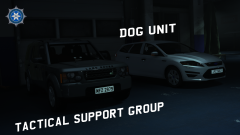 This looks superb 👌
 -
-
Strange. I don’t recall adding anything with Menyoo, it was purely the trainer itself alongside RAGEHook.
-
An update regarding this - creating separate .rpfs in different dlc packs appeared to resolve this issue. Keeping the archive files individually below 2GB.
-
This confuses me. Menyoo uses SHV to load, and every time the .asi is in my GTA directory, RAGEHook will crash the game to desktop when either plugins are loaded or the game is launched from the RAGE launcher. Are these mods meant to be incomparable with each other? 🤔
-
Hi, So I’ve been modding my cars in-game recently. I’ve used police car modifications, transport and ambulances etc. with no issue in the past. I’ve now installed several civilian car modifications to the game, testing each one to make sure it works. However, upon occasional CTDs and playing the game for a while, I’ve noticed I get an ERR_ZLIB error. I check my vehicles.rpf and some vehicle files cannot be open - they’ve become corrupted. This has happened on two different occasions, with the exact same vehicle modes used where different files have been corrupted. What’s happening here? Why are my car model files being indiscrinately corrupted? My vehicles.rpf is over 2GB but less that 3GB - it should still work technically and it has done for a few game sessions of over 1 hour each, however the files appear to be randomly corrupted. Any helpful feedback would be appreciated - this issue is quite difficult to backtrack and I’d appreciate anyone who had good knowledge of installing lots of car mods and OpenIV to help out!
-

-
-
-
-
.thumb.png.8ecbfbf534c7bd238414cceea9d16a1a.png) Thanks for releasing 😉
Thanks for releasing 😉 -
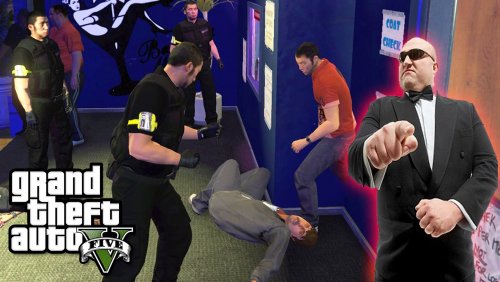 UK bouncers like the ones standing on the doors of the many nightclubs across the UK. Included with a realistic SIA armband for ID purposes. *Attitude not included* it's up to you whether you want to be a nice bouncer or an asshole 😉 INFO REGARDING INSTALL/CREDITS: - Original model and skins by festivalmatt. Bouncer skins by Double Doppler. - Backup your original game files! Just install to your componentpeds.rpf folder. - Do not redistribute without author's permission. - Contact me on doubledoppler@live.co.uk OR my facebook page facebook.com/doubledoppler. - Happy bouncing!
- 1 review
-
-

- 2
-
-
Works quite well actually, however criminals will use tasers instead of pistols now.
-
I'll try that out, thank you for letting me know and linking it.


.thumb.png.8ecbfbf534c7bd238414cceea9d16a1a.png)
