


TheRuslu
Members
-
Joined
-
Last visited
Everything posted by TheRuslu
-
The problem must lie in Framework, C++ or the Windows itself, it can't be the game or the RPH.
-
GTA V got updated today and the current version of RPH doesn't support it. It will probably be updated in the next few days. Their site is down, because their host shut their website down for "high volume of incoming connections", they are trying to get it back up.
-
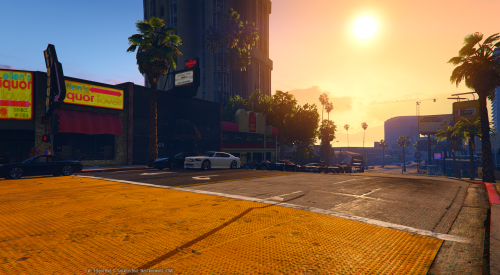 Well, it's a noticeable improvement from the original, where the streets were quite deserted and the world didn't feel like a big and populated place, of course you can't go too extreme with it, unless you want the game to go crazy.
- 19 comments
- 3 reviews
-
It of course depends on the hardware that is being used - the more RAM and VRAM available the more the system and the game can handle. For me I found that 1.6x density and 20x variety was the highest my system could handle without the game crashing or becoming unplayable.
- 19 comments
- 3 reviews
-
Tried it with Highest and Extreme High, on both occasions the game would crash instantly when going onto the street or after about 3 minutes of driving around in the city. Ultra High however didn't crash and ran tolerablely. It's probably that the CityDensity value can't exceed 2.0, otherwise the game can't handle it and will crash.
- 19 comments
- 3 reviews
-
Have you tried how much you can go with the density without the game crashing or becoming unplayable?
- 19 comments
- 3 reviews
-
Weird. I suggest trying with LSPDFR 0.3, when it gets released today, hopefully then it works, otherwise the only thing I can come up to is that your GTA V is corrupted.
-
Have you tried removing and reinstalling LSPDFR? When installing it make sure that you only copy the LSPDFR files as the RPH that is included with the package is outdated.
-
First, make sure that you have installed all updates through Windows Update. Then run System File Checker (SFC) to make sure your Windows files are correct: https://support.microsoft.com/en-au/kb/929833 Finally, try to install NET Framework: https://www.microsoft.com/en-us/download/details.aspx?id=49981
-
Run this application to see if you have everything installed and configured correctly: If you are using RPH 32, then it will give you a suggestion to go back to 29, you can ignore that for now.
-
What version of GTA V do you have?
-
 LSPDFR still keeps crashing on the same exact spot with all universal and LSPDFR specific RPH plugins turned off. RagePluginHook.log EDIT: I managed to identify the issue and fix it. It seems that it requires Windows Media Player to be enabled and up to date, I had it disabled under Windows Features, because I never use it, reenabling it solved the problem.
- 1,081 comments
- 166 reviews
-
-

- 1
-
-
LSPDFR keeps crashing on me when I try to talk to the Gas/Petrol station owner during "Gas/Petrol Theft", it also crashes when I try to talk to the Officer during "Traffic Stop Backup Required". I have tried to uninstall and reinstall this mod and all the necessary files multiple times, but with no success, I have also run the Troubleshooter, which reports no issues. I have attached a RPH log, which ends with the LSPDFR crashing due to "Petrol/Gas Theft" callout. RagePluginHook.log
- 1,081 comments
- 166 reviews
-
Vehicles in Estonia: PD EMS FD
