



Capital XR
Members
-
Joined
-
Last visited
Everything posted by Capital XR
-
 why do the lights not work?
 -
-
-
-
.thumb.png.c3b9e4f9e251d182134617bd44e94af6.png) I'm glad you like it! Thanks for the 5 stars! And I just saw that you asked to have the coordinates in the ini file. I believe that would be really cool especially if you have custom gas stations. I'll add that in the next update.
I'm glad you like it! Thanks for the 5 stars! And I just saw that you asked to have the coordinates in the ini file. I believe that would be really cool especially if you have custom gas stations. I'll add that in the next update.- 20 comments
- 1 review
-
-
Yea, I looked through the mod upload section but cannot find the option to change the version number.
- 20 comments
- 1 review
-
Hey, just wanted to let you know that you can now download the new version including fixed blips and locations and also Jerry cans. Showcase: https://youtu.be/udvsSLsghU4
- 20 comments
- 1 review
-
-

- 1
-
-
Quick update regarding this: I did already add all the gas stations manually now using coordinates as before I added them via prop ID's which are not always the same. As I am currently trying to figure out how to add a working Jerry can, and other props the release for this version will just take slightly longer. If I do not manage to finish adding the props I'll just release a hot fix version fixing the gas station location by tomorrow. I made about 26 gas stations work and also included 2 gas stations at two different airports for planes or helicopters to be able to refuel as well.
- 20 comments
- 1 review
-
Hey, Yes I am aware of that. I decided to change my mind regarding the name last minute causing this. It will be fixed next update so it is the same everywhere. Ah, thanks for letting me know. Ill manually add the gas stations in the next update which will fix it. Appreciate you!
- 20 comments
- 1 review
-
-

- 1
-
-
XR's Fuel Plugin adds a realistic fuel system to GTA V and LSPDFR without overcomplicating gameplay. Vehicles consume fuel while driving, retain their fuel levels during your session, and can run out of fuel entirely if you're not paying attention. Refuel at gas stations around San Andreas, monitor your fuel with a customizable HUD, and receive low-fuel warnings before you're stranded. Fuel consumption rates, vehicle class multipliers, HUD settings, and refueling options can all be adjusted through the included configuration file or the in-game settings menu. Designed to be lightweight, configurable, and easy to install, XR's Fuel Plugin adds another layer of immersion to every patrol. Installation Guide: https://youtu.be/arcqtyDSeEU Features & Fixes: v.0.1.0 Fully customizable fuel system. - Custom fuel usage for different vehicles (Motorcycles use less, planes use way more, bycicles use none.) - Refuel at gas stations (They now have blips) - Engine stall once fuel = 0% - Speeds influence fuel usage - Random fuel levels (50-100%) on civilian cars - Fuel tracking system - low fuel warning - Many other settings in the menu or INI v.1.0.0 Added working Jerry cans Added aviation fuel Fixed & added gas station locations (and their blips) Showcase: v.1.0.0 https://youtu.be/udvsSLsghU4 v.0.1.0: https://youtu.be/OK6efNh7IWo Requires: RPH LemonUI (Special version which is included in the download) GTA5 LSPDFR
- 20 comments
- 1 review
-
-
- 1
-
-
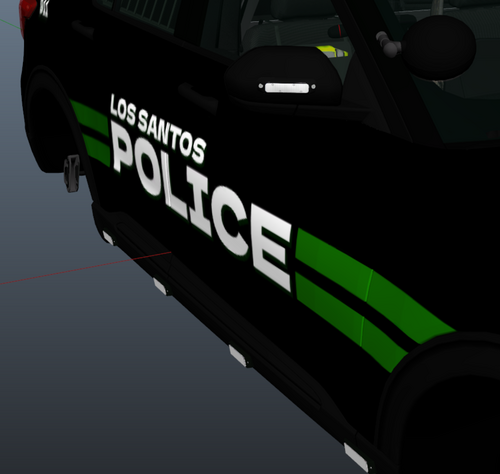 ---------------------------------------------- LSPD Police Livery - Livery - By CapitalXR v.1 ---------------------------------------------- >>> IMPORTANT: This livery is a custom LSPD Police style for the 2020 FPIU. ---------------------------------------------- >>> HOW TO INSTALL: 1) Open "OpenIV" and enable "Edit Mode" 2) Go to your preferred Vehicle DLC in "Grand Theft Auto V\mods\update\x64\dlcpacks" 3) Open the Vehicle DLC Folder and go to: "YourVehicleDLC\dlc.rpf\x64\vehicles.rpf\" 4) Locate your 2020 FPIU .ytd file (possibly named fpiu, 2020fpiu, fpiu2020, etc.) 5) Open the vehicle's .ytd file 6) Search for the keyword "sign" (possibly named fpiu_sign_1 or another number) 7) Repeat this for every vehicle .ytd you find for this model, including the "+hi" version 8) Rename the file included in this pack to match the original file name. DO NOT CHANGE THE FILE TYPE (keep it as .PNG). Update the number as needed (sign_1, 2, 3, etc.) 9) Drag it into the folder and click "Ok" WITHOUT changing any options. 10) Save it and launch GTA V 11) Use a mod menu (like Menyoo) or console to spawn your vehicle. You can then apply the new livery using the mod menu. ---------------------------------------------- >>> CREDITS: - Livery: CapitalXR (myself) - Inspiration: https://www.ford.com//police-vehicles/hybrid-utility/ ----------------------------------------------
 -
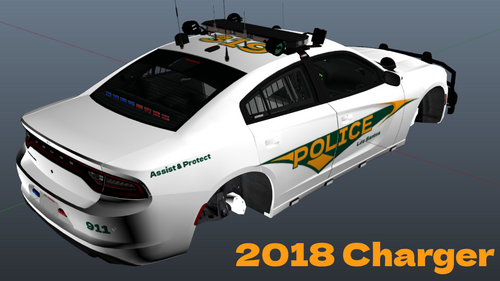 Military Style - Mini Livery Pack - By CapitalXR #v.1A military police inspired mini livery pack based on U.S. Army MP patrol vehicles from Fort Bragg. This pack features clean, simple, and realistic designs aimed at recreating the look of on-base law enforcement units. Designed to fit vehicles like the 2018 Charger and 2020 FPIU, it’s a great addition for players looking to enhance immersion with a subtle, authentic military-style presence in GTA V. Disclaimer: This livery is inspired by U.S. Army Military Police (MP) patrol vehicles, specifically those used at Fort Bragg. This project is not affiliated with, endorsed by, or connected to the U.S. Army or any government agency. How To Install:1) Open "OpenIV" and enable "Edit Mode" 2) Go to your prefered Vehicle DLC in "Grand Theft Auto V\mods\update\x64\dlcpacks" 3) Open the Vehicle DLC Folder and go to: "YourVehicleDLC\dlc.rpf\x64\vehicles.rpf\" 4) In there you have to locate your 2018 Charger or 2020 FPIU .ytd file (Possibly named chrg, charger, 2018charger, 2020fpiu, fpiu, etc) 5) Open the vehicles's .ytd file 6) Search for the keyword "sign" (possibly named chrg_sign_1 or fpiu_sign_1 [or any other name or number]) 7) Repeat this for every vehicle .ytd you find for a specific model. Including the "+hi" Version. 8) Now you must rename the file I included to match the original files name (DO NOT CHANGE THE FILE TYPE [KEEP IT A .PNG) HOWEVER you must Change the number to the next possible one (sign_1, 2, 3, 4, etc). 9) Drag it into the folder and click "Ok" WITHOUT changing any options. 10) Save it and launch GTA V 11) Use a mod menu (like Menyoo) or console to spawn in your vehicle. You can then change the livery using a mod menu.
 -
Hey, It's already released on my profile! It has been made for OfficerArk'a LSPD Pack but should work for other vehicles of the same type.
-
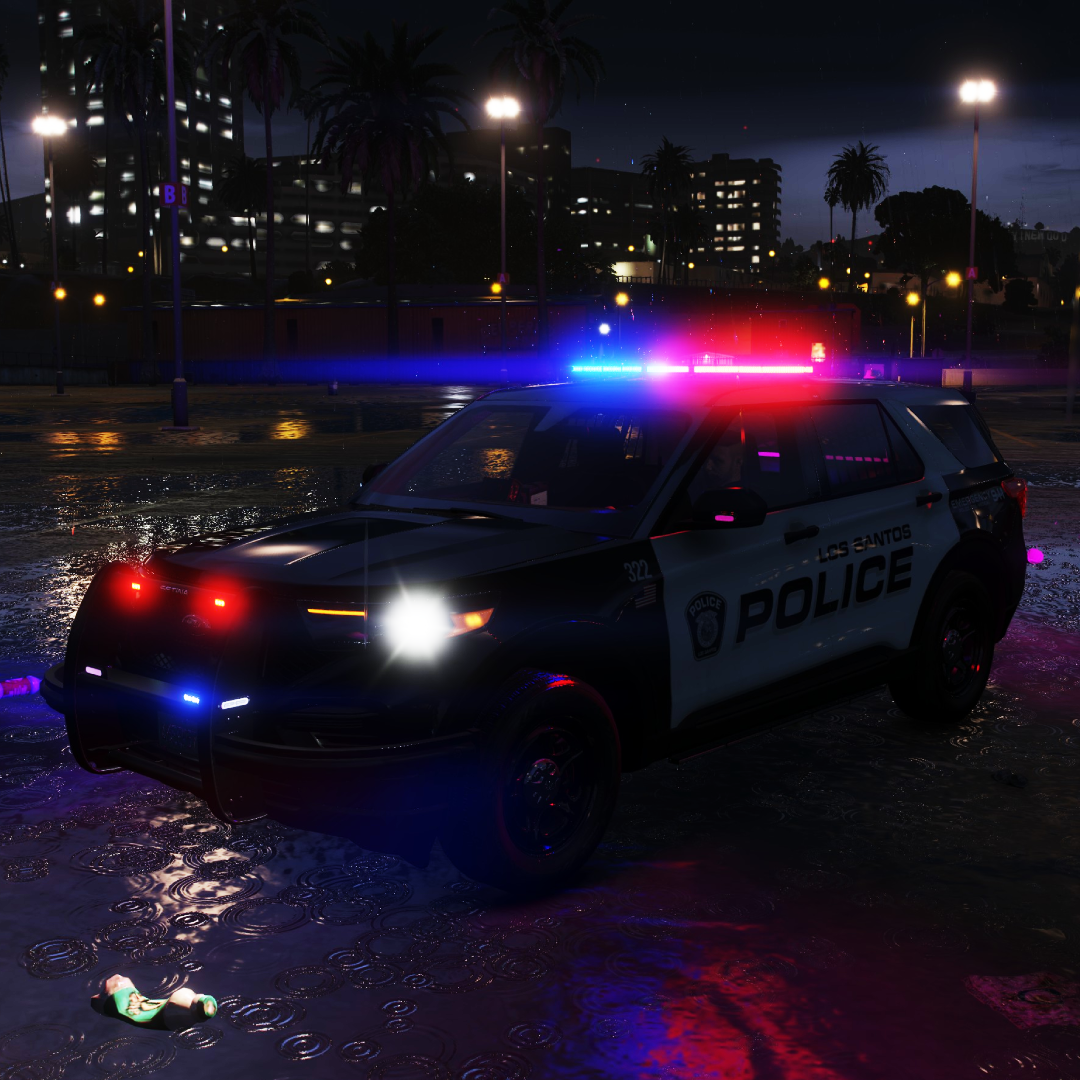
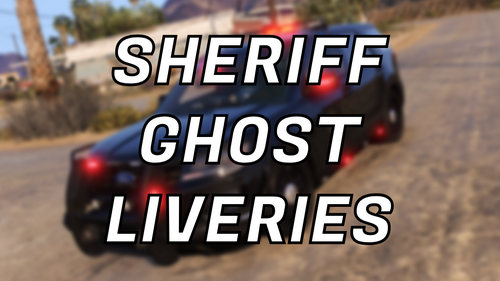 ---------------------------------------------------- Los Santos County Sheriff Livery Pack - By CapitalXR ---------------------------------------------------- >>> IMPORTANT: This livery was originally created for Officer Ark's LSPD pack. However, it should work for most other vehicle models (only the ones provided, of course). ---------------------------------------------------- >>> Current Vehicles: - 2016 FPIU - 2021 Durango - 2020 FPIU - 2021 Tahoe - 2018 Charger ---------------------------------------------------- >>> HOW TO INSTALL: 1) Open "OpenIV" and enable "Edit Mode". 2) Go to your preferred vehicle DLC in: Grand Theft Auto V\mods\update\x64\dlcpacks 3) Open the vehicle DLC folder and go to: YourVehicleDLC\dlc.rpf\x64\vehicles.rpf\ 4) Locate your vehicle’s .ytd file (possibly named vehiclename, vehicleyear+name, etc.). 5) Open the vehicle’s .ytd file. 6) Search for the keyword "sign" (possibly named vehiclename_sign_1 or similar). 7) Rename the included PNG file to match the original file’s name. DO NOT change the file type (keep it as .PNG). However, change the number to the next available one (sign_1, sign_2, sign_3, etc.). 8) Drag it into the folder and click "OK" without changing any options. 9) Repeat this for every vehicle .ytd file for that model, including the "+hi" version. (There is no +hi option in Officer Ark's pack.) 10) Save everything and launch GTA V. 11) Use a mod menu (like Menyoo) or console to spawn the vehicle. You can then change the livery using the mod menu. ---------------------------------------------------- Download the normal version: https://www.lcpdfr.com/downloads/gta5mods/vehiclestextures/53440-los-santos-county-sheriff-livery-pack-by-capitalxr/
 -
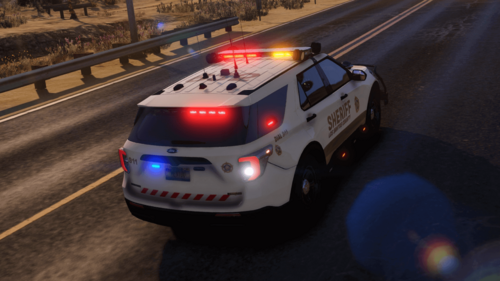 ---------------------------------------------------- Los Santos County Sheriff Livery Pack - By CapitalXR ---------------------------------------------------- >>> IMPORTANT: This livery was originally created for Officer Ark's LSPD pack. However, it should work for most other vehicle models (only the ones provided, of course). ---------------------------------------------------- >>> Current Vehicles: - 2016 FPIU - 2021 Durango - 2020 FPIU - 2021 Tahoe - 2018 Charger ---------------------------------------------------- >>> HOW TO INSTALL: 1) Open "OpenIV" and enable "Edit Mode". 2) Go to your preferred vehicle DLC in: Grand Theft Auto V\mods\update\x64\dlcpacks 3) Open the vehicle DLC folder and go to: YourVehicleDLC\dlc.rpf\x64\vehicles.rpf\ 4) Locate your vehicle’s .ytd file (possibly named vehiclename, vehicleyear+name, etc.). 5) Open the vehicle’s .ytd file. 6) Search for the keyword "sign" (possibly named vehiclename_sign_1 or similar). 7) Rename the included PNG file to match the original file’s name. DO NOT change the file type (keep it as .PNG). However, change the number to the next available one (sign_1, sign_2, sign_3, etc.). 8) Drag it into the folder and click "OK" without changing any options. 9) Repeat this for every vehicle .ytd file for that model, including the "+hi" version. (There is no +hi option in Officer Ark's pack.) 10) Save everything and launch GTA V. 11) Use a mod menu (like Menyoo) or console to spawn the vehicle. You can then change the livery using the mod menu. ----------------------------------------------------
 -
Working on this new Los Santos County Sheriff Livery Pack. I currently finished the following: 2020 FPIU 2018 Charger 2021 Tahoe Im still working on the follwoing: 2021 Durango 2016 FPIS 2016 FPIU 2014 Charger 2015 Tahoe (I might not end up making a livery for all of these on first release) Releasing this in about 48 hours.
.png.ec8b1e3d37828be2d2fa87cd413682e0.png)
-
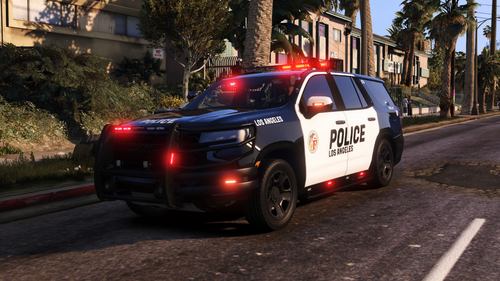 Maybe for the 2021 Tahoe ig but for most other vehicles there is one already
 -
Y'all do realize that there is millions of generic police LAPD liveries here and nobody would download one of the basic ones. Nobody plays with the generic ones. Es gibt Millionen von denn normalen LAPD liveries. Die will niemand mehr
-
---------------------------------------------- 2021 Tahoe - Police Livery by CapitalXR ---------------------------------------------- >>> IMPORTANT: This livery has been originally created for Officer Ark's LSPD Pack featuring the 2021 Tahoe. However it should work for MOST (if not all) other 2021 Tahoe models. ---------------------------------------------- >>> HOW TO INSTALL: 1) Open "OpenIV" and enable "Edit Mode" 2) Go to your prefered Vehicle DLC in "Grand Theft Auto V\mods\update\x64\dlcpacks" 3) Open the Vehicle DLC Folder and go to: "YourVehicleDLC\dlc.rpf\x64\vehicles.rpf\" 4) In there you have to locate your 2021 Tahoe .ytd file (Possibly named tahoe, 21tahoe, 2021tahoe, 21tahoepolice, etc) 5) Open the tahoe's .ytd file 6) Search for the keyword "sign" (possibly named tahoe_sign_1 [or any other name or number]) 7) Now you must rename the PNG file I included to match the original files name (DO NOT CHANGE THE FILE TYPE [KEEP IT A .PNG) HOWEVER you must Change the number to the next possible one (sign_1, 2, 3, 4, etc). 8) Drag it into the folder and click "Ok" WITHOUT changing any options. 9) Repeat this for every vehicle .ytd you find for a specific model. Including the "+hi" Version. 10) Save it and launch GTA V 11) Use a mod menu (like Menyoo) or console to spawn in your vehicle. You can then change the livery using a mod menu. ---------------------------------------------- >>> CREDITS: - Livery: CapitalXR (myself) ---------------------------------------------- >> SHOUTOUTS: - Shoutout to Officer Ark on LCPDFR.com for the main vehicle and template. Check out their files. ----------------------------------------------
-
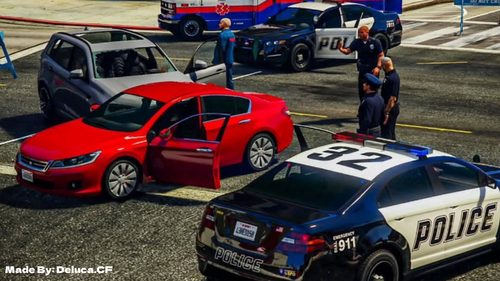 Thank you mate! Some of those where haha. Still working on making them have a better quality in the actual loading screen.
 -
Hey, Wasnt possible for me to make it in the exact style but i have 20 images with multiple units now: https://www.lcpdfr.com/downloads/gta5mods/datafile/53413-capital-xrs-police-loading-screens-unit-mix/
-
 Updated loading screens for GTAV Story mode! This pack features 20+ police themed loading screens for different units! HOW TO INSTALL: 1) Open OpenIV 2) Enable "Edit Mode" 3) Go to mods\update\update.rpf\x64\data\cdimages 4) Make a backup of your current "scaleform_frontend.rpf" if you want to change back to the og ones 5) Delete "scaleform_frontend.rpf" Drag in the "scaleform_frontend.rpf" file included in this download 7) Launch the game! --- YOU MUST NOT STEAL ANY OF MY WORK AND DISTRIBUTE IT ANYWHERE This pack has been made on request.
 -
Yes, That would be amazing. I'll work on it as soon as I can!
-
Capital XR Mod List is one of the biggest and most complete LSPDFR mod lists for GTA 5, featuring 100+ carefully selected and realistic police mods. It includes the best callouts, backup plugins, EUP uniforms, police vehicles, dispatch audio, visual enhancements, and essential utilities to create a highly immersive law enforcement experience. Designed for stability, realism, and smooth gameplay, this GTA 5 LSPDFR modlist is fully updated for 2026 and perfect for players looking to transform their game into the ultimate police simulator. 👉 Explore the full mod list here: https://sites.google.com/view/capital-xr-modlist/lspdfr

.thumb.png.c3b9e4f9e251d182134617bd44e94af6.png)

.png.ec8b1e3d37828be2d2fa87cd413682e0.png)
