


1803 Creations
Members
-
Joined
-
Last visited
Everything posted by 1803 Creations
-
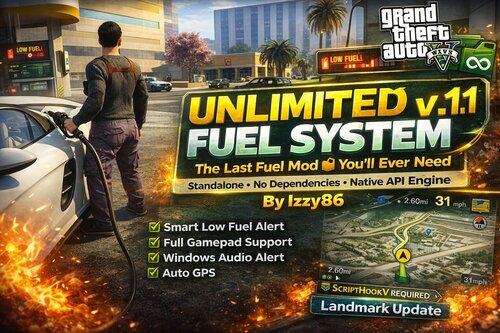 I could but that requires me to delete and backup my old fuel mod, It would be nice to see it in a video. No worries if there is no video!
- 19 comments
- 1 review
-
-

- 1
-
-
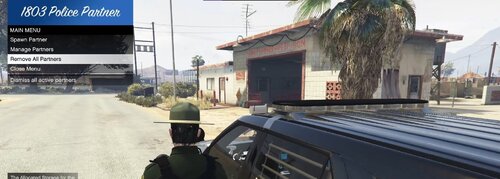 Okay. The future release will have the keybind configurable with an .ini file. Configurable cars for departments are also planned for ini file.
- 12 comments
- 1 review
-
This is the preview (or beta, whatever you wanna call it) version for my police partner mod. The code is on Github and provided in the download. How to install: .cs files are for open-source reference. The other files go into GTAV\plugins\lspdfr folder, To open menu: press F2 on keyboard. Showcase: https://www.youtube.com/watch?v=iJLdLlwMKSk The first version has the police partner able to do three things: Drive around and patrol Join your traffic stop at the press of "Y" on keyboard Automatically join pursuits If you spawn more than one partner, only the nearest one will respond for traffic stop backup. Currently working on for future release: -INI file for more cars and customization -Better traffic stop backup, now cop gets out and stands near car, once traffic stop ends it gets back in and drives away. -Have the cop be able to stop and patrol at a spot Probably not next version but future versions will have the ability for the AI cops to call for backup or traffic stops, pursuits, etc. So instead of you always calling them, they can call you to respond too. Github: GitHub1803creations - OverviewGTAV / LSPDFR / FIVEM Developer. 1803creations has 13 repositories available. Follow their code on GitHub.
- 12 comments
- 1 review
-
-
- 2
-
-
 If you saw that, it was not my mod, Could have been LSPDFR or another script/plugin with ambient stops but this script does not have any arrests or placing people in the back of cars.
- 84 comments
- 1 review
-
-
- 1
-
-
 Yes, I will look into changing the name and outfits of the peds. I think most of the driving issues should be fixed in the newest version. I havent seen any rogue drivers in awhile since the newest version
- 76 comments
- 1 review
-
Looks cool! Do you have a video of gameplay with it in use? Would like to see: map blips, fueling, fuel gauge/fuel levels, EV charging/range support?
- 19 comments
- 1 review
-
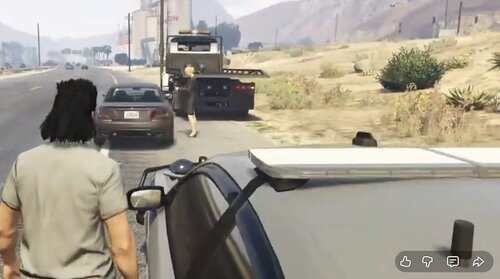 A hit animal is a good one. Ill add that one in the future. I can think about adding text so they can say they are out of fuel or whatever for diff scenarios. I cant make it work with any specific fuel mod. As for the others, I think a broken down car is good as one scenario and not multiple (tow truck is even close but still different).
- 14 comments
- 1 review
-
I'll look into changing cleanup/despawning in the next version. Glad you like it!
- 14 comments
- 1 review
-
-

- 1
-
-
So far so good with running both set to 100% spawn rates in .ini file and only one spawning at a time. Ill keep an eye on it during my next patrol and probably will see this update tonigh!
- 84 comments
- 1 review
-
When you use AI on the web browser, you are using the cloud to access the AI model. The web browser version gets slow and laggy after about 1 hour of trying to program coding languages with it. It is running off HTML and other web browser protocols. When I/you download a language model and use it locally, it does not use a web browser, it is using your local processor/ram/hard drive to run the AI instead of the cloud and web browser. It also remembers every conversation you have unless you delete it and reinstall it. So once it learns the correct way to build a script or plugin, it will do better at creating one the next time. Make 10+ scripts/plugins like me and it can build one in 10 mins or less on for the "first working copy". You should always test for at least 4-5 hours every time you need to make major changes. Test in different areas of the map. Use clean world mods to see if you entities can be safely deleted, Ive ran into issues in testing where the code isnt expecting a delete so make sure to test that out!
- 14 comments
- 1 review
-
I use multiple AI's. Look into ollama.com . There are multiple AI's you run legally run at a time if you run each in its own VM. I basically am combining the use of VMs and AIs so you can run multiple algorithms at a time. Think of it like running AI on multiple web browsers but instead, you are doing it on your own resources locally and not through a web browser.
- 14 comments
- 1 review
-
Yes, maybe today or tomorrow. One issue I am testing it spawning over other callouts/scripts but I think I found the fix (which I just used on the ambient civilian mod I just released) Going to test it with both mods running and hoping to only see one or the other and not both spawn on top of each other. Thats where we are at now. I want V2.0 (next version) to be the stable/last release hopefully! I will probably combine some ideas from this. civilian script, speeding script/my callouts and integrate a new plugin that will work with as callouts/other AI cops reporting and asking for backup. That is the next big project goal, we will see what becomes of it! In the meantime, expect V2.0 to be out in next 48 hours hopefully pending no issues with my testing.
- 84 comments
- 1 review
-
I use multiple AI's to cross check code. So when one makes a mistake or issue with code, the other usually fixes it/tells me what is wrong with it. I also use a locally trained ai model, basically a model you can run on your own resources and it is free and remembers every conversation you ever had with it. So once it learns how to build multiple scripts/plugins, it gets pretty good. But I still use the other AI's to make sure there aren't performance issues or other ways to do things better with code.
- 14 comments
- 1 review
-
-
This is a scripthookdotnetV3 script. Files go into the GTA\scripts folder. This is kind of like my "Ambient AI Police" script except instead of this having police scenarios, these are civilian scenarios. THIS IS NOT A CALLOUT PACK. You are welcome to play LSPDFR and integrate yourself into a scenario if you see one like check peds, call a tow truck, etc. But these will not show up as callouts, these will run with or without LSPDFR (as all scripts do). Showcase: Three scenarios: 1.Broken down car and tow truck on scene Broken down car, ped is on phone calling for help Small car accident Spawn logic, all configured in .ini file: Only spawn points within a certain distance Cleanup when far enough away Max number of scenarios running at a time V1.1 (Updated 3/2/26) Increased time to 10 minutes for each scenario. Scenes now last 10 minutes, if you see one clean up, you were (10 mins) late to the party! All my scripts will eventually be available on Github: GitHub1803creations - OverviewGTAV / LSPDFR / FIVEM Developer. 1803creations has one repository available. Follow their code on GitHub.
- 14 comments
- 1 review
-
-
- 1
-
-
-
.thumb.jpg.5d87250f4558cca01dcb5407f198bdc4.jpg) How do I credit: " 'insert AI Name here' scan the web for any LSPDFR callout code that can help build this project" ? I've never seen any of the four AI's I use say they are actually using anyone's callout pack, I think it more or less learns how to code the correct way scanning the web" Here is a list of sources AI is scanning code from. From what I understand, it is scanning this code to learn how correct code looks, then creates a project based on my prompts and customizations. It is not copying anyone's code. GitHub repositories — 28 (the full "lspdfr" topic count, all containing full plugin/callout source; some untagged ones from searches are already covered here). lcpdfr.com / lspdfr.com forum threads — 22 unique threads with direct pasted code (examples: the big 2016 creation guide with full Main.cs + PursuitinProgress callout; "So im creating my plugin" with complete HighSpeedPursuit class; "My Callout" (2023) with full custom code; "A DEFAULT CALLOUT PRESET"; recent 2025 threads like "CalloutClass", "Need Help with Callout Scripting", "LSPDFR Plugin wont build"; plus many others with OnBeforeCalloutDisplayed/CalloutInfo snippets, IntoxicatedIndividual examples, etc.). Pastebin.com — 4 distinct pastes containing actual code (e.g., pastebin.com/1h1PWcfB from a forum user callout; the YouTube tutorial pastebin.com/dAhFd5Md with setup/template code; plus 2 more from help threads with class excerpts). External guides/docs — 5 (LSPDFR Callout Modding Google Doc with templates; multiple Studocu-uploaded API guides with code blocks; Albo1125-style references; YouTube-linked docs). Reddit threads — 4 with snippets or direct code mentions (e.g., gamedev help posts linking + quoting code; LCPDFR predecessor open-source notes that overlap with LSPDFR modding). Other scattered sites — 2 (minor mentions on the-programmer.com forum with plugin code references; one Scribd PDF with embedded code excerpts).
How do I credit: " 'insert AI Name here' scan the web for any LSPDFR callout code that can help build this project" ? I've never seen any of the four AI's I use say they are actually using anyone's callout pack, I think it more or less learns how to code the correct way scanning the web" Here is a list of sources AI is scanning code from. From what I understand, it is scanning this code to learn how correct code looks, then creates a project based on my prompts and customizations. It is not copying anyone's code. GitHub repositories — 28 (the full "lspdfr" topic count, all containing full plugin/callout source; some untagged ones from searches are already covered here). lcpdfr.com / lspdfr.com forum threads — 22 unique threads with direct pasted code (examples: the big 2016 creation guide with full Main.cs + PursuitinProgress callout; "So im creating my plugin" with complete HighSpeedPursuit class; "My Callout" (2023) with full custom code; "A DEFAULT CALLOUT PRESET"; recent 2025 threads like "CalloutClass", "Need Help with Callout Scripting", "LSPDFR Plugin wont build"; plus many others with OnBeforeCalloutDisplayed/CalloutInfo snippets, IntoxicatedIndividual examples, etc.). Pastebin.com — 4 distinct pastes containing actual code (e.g., pastebin.com/1h1PWcfB from a forum user callout; the YouTube tutorial pastebin.com/dAhFd5Md with setup/template code; plus 2 more from help threads with class excerpts). External guides/docs — 5 (LSPDFR Callout Modding Google Doc with templates; multiple Studocu-uploaded API guides with code blocks; Albo1125-style references; YouTube-linked docs). Reddit threads — 4 with snippets or direct code mentions (e.g., gamedev help posts linking + quoting code; LCPDFR predecessor open-source notes that overlap with LSPDFR modding). Other scattered sites — 2 (minor mentions on the-programmer.com forum with plugin code references; one Scribd PDF with embedded code excerpts). -
-
This is my third callout pack, see the map for spawn locations. This one focuses on Park Ranger callouts. Callouts and possible future callouts are listed below. All callouts will have multiple scenarios. I am open to suggestions! Files go into the GTAV\plugins\lspdfr folder with all callout packs. The .ini file will generate automatically the first time and has some options to configure. Showcase: https://www.youtube.com/watch?v=p4zqXf57eTk Callout Plans: (Green Underline indicates Callout in current version) Animal Struck Illegal Parked Car Off-Road Violation Mountain Bicycle Accident Road/Trail Construction Lost Hiker Illegal Camping Fire reported Poachers Climbing Accident Injured Horseback Rider Vandalism Suspicious Person Drunk and Disorderly / alcohol V1.1 has two new callouts and three new locations. New Callouts: Bicycle Accident: Multiple Scenarios Road/Trail Construction Scene: Player is in charge on controlling the scene New locations: Illegal Fireworks
-
-
.thumb.jpg.53b34831893b714bdea2520e5d0a8595.jpg) Did you update to version 1.1? There was an extra space on the plate for the autofill in V1.0. If it looks like a changed plate (it is shorter than the standard plate) then it will be in the system. There is a chance it could be a default plate that wasnt changed because the driver is not in our database. So if you come across a driver not in the database, the plate and driver wont return anything in our system. If you come across a name you dont see in the database, you can add it (and make a plate/car for them) using the admintool. I will eventually gather more names and try to get them all but right now we have about 2600 names. If the driver name is in the database, then their plate should come back in the vehicle lookup.
Did you update to version 1.1? There was an extra space on the plate for the autofill in V1.0. If it looks like a changed plate (it is shorter than the standard plate) then it will be in the system. There is a chance it could be a default plate that wasnt changed because the driver is not in our database. So if you come across a driver not in the database, the plate and driver wont return anything in our system. If you come across a name you dont see in the database, you can add it (and make a plate/car for them) using the admintool. I will eventually gather more names and try to get them all but right now we have about 2600 names. If the driver name is in the database, then their plate should come back in the vehicle lookup. -
Appreciate the kind words! Hopefully we all can make GTA5 modding a good time for the next few months and then get ready for GTA6 time!!
- 84 comments
- 1 review
-
-
-
- 2
-
-
Expect the new version in the next couple of days, testing it out today to make sure siren issue is fixed and other things are working as expected.
- 84 comments
- 1 review
-
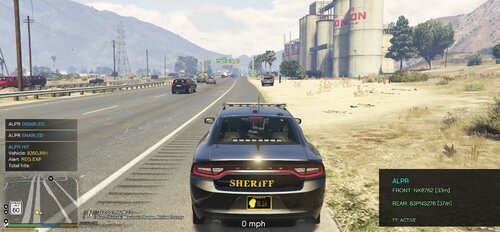 Thanks for your suggestions. Once I continue to use/test the system, I will likely add in ambient traffic stops with some notifications from other cops either asking for backup bc of a warrant or something and/or have the notification say "Paleto Sheriff pulling over suspect "name" "license plate" for "reason" As far as working with other mods/developers, I am 100% open to it and the code for the PersistentWorld project and database is completely open source so anyone is welcome to build plugins off of it.
 -

.thumb.jpg.5d87250f4558cca01dcb5407f198bdc4.jpg)
.thumb.jpg.53b34831893b714bdea2520e5d0a8595.jpg)
