




J T
Members
-
Joined
-
Last visited
Everything posted by J T
-
-
yeah i seen that its pretty cool but doesnt have any spotlights :( most of my cars that ive downloaded have a spotlight or two just found a car but i dont know if its out or not but this is what im looking for or similiar to it http://www.youtube.com/watch?v=u10DVpMOYzg
-
try using els v5 its alot more stable i use to have v6 but it kept crashing so many times v5 should let you play for however long you want and should be able to call in noose without crashes
-
-
what you can do is record the live feed with bandicam then convert it to mp3 and change vehicle ide for police vehicles to be able to listen to the radio then transfer the recorded the live feed or feeds to your user music and listen to it in game...it makes such a big difference then you dont have to bring up the live feeds all the time you can listen to it in the game
-
the nypd are corrupt as hell
-
what version of els are you running?
-
yeah something like that i think itd look sick...theres a slicktop on gtapolicemods that has lights on the rambar
-
ill try that and yeah i use google alot but im pretty picky when it comes to cars
-
can anyone make a ford crown with this lightbar? http://gtapolicemods.com/downloads.php?do=file&id=1512 and add lights to the ram bar light his ford taurus i think it would look sick...im currently using this ford crown because the lights look so awesome
-
thats exactly what happened to me what i first snagged a thief...soon as he took off in the car i had a pursuit in progress happen right in front of him kinda like in the one episode of bait car...love this mod especially being able to call in any of my squad cars in right away instead of having to steal a car to get to the police station to go on shift
-
definately worked
-
-
-
-
i went back to els thought i would try the / key since i installed the stock cars for the bank heist mission...trying to beat the game and was curious to see if i could find it but couldnt and i dont wana have to buy a numpad...els may have the door glitch but thats no big deal v5 is very stable.... EDIT i got a new computer with a numpad and runs alot better so this topic can be closed
-
http://gtaiv.chinagreenelvis.com/enb/ looks awesome
-
embedding disabled
-
when you call for a prison transport will the AI car park behind yours or close to it ?
-
you dont have to get in the vehicle just stand beside it and then do ctrl t
-
-
anyone know how to configure the / to turn on lights without the siren to a different key? for some reason it doesnt work for me and it might be because i dont have numpad on my laptop...ive looked in the lcpdfr ini file and all over google for this problem and cant find it
-
-
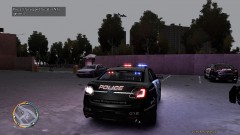
From the album: lcpdfr
YakadafiART's ford taurus -
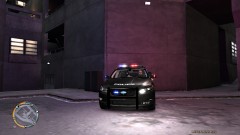
From the album: lcpdfr
YakadafiART's ford taurus


