
RWieber79
Members
-
Joined
-
Last visited
Everything posted by RWieber79
-
 If updating from the previous version do I need to delete my old ini so a new one generates or can I keep the one I have?
- 37 comments
- 1 review
-
-

- 1
-
-
.thumb.png.4ae541125774b3d59e60a0636013f9c1.png) Any chance of adding slots for custom baton and flashlight? I have the TLS belts that have holstered and unholstered variants would be great to be able to put those to use with this mod as well. Thanks!
Any chance of adding slots for custom baton and flashlight? I have the TLS belts that have holstered and unholstered variants would be great to be able to put those to use with this mod as well. Thanks! -
 I haven't tried the latest update yet but when I had the previous version installed I was constantly getting the message that a crowd was gathering and dispersing when no weapon was drawn and even while driving in the vehicle. Idk if maybe it was conflict with a mod I use that disables the weapon wheel or what but at the very least the option to turn off the messages would be great. It did not generate an ini that I know of so I assume you didnt create it to do so but I think and ini would be good for the mod so that way players get the option of disabling the messages and any other configurable options you choose to add in.
- 10 comments
- 1 review
-
 Does the Patreon version Thanks for the reply, also is the patreon version simply early access versions that may have other features due to them being higher versions or do the patreon versions also have features that will always be exclusive to patreon versions of the MDT? The reason I ask is to determine if I want to use this version on here or if there are added features that will always be exclusive to patreon then that is the one I will get.
- 118 comments
- 17 reviews
-
Out of curiosity is this made to work with Policing Redefined, Stop the Ped, both or neither? Been looking for a good MDT to use with Policing Redefined, I've went back to STP because of that reason mostly so a better MDT would be great. I'll check out the Patreon as well, and I really like the idea of it working with NPCAI, that has to lead to much more immersive interactions with Peds.
- 118 comments
- 17 reviews
-
 Really like this plugin, adds to immersion when approaching a pulled over vehicle alerting you to things in plain view like an officer would actually see irl. Also the included VehicleItems.xml is great because with over 6000 items you dont keep seeing the same items in a vehicle search over and over again with Stop the Ped.
- 14 comments
- 1 review
-
-
- 1
-
-
So since I updated to the newest vehicles.xml every vehicle I search has nothing of interest. Anyone Else had this issue? I also have Patrol MDT and Visual Probable Cause installed so idk if that could have anything to do with it or not.
- 14 comments
- 1 review
-
-
- 1
-
-
 I installed the plugin for the first time today, looks like it loads ok see's my input and output devices but when I press the keybind and say one of the phrases nothing happens. I don't get the megaphone sound either. Also crashed my game once earlier when I was getting back into a patrol car. I use Grammar Police and NPCAI already so I know my Voice Recognition is set up correctly and also I have other plugins that use NAudio as well so that is installed in my game files, idk if that and the one embeded in the file for this plugin would conflict or not. Im not a dev so its over my head, lol. Also here is the most recent rage log if it helps. Any info is greatly appreciated, would really love to try out this mod. Thanks RagePluginHook.log
- 68 comments
- 2 reviews
-
Do I need to use the pdb file from the previous version? I noticed there isnt one is the download.
- 37 comments
- 1 review
-
-

- 1
-
-
Here ya go, I just overlooked the log mixed in with the other files. Pasted content ScriptHookVDotNet.log
- 37 comments
- 1 review
-
-
- 1
-
-
Great news, so I assume you don't need the log then? If you do which log are you talking about because I looked and I don't have a log for SHVDN. Thanks
- 37 comments
- 1 review
-
-
Yeah I was checking the differences from the original file and saw it. I was not aware that is how it was supposed to be in xml so I thought it may have been a typo or something. So far the mod is really cool. I actually used a vehicles.xml that was basically word for word the same as the one you included up to about 3000 items and then yours kept going and going, lol. Its great, over 6000 items so you dont get the same stuff over and over!
- 14 comments
- 1 review
-
-
- 1
-
-
I'm having the same issue and I have the latest SHVDN. Other scripts still working but Roadworthy throws the error and doesnt work.
- 37 comments
- 1 review
-
-
- 1
-
-
On the vehicles.xml the only differences I noticed were on a couple lines after part of the line item it shows & and then the rest of the line. For example: <Item chance="normal">Pry bar with a 'Property of Los Santos Water & Power' tag</Item> <Item chance="often">Bag of 'Gourmet' popcorn (Sea Salt & Vinegar)</Item> <Item chance="normal">Box of 'Oats & Honey' granola energy bars</Item> Are these supposed to be that way or did something not download correctly on my end? There are only approx 5-7 instances of this so that is why I am asking along with that being the only changes that show up from the previous version. Its basically the spots where the word should be "and" but it is replaced with & Thanks
- 14 comments
- 1 review
-
-
- 1
-
-
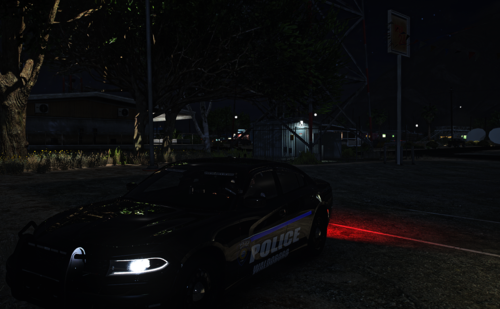 Yeah I just tweaked it to make it useable for me in the Reshade sliders nothing else and just for personal use.
 -
Ok thanks, I was wondering because I noticed it was slightly different than the one with QuantV. The preset looks nice except the taillights, streetlights and some of the other lights are way too bright on my end. I lowered them all in the ReShade menu and it helped alot so Idk if its just from our monitors being different ot what but either way it looks pretty cool.
-
Hello, I am wondering if it would be possible to add in an animation for the player to use the radio on the right shoulder the same way it is already available for the chest and left shoulder in LSPDFR. Alot of the vests I would like to use for my characters have the radio already modeled onto the right shoulder of the vest so if I want to use those vest currently I have to turn off the animation which really kills the immersion/realism. Thank You
-
Is the visualsettings.dat different from the one that gets installed with QuantV?
-
 If you are using Ultimate Backup you can set what color you want the vehicles to spawn in the xml files. Here is an example of what it should look like: <Vehicle chance="50" pax="0" pax_chance="0" livery="2" color="Black">police4</Vehicle>
- 480 comments
- 18 reviews
-
-
 Can this be used to disable all of the Rockstar recording and clip controls for keyboard and controller as well as the home button social club? I didnt really see the commands in the list but then again not 100% sure what to look for either so thats why I am asking. Thanks
 -
 Is there a new discord link? the one on page says invalid and the one in the banner just zooms the banner. Thanks
- 352 comments
- 25 reviews
-
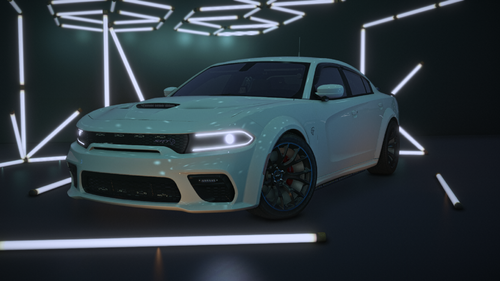 Would love a marked non slicktop version of this with the bullbar like your 22 charger rt from patreon. I've been looking for a good marked Hellcat with this hood forever and everyone I find is either slicktop, not els, has problems with the model somewhere or the taillights are 100 times brighter than my other vehicles so I have to mess with my reshade settings every time I want to use one of those cars. All of yours seem to have the perfect amount of lighting and everything works right.
 -
No matter I put in the search field it comes back with 0 results.
.thumb.png.4ae541125774b3d59e60a0636013f9c1.png)