


Lupu
Members
-
Joined
-
Last visited
Everything posted by Lupu
-
 No worries. Keep up the good work. Like many have said in this thread, I'd love to see this work. I may create a pull request and run the code through linting to see if I can catch any bugs. And don't stress over the negative feedback.
- 64 comments
- 2 reviews
-
I have the same problem, with the latest version. I also noticed that all the keys in "Keys.ini" are set to "None".
- 64 comments
- 2 reviews
-
 What's the fucking hotkey for this? I noticed F7 in some comments, but that doesn't work for me.
- 637 comments
- 76 reviews
-
 I am getting this error when Road Rage call out happens around Palleto Bay. RoadRage2: Operation is not valid because the specified Rage.Ped is invalid. Attached is my log if it helps. RagePluginHook.log
- 197 comments
- 37 reviews
-
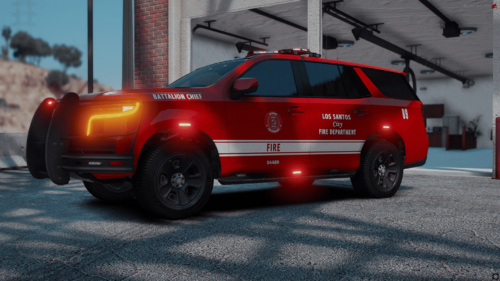 It doesn't spawn without the original vehicles installed as well. The ones by Dzy. Also, the light reflections are blue instead of red. Otherwise, amazing vehicle design.
 -
 No, it is not. It's by far the best plugin for RHP. You can find an updated version on their discord server.
- 283 comments
- 23 reviews
-
 My game crashes upon executing RHP, and an error displays on the screen stating that a log file could not be created by siresettinglimiter. Clicking the ok or the X button on the error, causes the error to pop-up over and over, in a loop.
- 342 comments
- 20 reviews
-
The game is buggy when it comes to graphics. I would say a Radeon 580 if you can find one, but you also need a decent CPU like a Ryzen 7 1700x or a Core i7. I am using a Radeon 6600M (laptop gpu and cpu) and the game runs on high video settings.
-
 I like the money transport addition to the list of callouts. The kindnapping callout still glitches out. Depending on which one of the culprits you're chasing, once you catch him, the other will dissapear, and so does the victim.
- 268 comments
- 26 reviews
-
 Buggy mess. Crashes on the first call-out. Older versions were fun to play, this one, not so much.
- 643 comments
- 55 reviews
-
-

- 1
-
-
There's a test call-out that keeps coming up with the latest update. A person is spawned, and if you interact with it, the dialog is in German. If you press END, the event ends, but if you comment out some of the call-outs inside the INI file, the test call-out keeps coming up every few seconds.
- 268 comments
- 26 reviews
