



Bear82
-
Joined
-
Last visited
Posts posted by Bear82
-
-
If anyone can help, I would be very grateful!
I've tried it two more times now, upgrading from the previous version to the new one, but unfortunately, I keep getting the same errors.
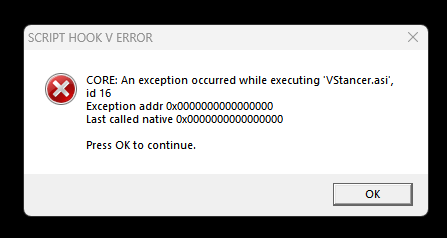
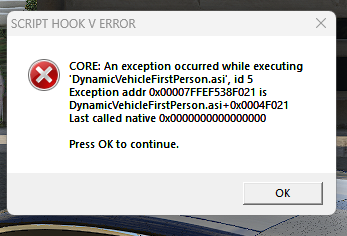
Error 1: when LSPDFR loads automatically after starting the game.
Error 2: when I get into the car.
1 New UPDATE RagePluginHook.log asiloader.log ScriptHookV.log
-
16 hours ago, Gan Ceann said: Hello,
Can you upload your latest RagePluginHook.log from your main game folder?
Do you still have AdvancedHook installed for ELS?
Old game version just tested without error message:
-
3 hours ago, Gan Ceann said: Hello,
Can you upload your latest RagePluginHook.log from your main game folder?
Do you still have AdvancedHook installed for ELS?
Yes, AdvancedHookV is still installed.
I'm just seeing something about "A.G.S.: ...memory is corrupt". But this worked in the old version – and there isn't a new gameconfig or anything like that yet.
Even if I remove A.G.S., the error message still appears.
-
Hello everyone,
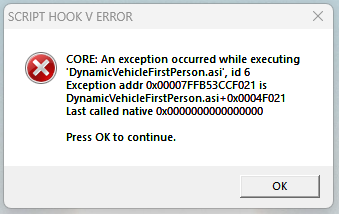
I updated the game including lspdfr_049_9572, ScriptHookV_3788.0_1013.33, and ScriptHookVDotNet, but I keep getting the same error message, or some things just stop working. Even if I remove the affected extension, the same error occurs, only with the name of the next extension (I think it only affects .asi applications). I also removed and reinstalled the ASI Loader and OpenIV.ASI via "OpenIV"—but without success.
Can anyone help? I would be very grateful!
-
-
-
-
Hello everyone, I hope someone can help me.
A few months ago, I was able to use my steering wheel and pedals (gas and brake) perfectly with my x360ce and JoyToKey. It worked sporadically again for a while, but unfortunately, it's only working intermittently, and I can't find any clue as to why, since the settings remain the same.
I don't know if it's related to a Windows 11 update, but the game always uses the Windows x360 controller. I'd prefer to use the x360ce, as it doesn't have blind spots, for example.
- However, if I deactivate the Windows controller, the steering wheel switches off after a few seconds (like it's been powered off) – even though the x360ce software is running.
- If I uninstall the Windows controller driver, it reinstalls itself immediately after reconnecting.
- I've also tried various settings in the x360ce software, such as the "hide" function and "map to".
- In Windows, under "Game Controllers," I've also set the x360ce as the preferred device.
- I've also disabled everything in Steam (for the game and in general).
- I've also tried copying the "Xinput.dll (1_0 to 1_4 and Uap)" files from Windows/System32 to the main GTA folder.
It would be great if you have any other ideas :)
Related topic:
-
Hello everyone, I hope someone can help me.
A few months ago, I was able to use my steering wheel and pedals (gas and brake) perfectly with my Xbox 360 CE and JoyToKey. It worked sporadically again for a while, but unfortunately, it's only working intermittently, and I can't find any clue as to why, since the settings remain the same.
I don't know if it's related to a Windows 11 update, but the game always uses the Windows Xbox 360 controller. I'd prefer to use the Xbox 360 CE controller, as it doesn't have blind spots, for example.
- However, if I deactivate the Windows controller, the steering wheel switches off after a few seconds (like it's been powered off) – even though the Xbox 360 CE software is running.
- If I uninstall the Windows controller driver, it reinstalls itself immediately after reconnecting.
- I've also tried various settings in the Xbox 360 CE software, such as the "hide" function and "map to".
``` - In Windows, under "Game Controllers," I've also set the x360ce controller as the preferred device.
- I've also disabled everything in Steam (for the game and in general).
- I've also tried copying the "Xinput.dll (1_0 to 1_4 and Uap)" files from Windows/System32 to the main GTA folder.
It would be great if you have any other ideas :)
-
2 hours ago, Lennyy said:
I am on Rockstar Games Launcher and my GTA V has not updated and is still on v. 3586
Hi, Rockstar Games definitely released an SDK update yesterday, and there's a 46.4 MB update for GTA in my Steam queue. I haven't downloaded it yet, though, because I wanted to wait here first. I also had two crashes yesterday.
-
-
2 hours ago, PookiethePOPO said:
Go to your root directory and delete args.txt (You can rename it aargs.txt if you don't want to delete it).
THANK YOU so much, you guys are the best!
Yes, deactivating / renaming the *args.txt helped.
Interesting, the text file is actually about preventing Battleye from starting. And it's from ScriptHookV, if I'm not mistaken. Great, thanks again! -
Edited by Bear82
10 hours ago, Gta99882902 said:You can just search for rockstar games launcher install on the internet and download it that way.
You're a lifesaver man! Thank you so much, I have been trying to fix the issue all day.
Great, thanks. That's how it was again (https://socialclub.rockstargames.com/rockstar-games-launcher) , and the SDK will install automatically. Just like it did yesterday with the update.
1) uninstall.exe in Program Files\Rockstar Games\Launcher
2) Install: Rockstar-Games-Launcher.exe
3) Launch: Rockstar Games Launcher --> Automatic update + SKD installation
4) Log in via Rockstar Games Launcher --> Settings and disable BattlEye
5) Launch via SteamI've tried other things without success:
6. Checked Steam files for errors
7. Manual SDK installation via Social-Club-Setup.exe
Still getting the error message "Reinstalling the game"Which directory should I manually delete the SDK from?
Or am I doing something wrong in the above section? -
-
-
Hello, I need your help. I have some vehicle packages or individual replacements, but with some of them the dashboard is not displayed correctly, or the rev counter, speedometer, etc. It also doesn't work with the police cars with "VDT_GENTAXI".
Now I've tried to replace and test some "<dashboardType>XYZ</dashboardType>" in the "vehicles.meta" using the wiki/Vehicles.meta, but I can't seem to find the right one. Is there a trick or another line or file that also needs to be adjusted?
-
Edited by Bear82
17 minutes ago, Shwagins49 said:scripthook was updated on their site however dinput8 was and is the issue for. I removed it from files and rand Gta v and lspdfr (base) however simple trainer and els not working due to dinput8 issue
Thanks for the info!
Script Hook V ( https://www.dev-c.com/gtav/scripthookv/ ) hasn't been updated yet, or have I misunderstood you?
15 minutes ago, zedka said:Yeah is the dinput.dll of scripthookv you have an over version
dinput8.dll free download | DLL‑files.com
for this try to delete old version scripthookv in your folder and with the new script folder take just the scripthookv not dll
because is not correctly fonctionnal
and dl the dinput8 and paste on your folder gta v maybe is good after that but the mods for me doesn't work
Thanks, but I have a slight stomach ache on my side 🙂
-
-
-
-
-
I have a problem starting with RPH:
The current game version is not supported.
Installed game version: 3411.0
Latest game version: Unknown
Supported game versions: 3407.0I have updated everything, so I cannot assign the statement or recognize the error straight away, can someone say something about it briefly?
-
Edited by Bear82
Hello everyone, maybe someone has a solution for this.
I can't determine everywhere where the yellow circle for the prisoner should appear. The police station, the entrance and the garage with spawn point work everywhere, also some points for the prison - just not in some places, what could be the reason for this?
I've already found a lot here about this
and tried a few things myself, but unfortunately without success - whether with "f" or without "f". So here are two examples of how I tested it:
<Station>
<Name>California Highway Patrol CHP</Name>
<Agency>sahp</Agency>
<ScriptName>hwyPol</ScriptName>
<Position>2581.09, 463.99, 108.61</Position>
<Heading>172</Heading>
<DropOffPosition>2561.89, 506.266, 108.20</DropOffPosition>
<GaragePosition>2553.592, 445.2565, 108.22; 133</GaragePosition>
<GarageSpawnPosition>2568.364, 477.7029, 108.29; 179</GarageSpawnPosition>
</Station>or with "f".
Thank you very much!!!!
-
Spoiler
Hi, I solved it like this:
+ duty_selection.xml (in the custom folder)
+ agency.xml (in the custom folder)
both complement each other, on the one hand the selection in the garage and on the other hand the spawning in traffic.
As an example:- duty_selection -
<Duty>
<Peds>
......
<Agency>sahp</Agency>
......
</Peds>
<Vehicles>
.....
<Agency>sahp</Agency>
.....
</Vehicles>
<VehicleDescriptions>
......
<Description agencyRef="sahp" name="Highway Patrol Ut Unmarked" fullName="2016 Ford Explorer UM">CHP16ExplorerSlick</Description>
<Description agencyRef="sahp" name="Highway Patrol Utility" fullName="2013 Ford Explorer">SAHP13FPIU</Description>
<Description agencyRef="sahp" name="Highway Patrol PickUp" fullName="2013 Chevrolet Silverado">SAHP13Silverado</Description>
<Description agencyRef="sahp" name="Highway Patrol CVPI" fullName="2010 CVPI Cruiser Vic">SAHP10CVPI</Description>
<Description agencyRef="sahp" name="Highway Patrol CVPI" fullName="2011 CVPI Cruiser Vic">cvpi11</Description>.....
</VehicleDescriptions>
</Duty>- agency -
......
<Agency> <!-- 3 SAHP -->
<Name>California Highway Patrol</Name>
<ShortName>SAHP</ShortName>
<ScriptName>sahp</ScriptName>
<Inventory>patrol_eup</Inventory>
<BadgeModel>prop_sahp_badge</BadgeModel>
<TextureDictionary>s_m_y_hwaycop_01</TextureDictionary>
<TextureName>decl_diff_000_a_uni</TextureName>
<Loadout chance="75">
<Name>Patrol Unit</Name>
<Vehicles>
<Vehicle>CHP13Explorer</Vehicle>
<Vehicle>CHP13ExplorerSlick</Vehicle>
<Vehicle>CHP13F350</Vehicle>
<Vehicle>CHP15Tahoe</Vehicle>
<Vehicle>CHP15Charger</Vehicle>
<Vehicle>CHP15ChargerSlick</Vehicle>
<Vehicle>CHP16Explorer</Vehicle>
<Vehicle>CHP16ExplorerSlick</Vehicle>
<Vehicle>SAHP13FPIU</Vehicle>
<Vehicle>SAHP13Silverado</Vehicle>
<Vehicle>SAHP10CVPI</Vehicle>
<Vehicle>cvpi11</Vehicle>
<Vehicle>sahp1</Vehicle>
<Vehicle>sahp3</Vehicle>
<Vehicle>sahp5</Vehicle>
</Vehicles>.........
Please give feedback on how it works and what experiences you have had.


After update .asi error
in Legacy
·
Edited by Bear82
I just noticed that this affects almost all .asi files in the main folder as well as subfolders - such as VStancer, DynamicVehicleFirstPerson, A.G.S and/or LeFixSpeedo, etc.