


ilikeplanesverymuch
Members
-
Joined
-
Last visited
Everything posted by ilikeplanesverymuch
-
Got it👍
-
Thanks for clarifying. However the issue is now fixed. I had to downgrade to an older version I had backed up. Works fine now.
-
Would that be the problem for rph infinitely loading you reckon? And do you think there would be a solution to this beside updating to the latest versions?
-
When trying to launch GTA V through RPH, rage loads fine until it says "Loaded LSPD First Response". After that, RPH continues to load 10 to 15 minutes after launching. Here is my RPH Log: RagePluginHook.log
-
@Yasd Any help would be appreciated
-
@Yasd I have renamed the mods folder to "_mods". The errpr still persists. I launched the game through RPH and yet RPH freezes on "launching game via steam" which i believe causes it to not be active when I am in the game. To note also, when I am in the game, clicking the "X" button on the RPH UI will cause my game to close and send to back to desktop. This "stuck" UI also doesn't close when I exit the game. I also cannot locate any RPH log that loaded with my most recent launch of the game. My game is also on version 2802 and so is my RPH. Though my scripthookv.dll is on version 3179.
-
RagePluginHook (2).log
-
I am currently running GTA V on version 2802. I am also running lspdfr on the same version as the game, and so is RPH. When I launch the game through RPH, the game loads in fine, but I find that RPH freezes as it says "Launching game via steam". The game then enters GTA V without the usual RPH log or whatever thing pops up when it loads (which is what makes me think it is glitching or freezing). When in the game, I cannot access the RPH menu through pressing F4 and no plugins load when I spawn into the game (probably because it isn't loading). My RPH log is provided below. Help would be appreciated.RagePluginHook.log
-
Right.... And you also get the same error? @MathVC @Yasd I have deleted all my mods using the mod remove tool which has fixed the issue. However when I revert back to 3028 with a few files gathered by these two commands "download_depot 271590 271591 5706962312953127803" and "download_depot 271590 271594 7259497167106792192", the same game memory issue occurs. Another strange thing is that my game GTAV game file says that it is 3028 but when loading into gta through RPH. it says I have "Build 3724" in the bottom right corner. Here is the log RagePluginHook.log
-
@mike912 are you also using 3028 and manual transmission?
-
@MathVC@Yasd Here is another log after verying the games files. Same error. If anyone would mind checking to see if you can find anything would be appreciated. RagePluginHook.log
-
I will try that. Thanks for clarifying.
-
@MathVC No graphic mods installed. Would you think a clean install and then a revert to 3028 and install of the manual transmission would work?
-
Thanks, will do. And also after renaming the folder, do I do the same processes with the kids that need to be dragged and dropped into openiv and just openiv like the gameconfig file?
-
Here is another log of GTA V when starting up. I moved the gameconfig.rpf file to openiv this time. I am not sure if I have made any changes as I did this with the log I attached a few days earlier. If you have a look and identify anything different, that would be appreciated. Also, how would I start a new mod folder as you suggested earlier? RagePluginHook.log
-
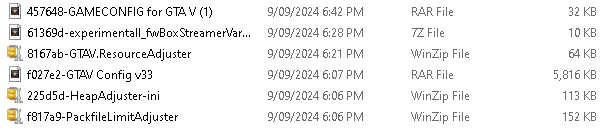
I have downloaded the four mods you have recommended. The image below is what I have downloaded. My game still crashed like the same prior to downloading these mods ("Game memory error. Please reboot and restart game") I also downloaded a 3028 gameconfig version separately from the "Gameconfig V33" as my game is currently running 3028, and when looking at install guides, it had told me to drop that version of the gameconfig to the according game version. When trying to look for the 3028 version with the gameconfig mod i downloaded from here: https://www.gta5-mods.com/misc/gta-5-gameconfig-300-cars I could not find the 3028 version, so i downloaded it from here: https://www.gta5-mods.com/misc/gameconfig-for-gta-5-1-0-3028-oiv I am pretty sure I downloaded the mods correctl. Here is the RPH log attatched below of the latest boot. RagePluginHook.log
-
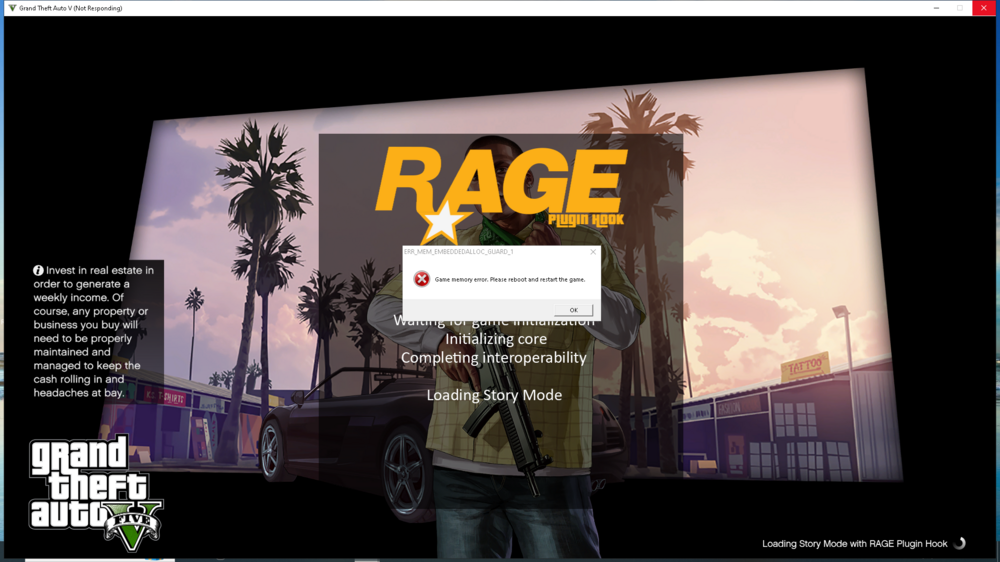
As shown by the picture attatched below, I have been experiencing a so called memory error which is strange as I have enough ram to run the game. I have never had this issue until recently when it appeared when trying to boot the game up. As I run the game through RagePlugin Hook, the error appears as the game begins to boot up story mode. I am currently on game version 3028 as I am wanting to use the Manual transmission mod. My RPH log is also attatched below. Help would be appreciated. RagePluginHook.log
-
Followed the steps in this Reddit post. ONLY FOR STEAM USERS.
-
Thank you for helping me out with this issue but it has now been resolved using the steps of a Reddit post.
-
Tried a revert to 2944 with all the appropriate files for that version. Had the exact same problem with the crashing and I was wondering if the problem may be indentifiable through this crash log? or is the problem maybe because of a change in the update.rpf files? RagePluginHook_20042024_035933.log
-
I’ve moved all my mods and plugins to a seperate folder and removed them from the main directory. I also verified the game’s files which afterwards reverted the game to the current patch/version whatever which made my game work. I tried to revert my game back to 3028 and see that doing that causes the game to crash while loading. I know that I may have to use the newest game version from now on but would you know why it crashes when I revert back to 3028?
-
I have tried to run gta on its own, failed when it began to load the world population and stuff, already renamed my mods folder to _mods, still didn't work. I have mainly installed plugins all related to LSPDFR and one police car mod. If following your steps of disabling the all mods, does that count as the plugins and LSPDFR aswell? And when you mean disable, do you mean delete?
-
Does that mean I have to delete all my mods or is there a way to disable them?
-
Not an expert or anything but I reckon just wait for the updated versions of scripthookV and RPH to be out
-
Like without any mods, RPH, scripthook, etc?

