


XboxFormula1
Members
-
Joined
-
Last visited
Everything posted by XboxFormula1
-
-
It only seems to happen occassionally when I submit charges with CompuLite, but there doesn't seem to be much consistency with what causes it (like no. of charges). I can try to reinstall GrammerPolice and see if that solves the issue over the next couple days.
-
Hi, My LSPDFR generally works fine, however it seems to occasionally crash when I press submit charges on CompuLite. It doesn't happen all of the time, but I'm not sure what's causing the crash. It's only my LSPDFR that crashes, not my entire GTA V so I can just do 'forceduty' but it's obviously a bit irritating when you're half way through an incident. I've attached my rage plugin hook log. If anyone's able to help, it would be much appreciated! RagePluginHook.log
-
Thank you!! I've finally got it all working now.
-
Just a load of mods generally. I noticed the issue when I was trying to install a taser (https://www.lcpdfr.com/downloads/gta5mods/misc/9789-taser-x26/) and ped stuff (like https://www.lcpdfr.com/downloads/gta5mods/datafile/39315-improved-ai-accuracy/). I don't have the patchday it mentions, I'm not too sure how to get around it.
-
I've finally started to get the hang of OpenIV but on some mods, the instructions tell me to open a different patchday from what I have (e.g. patchday8ng when I only have patchday25ng). But my patchday doesn't have the same files in it, nor can I find the files mentioned in the instructions anywhere in my mods folder. Does anyone know a way to get around this? I've tried googling and watching tutorials, I cannot find anything.
-
the AdvancedHookV.dll file was conflicting with the default ELS files which made my ELS not work properly.
-
Update: I have fixed the problem, the issue was the AdvancedHookV.dll file then it worked fine.
-
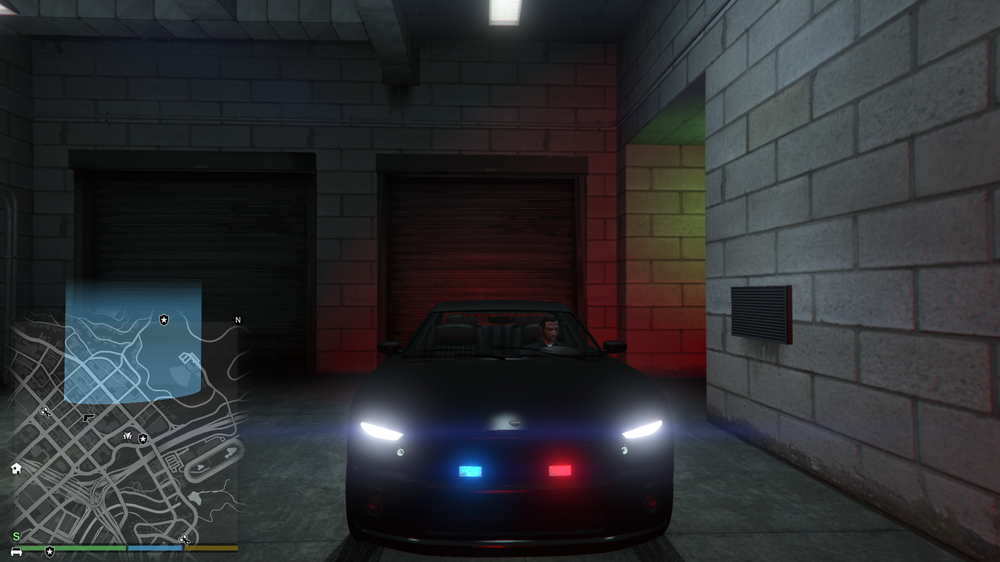
Picture of what I mean trying it with different cars, the one on the right, it wont spawn without the lightbar so idk if there's something in the mod that's causing it or if it's because im using default car ELS won't completely turn off on this one.
-
I installed this a few hours ago but it seems to have made my ELS dimmer and barely visible. Does anyone else have this issue or does anyone know how to fix it? This is with the default cars, not sure if it only works with car packs.
-
no worries, thank you
-
For the file - https://www.gta5-mods.com/tools/packfile-limit-adjuster It is getting flagged up by my Anti Virus as a suspicious file, I've not had this with any of the other mods.
-
thank you! wasnt sure whether they were just for certain mods or not
-
Currently trying to get back into LSPD:FR with some more mods than I had previously. I don't really know what 3 "essential" files do though: Custom Gameconfig XML - https://www.lcpdfr.com/downloads/gta5mods/misc/24718-gameconfigxml-for-lml-or-manual-install-by-rde-team/ Heap Adjuster - https://www.gta5-mods.com/tools/heapadjuster Packfile Limit Adjuster - https://www.gta5-mods.com/tools/packfile-limit-adjuster Was wondering if anyone could help me out by letting me know if they're actually needed and what they do. Thank you!
-
it took about 3 days last time, but that was for everything (rph, lspdfr, scripthookV, etc)
-
Where are all the law enforcement vehicles in the folders? I've tried looking in the places where tutorials say they'll be (patchday25 for example) and they're not there.
-
Thank you!
-
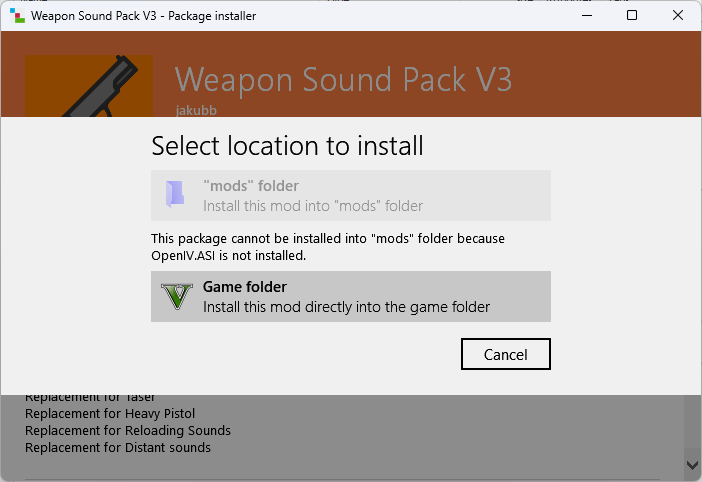
OpenIV.ASI didn't come with the setup
-
How do I fix this?
-
No, EUP, apparently you can install it via OpenIV.
-
Might be easier to just reinstall LSPDFR then.
-
This has happened once to me before, I'm assuming one of the rage files have corrupted, it fixed itself once I reinstalled the rage files. You can do this by installing the manual download of LSPDFR and copying across all of the rage files (replacing your old files).
-
Would it be easier to install it with OpenIV?
-
where's my mods folder?
-
What folders do I put these mods in? I tried installing it like 2 weeks ago but it didn't work, not sure that I installed it properly.





