


XboxFormula1
Members
-
Joined
-
Last visited
Everything posted by XboxFormula1
-
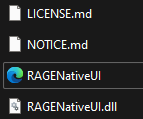
turns out just the bottom one is fine, lspdfr is no longer crashing Thank you for your help!
-
Which ones do I copy over? Is it just the bottom one or is it the bottom two?
-
Will try tonight, thanks!
-
I've created a new thread for it with logs just as my original problem was solved here, thank you!
-
https://medal.tv/games/gta-v/clips/20CS9UI_ErSm_2/d1337uXf5tVw?invite=cr-MSxhWEwsMTkzNzA5ODk5LA I've attached the 3 most recent logs with the same issue. I'm pretty sure I have everything I need installed. The problem only started once I started installing mods: - CompuLite - Stop The Ped - UltimateBackup RagePluginHook_12032024_212703.log RagePluginHook_12032024_214629.log RagePluginHook_12032024_215226.log
-
I seem to have jinxed it. Got the mods working but now LSPD:FR is crashing. https://medal.tv/games/gta-v/clips/20CS9UI_ErSm_2/d13375W4maaa?invite=cr-MSxYN2wsMTkzNzA5ODk5LA
-
Tried an adblocker and it worked, no redirects and my antivirus seemed to be happy with the website now. Thank you for your help, I think that's everything now!
-
Alright. I'll install an adblocker and see if that helps.
-
just want to make sure everything is fine before i download more mods / move compulite to my gta files
-
Little bit of an update. I installed it however the website redirected me to a page asking me to complete a captcha and allow notifications to "prove I'm not a robot", I completed this, completely unaware that it had redirected me to a scam page. It repeatedly sent me notifications claiming my PC was infected/hacked and my HDD had permanent damage (I knew that part was false because I have an SSD but). Took me a couple minutes to sort this out however I sorted this, after a few virus scans, I believe my PC is fine. I'm just curious, why did this happen after downloading it?
-
Ah right, thank you for your help!
-
I just went onto the compulite website but it was blocked by my antivirus as a "suspicious" website. Is this normal?
-
Will try tonight, thank you!
-
https://medal.tv/games/gta-v/clips/201vWgdoNG2p0e/d1337AhO87wt?invite=cr-MSxNUmksMTkzNzA5ODk5LA How do I stop this from happening. I'm trying to arrest someone and other officers keep shooting. Also, another question. Is compulite apart of LSPD:FR or is that a separate mod, if it's separate, could you please send me a link, thank you!
-
Ah, thank you so much! It wasn't very clear when people were talking about it.
-
Is there a way to remove GTA Online from what I've installed on steam? I'm only interested in the single player as I'm using LSPD:FR. I'm attempting to remove it so I don't accidentally load up GTA Online and get banned. Also, would it be worth playing LSPD:FR without any mods for a bit or is it best to install some mods straight away, based on content like calls.
-
Oh, it's not you that was confusing, it was my mate. Apologies for that lmfao.
-
Ah right, thank you so much!
-
Would Rockstar Games Launcher work then or should I go and buy the steam version? Thanks for clarifying. He's a very confusing guy tbh.
-
Hi. I'm currently looking to start playing LSPD:FR and I'm wondering if I could get a bit of help with figuring out what version of GTA to install. One of my friends advised me not to buy the version with GTA Online as that'd get me banned. Would LSPD:FR work if GTA is installed via the Rockstar Games Launcher or does it have to be from steam? Also, if possible, does anyone know what version I need to revert GTA back too or is the base game (no online) fine as it is.


