




officerpudding78
Members
-
Joined
-
Last visited
Everything posted by officerpudding78
-
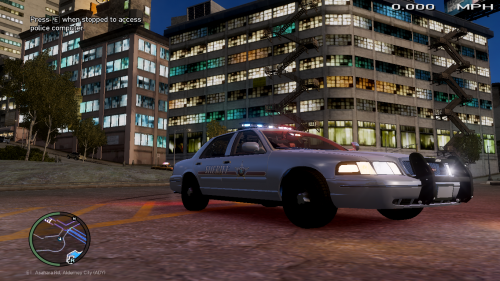 Sure! I will be glad to listen, sorry for the late response, I am currently modelling an RCMP pack for a clan that was recently made! Ill send some previews of vehicles!
 -
Oh sorry, my fault on the lights thing... but I do understand what you are saying! I'll try to have them up by next Sunday cause it's a busy week for me. :)
-
Yeah, again I know about the credits and I'm sorry, it's just been finals week along with ECA State Examinations and this file I rushed.... next time I'll know better. And you did say I had too many lights, which that did not have a lot. It had the amount the actual department uses. Skinning wise, that is the exact skin of the department so there would be no use in adding detail to it.... it is what it is.
-
I get that videos are more considered for showing mods and I get that. You don't need to be on my case about credits cause he Underwood just explained it. I never said I didn't put them on cause of different locations. I just don't have them together. You need to just cut me some slack because it's the first thing I have ever uploaded on here. Add more detail? The reason why the lights are setup the way they are is because it is based off of a county sheriff cvpi when they had this setup in 2006. And sir, I have been in game with the vehicle and it works fine. It is running on default configuration and if you'd like proof, I'll send it. But it seems you guys are trying to give me a rough time since it's my first time uploading, and when it comes to criticizing, it takes the fun out of uploading vehicles, and no one didn't even ask for opinions. You don't see me coming on to your uploaded files and criticizing them, so the key is to have mutual respect for others. If you love to criticize, go ahead but just let you know that it takes the fun out of uploading hearing false reports like "ELS not working" when I have even been in game with it running on ELS V8 with Default Configuration and it worked perfectly fine. And there are actually not a whole lot of lightbars. Here is the list of what all light modules that have been added and mapped on the vehicle: ION - Whelen TIR 6 Super LED (x2) Lightbar(s) - Federal Signal Arjent S2 (x1) Brake Light - RTL Custom 3rd Brake ELS (x1) Front Dash Light - Dual Avenger (x1) Again, this cvpi is based off of a sheriff department in real life based off of the time period of the 21st century in 2006. That is actually the standard amount of lights they use and close to the same type they use. I'm sorry if you are saying it's crap but we all have opinions. Just realize that it is based off of a sheriff cvpi in real life who had the same lighting setup in real life.
-
They are all under the Development section of LCPDFR.com here is the link: http://www.lcpdfr.com/files/category/30-development-resources/ There are also these too: http://gtapolicemods.com/downloads.php?do=cat&id=23
-
Thank! That's actually my first upload!
-
Ford Crown Victoria (1.0) - Liberty County Sheriff ==CVPI - Liberty County (1.0)== ========================================== == Vehicle Model By: officerpudding78===== == Vehicle Textures By: officerpudding78== ========================================== *Original model by F5544 --------------------------------------------------------------------------------------- Moral Support By: Eagle45 Partial Mapping By: Eagle45 ++++++++++++++++++++++++++++++++++++++++++++++++++++++++++++++++++++ ****PLEASE DO NOT REDISTRIBUTE WITHOUT PERMISSION**** HOPE YOU ENJOY!!!
-
When u install lcpdfr, some ppl say u have to unmark the view readme on gtaiv for it to work is it true
-
Pirated version is a problem for one, ditch the crack. For two, update scripthookdotnet and scripthook.dll IM USING THE ACTUAL COPY
-
Here is what I have computer wise: 4GB of ram Windows Vist Home Premium Service Pack 2 Processor: AMD PHENOM 9500 Quad-Core processor 2.20 GHz System Type: 32-bit Operating System Please, If anyone has a solution to my problem which is up there ^^^^^^^ Please Help. The things in my Gta IV folder: Trainer v65 Advance Hook.dll Asilog Dsound.dll GTA IV Liblua 51.dll Lua4net.dll Paul.dll Script Hook.dll Script Hook Script HookDotNet.asi xlive.dll GTA IV 1.0.7.0. Razor 1911 NOTE: PLS TELL ME IF I HAVE ANYTHING MISSING OR ANYTHING THAT I NEED TO TAKE OUT!!!
-
Hello, I am having a huge problem in GTAIV right now. I never tried playing lcpdfr before so once I downloaded with no other mods, I decided to try to play it and it said "GTAIV has stopped working" after the loading screen. I had the C++ Redistributure already installed with the net framework 4 full profile, games for windows live, and the actual copy of GTAIV for the PC already. After it said "GTAIV has stopped working," after the loading screen, a pop up said windows is searching for a solution. Once the solution popped up, it said turn on/off DEP(Data Execution Protection). I tried to turn it off so GTAIV would work. When I went to try to turn the DEP off, it would not let me so i went onto youtube to check for videos that would help me, and there was this one with a guy saying that I should download CRACK 1.0.7.0 by Razor 1911 and so I did. When I went to open it it would not let me. The reason why he said for me to open it is so that I can take the products files and put them into GTAIV's folder. The guy also told me to download the trainer for lcpdfr and I did. Then he told me to put the trainer in GTAIV's folder. My problem is now the pop up "GTAIV has stopped working". Anyone who knows about this stuff, please help me!!!

