




officerpudding78
Members
-
Joined
-
Last visited
Everything posted by officerpudding78
-
.thumb.png.2efd358911be1b0eea43a8409b9856c7.png) Okay, I think I will go ahead and work on it! If you have any pictures for me to view, that would be great because I want to help make it as close as possible to how you want it! If you want to talk via Teamspeak, you can connect to RedHawk Customz to help guide me: ts9.gamersvoip.net:9994
Okay, I think I will go ahead and work on it! If you have any pictures for me to view, that would be great because I want to help make it as close as possible to how you want it! If you want to talk via Teamspeak, you can connect to RedHawk Customz to help guide me: ts9.gamersvoip.net:9994- 6 comments
- 2 reviews
-
-
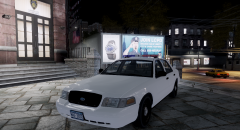
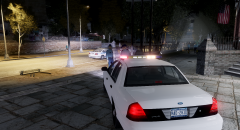
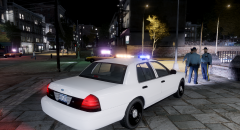
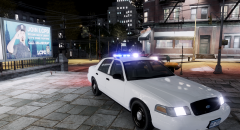
Las Vegas Metropolitan Police Dept. - 08' Crown Victoria Police Interceptor Modeled and Textured By: officerpudding78 Community: RedHawk Customz Poly Count: 69,525 ~About~ This vehicle is based off of the real life, Las Vegas Metropolitan Police Department. Please remember that this vehicle does not pertain to the real life police department and that it is just in game. Hope you enjoy! ~Credits~ 2008 Crown Victoria - Model is Ford Crown Victoria from Driver SF, converted to GTA IV by F5544, modified by KevinDV and Cj24. - Wheels from NFS:MW and converted by trewq34, Textures by GreenAid. - Honeycomb Grill made by KevinDV, Steering Wheel by EVI. Federal Signal Vector - Vector scratch made by Lamping1990. - Advisory edited by officerpudding78. 3rd Breaklight Surround (Modified) - Modeled & mapped by NickieB. - Remapped by officerpudding78. GoRhino Pushbar - Go Rhino Pushbar made & converted by Bxbugs123. - Main textures made by Bxbugs123. - Edited by officerpudding78. BodyGuard Partitioner - Setina BodyGuard 6,7 Partition made by deco. Unity Spotlight - Unity Spotlight Modeled & converted for GTA IV by Bxbugs123. - Main textures made by Bxbugs123. Garmin GPS Unit - GARMIN nuvi GPS Unit Modeled & converted for GTA IV by Bxbugs123. - Main textures made by Bxbugs123. Toughbook CF31 - Panasonic Toughbook CF-31 modeled and converted by Ridgerunner Designs. - Panasonic Toughbook CF-31 texture by Ridgerunner Designs. Watch Guard 4RE - Watch Guard 4RE made & converted by Caleb3019. - Textures by Caleb3019. Console (Custom Made) - Console scratch made by SheriffVanDyck. - Radio, coffee cup and walkie talkie by Rockstar Games. Pocket Jet Printer - Model is scratch built by johnclark1102. - Texture is made by diablozer0d617. SecurCOM Antennas - Modeled and mapped by PriMan. Whelen SA315 Speaker/Siren - Scratch Modelled by DannyBoy1909. - Textures by Vertex3D, edited by DannyBoy1909.
- 6 comments
- 2 reviews
-
-

- 1
-
-
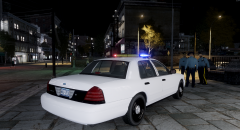
From the album: Old LVMPD Styled Light Bar
-
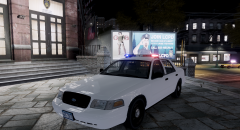
From the album: Old LVMPD Styled Light Bar
-
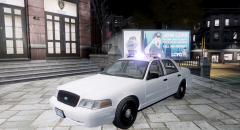
From the album: Old LVMPD Styled Light Bar
-
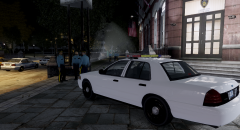
From the album: Old LVMPD Styled Light Bar
-
From the album: Old LVMPD Styled Light Bar
-
From the album: Old LVMPD Styled Light Bar
-
From the album: Old LVMPD Styled Light Bar
-
From the album: Old LVMPD Styled Light Bar
-
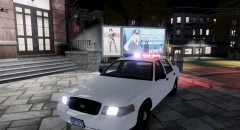
From the album: Old LVMPD Styled Light Bar
-
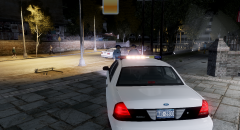
From the album: Old LVMPD Styled Light Bar
-
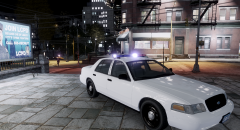
From the album: Old LVMPD Styled Light Bar
-
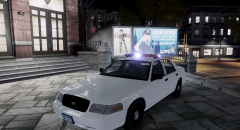
From the album: Old LVMPD Styled Light Bar
-
GTA IV: Vehicle Parts Disappearing From A Distance officerpudding78 Hey, I like to say thank you for all of your support on this topic! I am glad I have found the solution to my problem and I appreciate it! Also thank you on releasing your Whelen Justice for development purposes and that it looks really good in game. Sincerely, officerpudding78 Community Member
-
GTA IV: Vehicle Parts Disappearing From A Distance officerpudding78 So I opened both, the original vehicle and the modified vehicle, and I looked through the hierarchy and all of the L1's and L2's seem to be there. Picture of Both Vehicles Opened in Zmodeler https://gyazo.com/27768639d9b9d4d1d55df0497abdc91c Even though they are there, the vehicle still disappears in game.
-
GTA IV: Vehicle Parts Disappearing From A Distance officerpudding78 Hello, my name is officerpudding78 and I am a mid-experienced modeler. Recently, I have been making a pack and I couldn't figure out a solution to my situation. So recently, I put in a Crown Victoria that I modified myself and as I am driving along the road, I see the same car but at a distance, parts of the vehicle I seen disappeared as in the light bar, the spotlight, and every part disappeared that was on the car. The thing is when I get closer to the Crown Victoria, the parts reappear and I do not know how to fix this problem unfortunately. Much support is appreciated and this is a way that can help me learn a little more about why things work and how to develop a solution to the problem. In-Game Screenshot of My Lovely Situation: https://drive.google.com/file/d/0B-0piCjKgExEMVRmNWd6WUZGN28/view Sincerely, officerpudding78 Community Member
-
When installing ELS, just drag and drop the files you downloaded into your "Grand Theft Auto IV" directory located on your computer. Do not try putting it in through OpenIV.
-
You would use OpenIV for every mod besides ENB's which enhances graphics but it is recommended for better graphic cards.
-
Oh, cause I just reinstalled it and used a clean vehicles.img file and it worked fine.
-
OpenIV* because I once ran into this problem but all I did was reinstall OpenIV.
-
Try using the default vehicles.img, if it doesn't work, then you need to reinstall openiv. officerpudding78 LCPDFR.com Community Member
-
1) Make sure you have a clean directory of the game with no mods installed. 2)Go in game and play the prologue and after you get to the apartment, go to the bed and make a new save and then exit the game. 3)Download LCPDFR 1.1, and install it to the Grand Theft Auto IV directory you have made the game save in with no mods installed yet. 4)Once LCPDFR 1.1 is installed, it is very important to go to the directory right click on "GTAIV", go to "Properties", set is to "Run as an Administrator" under the "Compatibility" tab, and set the compatibility for "Windows XP (Service Pack 3). Hit "Apply" and then "Okay". 5) Right after you install LCPDFR 1.1, be sure to TEST IT OUT** in game by going to the directory, right click on "Launch GTAIV" and press "Run as an Administrator" and hit yes. 6)Once in game, hit ALT+P. 7)After it is working, you may install scripts and ELS and anything extra! officerpudding78 LCPDFR.com Community Member
-
Try putting the vehicle files you downloaded to replace a different vehicle from what you are replacing now. If that does not work, delete the two files in the vehicles.img you are replacing and import the ones you downloaded. If that does not work, try using the default vehicles.img and then import the vehicle files you downloaded. If it still isn't working try reinstalling OpenIV. officerpudding78 LCPDFR.com Community Member

.thumb.png.2efd358911be1b0eea43a8409b9856c7.png)
