


249Xeno
Members
-
Joined
-
Last visited
Everything posted by 249Xeno
-
 I looked in my openiv and everything seemed to be in the right place. I even open the .rpf and I saw the map in color with all the detail but when I log into the game, it shows black and blurry. I tried the RadarZoom too and that did not help, so I don't know what else to do. Anyone has any idea why my openiv shows the plugins, but not ingame.
- 107 comments
- 8 reviews
-
That do not work for me. All of my scripthookv and scripthookdotnet are all updated.
- 107 comments
- 8 reviews
-
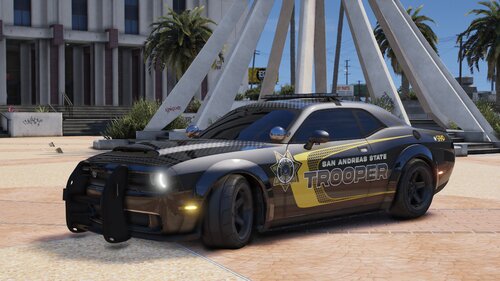 I love your skin and how it's on an addon/DLC with a choice of replacement. The car looks great with the light patterns everywhere around the car to show presence. I also have noticed there are a lot of Sheriff's cars, unmarked patrol, and State troopers but not enough police cars. Is there by any chance or possible that you would be able to put in more police skin? to even out the field for all Law Enforcement? Just a suggestion. would be appreciated. Once again, I love your skins and I know how much time you put into the work for the car skins.

