


StrandedReil
Members
-
Joined
-
Last visited
Everything posted by StrandedReil
-
 I'm having a problem with some mods. I'm using MTFO: Move The F*** Over (FKA Opticom) and Realistic Traffic AI. For some reason the npc vehicles move like way too much sometimes, they even crash into walls or drive onto opposite traffic to get out of the way, not sure which mod is causing this or if there is a way to fix this. I'm happy to switch to another mod if that is necessary.
- 114 comments
- 19 reviews
-
 I'm having a problem with some mods. I'm using MTFO: Move The F*** Over (FKA Opticom) and Realistic Traffic AI. For some reason the npc vehicles move like way too much sometimes, they even crash into walls or drive onto opposite traffic to get out of the way, not sure which mod is causing this or if there is a way to fix this. I'm happy to switch to another mod if that is necessary.
- 133 comments
- 15 reviews
-
Hey, I'm wondering if you sitll have found a solution for this, I'm looking for it aswell.
-
I just removed the old mods from the folder and reinstalled some new ones, it looks like old cars were breaking the game Anyways ty for the assistance
-
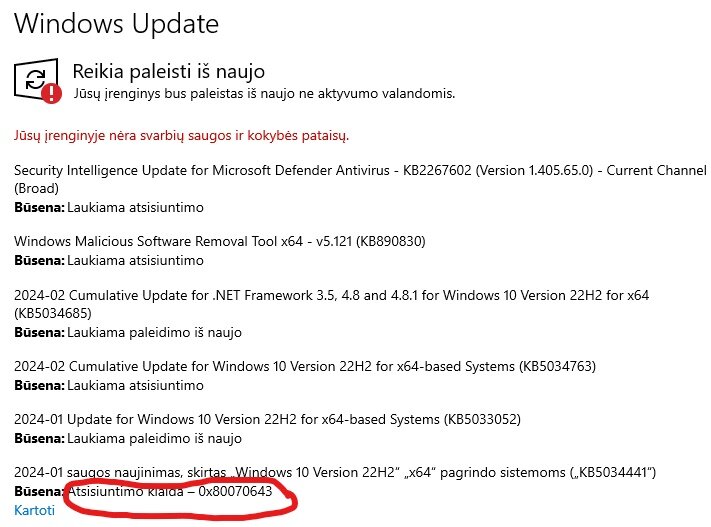
Hey guys, my game seems to be crashing on launch, I updated my drivers, the only thing that seems to be off for me is my windows updater itself, it seems to always need new updates, like every day. Also durring PC Restarts it gets stuck on the blue sceen "Restarting". There may be multiple reasons for this, but in terms of windows updates, I've tried repeating it again and again. I'll have the RPH Crash log pinned bellow aswell as the photo to windows updater. Edit (I just noticed my alt tab stopped working?? Could this be associated?) (This is in Lithuanian language, a short translation for the last update will be provided bellow) Safety update, made for "Windows 10 Version 22H2" x64 systems ("KB5034441") Status: Download Error - 0x80070643 Repeat crash report.txt
-
Hello, So I've managed to download Coastal Callouts successfully, now if I want to remove just the coastal callouts, how do I do that?
-
Update to this: I deleted some files called defender, then the Rage thingy started crashing, Now I get this error: And the Rage Hook thingy shows this crash report (simple version): Detailed report- (RNR file, cannot upload) I also tried verifying files and so on and so on, but nothing changes, just a new error..
-
Yes I do have a vehicle called defender, could you help me to uninstall it? I am not sure how, as I installed it long ago (Update) Just deleted all files (I think) in gtav folder that were called defender, seems like nothing changed, same error.
-
What were you doing when the crash/bug occurred? I opened the game, turned on Rage launcher and tried started loading, in middle of the loading it crashed. Did the game crash to desktop, or did the plugin crash? I'm unsure, though I think it means to the desktop. Does the same crash or bug happen consistently? If so, describe the steps to reproduce the issue. Yes, as soon as I start GTAV and Rage, and start loading in story mode, it crashes. Upload a copy of RagePluginHook.log from your main GTA V folder. Upload any relevant in-game screenshots.
