


Creators: Due to background reprocessing of files, approvals and file security checks may be delayed. Thanks for your patience.

DukSezQuak
Members
-
Joined
Everything posted by DukSezQuak
-
 Was just about to link it!
 -
Now if only the company that supplied the decals had reversed them so that they can be read properly in a mirror.
-
From the album: Termination Media
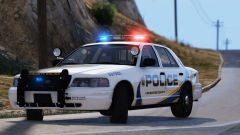
A sticker on a LSCPD cruiser reads "Save Lives, Move Right" in hopes that more drivers will get the message to pull over when emergency vehicles are trying to respond. -
From the album: Termination Media
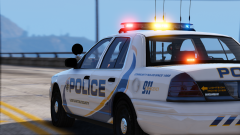
A Los Santos County Police Cruiser responding. A common reason as to why response times are cut down is because drivers fail to yield to emergency vehicles. It's time we start caring when the sirens are blaring. -
From the album: Termination Media
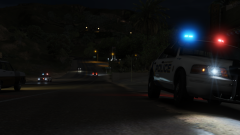
A Los Santos County Police Cruiser arriving on scene of an armed robbery, a few minutes after another unit arrived. The joys of rural policing and the backup times. -
From the album: Termination Media
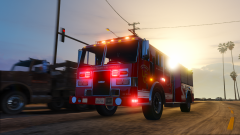
A Lakeview County Fire Services Pumper responding into the City of Los Santos for a mutual assist call for a major structure fire. -
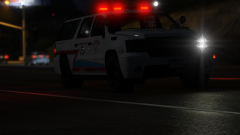
From the album: Termination Media
A Lakeview County District Fire Chief is responding to a Motor Vehicle Collision. -
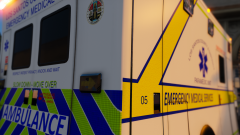
From the album: Termination Media
Description. -
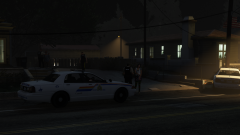
From the album: Termination Media
Multiple RCMP members attended a residence late Friday night after a 911 call was made from a landline, followed by an immediate hangup. Communications traced the phone number to a residence, where a male and a female were outside arguing verbally. Members separated the two and discovered that what seemed to be a harmless surprise pillow fight, turned into a surprise argument and physical fight. Police had to arrest the male for domestic assault, and the female was referred to a local shelter for safety until a justice can hear their case and decide official charges. The male has since been released on conditions, and a no-contact order was issued to both parties. -
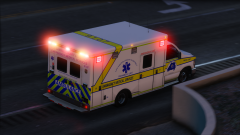
From the album: Termination Media
Was chilling out at the studio outside Los Santos when this happened. Ambulance was cruisin! Hard to get a shot. -
-
Make sure that the VCF file that comes with the ELS vehicle is named exactly as the vehicle appears in the RDE archive. (Ex. Replace a vehicle in the noose2 slot, the VCF should be named noose2.xml)
-
A showcase of the various projects and released that the boys over at DukSezQuak Design Studios have got going on! (Wait, you mean DukSezQuak isn't just one person!?)
-
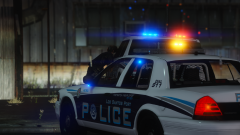
From the album: DukSezQuak Graphical Studios
Los Santos Port Police out on a traffic stop with a suspicious vehicle. -
100% agree, 4K is the way to go. For any releases my team and I decide to make, however, we will release a 4K set, and a 2K set, just for user preference, because we do understand that not everyone can run alot of high quality stuff on their systems. We start with the 4K, and, once we're happy, we scale everything down to 2K, separate them, package them, and off we go! -Duk1
-
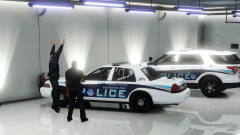 Newest, meaning not the newest models on the market, rather, the newest addition to the fleet.
 -
From the album: DukSezQuak Graphical Studios
DukSezQuak Graphical Studios - Project Number 201701-LSP1 Description: Los Santos Port Police Pack Based from: Glenolden, Pennsylvania Anticipated Release: TBA Narrative: Two Los Santos Port Police Supervisors checking out the two newest cruisers. One of them couldn't hold his excitement! Disclaimer: Requests are not accepted by the boys of DukSezQuak Graphical Design Studios, and any requests will be ignored. These modifications and/or textures are done on a "free-time" basis. -
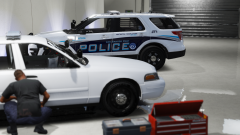
From the album: DukSezQuak Graphical Studios
DukSezQuak Graphical Studios - Project Number 201701-LSP1 Description: Los Santos Port Police Pack Based from: Glenolden, Pennsylvania Anticipated Release: TBA Narrative: A look into the Los Santos Fleet Services unit, preparing to outfit one of the last, but brand new Ford Crown Victoria units for the Los Santos Port Police. Disclaimer: Requests are not accepted by the boys of DukSezQuak Graphical Design Studios, and any requests will be ignored. These modifications and/or textures are done on a "free-time" basis. -
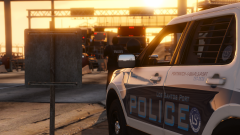
From the album: DukSezQuak Graphical Studios
DukSezQuak Graphical Studios - Project Number 201701-LSP1 Description: Los Santos Port Police Pack Based from: Glenolden, Pennsylvania Anticipated Release: TBA Narrative: Evening Portwatch. It's been a busy day here in the studio, with no signs of slowing down. -Duk2 Disclaimer: Requests are not accepted by the boys of DukSezQuak Graphical Design Studios, and any requests will be ignored. These modifications and/or textures are done on a "free-time" basis. -
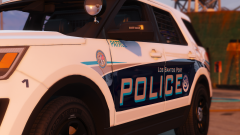
From the album: DukSezQuak Graphical Studios
DukSezQuak Graphical Studios - Project Number 201701-LSP1 Description: Los Santos Port Police Pack Based from: Glenolden, Pennsylvania Anticipated Release: TBA Narrative: A Los Santos Port Police FPIU parked along the docks. It's been a busy day here in the studio, with no signs of slowing down. -Duk2 Additional Images: Disclaimer: Requests are not accepted by the boys of DukSezQuak Graphical Design Studios, and any requests will be ignored. These modifications and/or textures are done on a "free-time" basis. -
I know that this is an old topic, but, you mean kinda like these? ;)
-
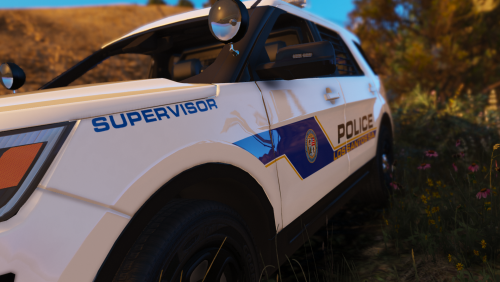 Thanks! Side note: we left the licence plate on the CVPI empty on purpose, so that the user can add their own plate onto the template with their photo editor of choice. If you want a specific plate added, message this account with the plate you desire and one of us will get to it as soon as possible.
 -
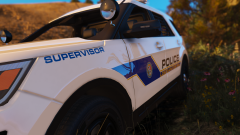
From the album: DukSezQuak Graphical Studios
DukSezQuak Graphical Studios - Project Number 201701-LS1 Description: Los Santos Police Department Texture Pack Based from: Wichita Falls, Texas Police Department Anticipated Release: January 15, 2017 Link: http://www.lcpdfr.com/files/file/14313-los-santos-police-department-mini-texture-pack/ Narrative: A Los Santos Supervisor FPIU. Disclaimer: Requests are not accepted by the boys of DukSezQuak Graphical Design Studios, and any requests will be ignored. These modifications and/or textures are done on a "free-time" basis. -
Based off of the Wichita Falls, Texas Police Department, we present you a Los Santos Police Department mini texture pack. This file contains two (2) 2K texture files, and two (2) 4K texture files for the Ford Crown Victoria and the Ford Police Interceptor Utility. Release # 201701-LS1 These textures are best used on the following templates: - BxBugs123 CVPI - Thehurk FPIU Please refer to the readme.pdf for further instructions. THIS FILE WAS RELEASED BY DUKSEZQUAK GRAPHICAL STUDIOS ON 15-JAN-2017 ON WWW.LCPDFR.COM, AND IS INTENDED FOR THE WEBSITES DISTRIBUTED ON ONLY. DUKSEZQUAK DESIGN STUDIOS DOES NOT PROVIDE ANYONE WITH PERMISSION TO REDISTRIBUTE THIS FILE. These textures are created on spare time by various artists under the DukSezQuak Graphical Studios, and while they do not request any compensation for their work, any donations would be greatly appreciated! Disclaimer: Requests are not accepted by the boys of DukSezQuak Graphical Design Studios, and any requests will be ignored. These modifications and/or textures are done on a "free-time" basis.
-
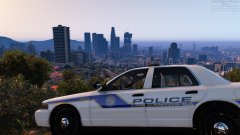 I'm sure that I can make some exceptions ;)


