Rizencraft
Members
-
Joined
-
Last visited
Everything posted by Rizencraft
-
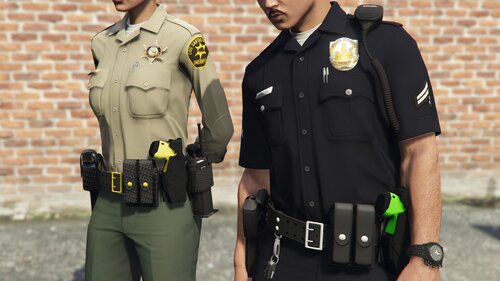 Could you add a silver button belt with a yellow taser instead of a green one?
- 16 comments
- 4 reviews
-
-
-
 Hopefully this can be updated so that their can be a unholstered leg taser option for use with CopHolster.
- 47 comments
- 13 reviews
-
.thumb.png.fc8bcf4c49efb0f46604702b368d2431.png) I seem to lag when pressing J to turn on the lights, and leaving a vehicle with the lights on. I think it's probably an issue with the XML files because when I disable ELS temporarily I don't get this issue, and when I used other ELS vehicles models I didn't get the issue.
I seem to lag when pressing J to turn on the lights, and leaving a vehicle with the lights on. I think it's probably an issue with the XML files because when I disable ELS temporarily I don't get this issue, and when I used other ELS vehicles models I didn't get the issue. -
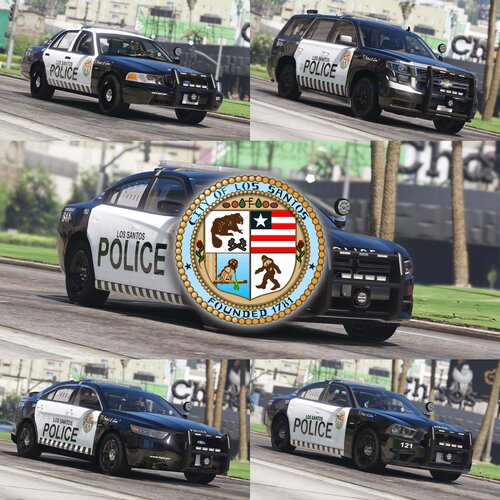 It's subtle, but the left and right rear doors for the charger have black streaks on them when viewed from the back. Your new texture pack doesn't have these issues, but doesn't work for the car pack I'm using, which is this.
 -
.thumb.jpg.0189516cd1c33d5f29068a78fea7ea7b.jpg) I joined your Discord and DMed you. My Discord username is darklord2346 or DarkLord2346.
I joined your Discord and DMed you. My Discord username is darklord2346 or DarkLord2346. -
I noticed that the windows have this reflective texture/tint on them, and they don't look like vanilla windows. It can distracting since all my other car packs windows are fine. Is that something that can be edited/changed? Maybe you can put it as an optional thing people can use.
-
Forgot to mention this, but another suggestion of mine is to have toggleable rambars for the whole fleet.
-
It works now. Are you thinking of adding toggle rambars and ALPRs for all the cars? Although this could be a nitpick, some of the cars in the back have 'BLAINESHERIFF.COM', while some have 'BREWARDSHERIFF.COM'. For the sake of consistency, could they all be 'BLAINESHERIFF.COM' to keep it consistent and lore friendly? A non lore friendly Breward Sheriff texture would also be nice, if you're willing to do it.
-
Getting a corrupt game data error when I add brevard to dlclist.xml and launch the game. Trying to open some of the cars in OIV gives me the 'probable corrupt file' error message.
-
-
-
 Just saw the new update and I forgot to mention this, but the distinction of gold and silver also applies to the peaked hats. So sergeants and above get gold bands, while every other rank gets silver bands. If you want to make it even more authentic, you could also add what's called 'scrambled eggs' to the hats for certain ranks, which I think is for majors and above, but don't quote me on that. With that in mind, it's a good idea to do as much research as possible. Look at YouTube videos, go to the department's website, to try to make the uniform as authentic and true to life as possible. At this point I really need to get to learning how to make uniforms on my lonesome. It's always been an interest of mine, but I don't really know how to start, and what resources there are available. Please send me a message if you're willing to give me some info on that.
 -
Great uniforms. Do you think you could add gold badges for sergeants and higher? Based on this table from Alanta PD's wikipedia page, sergeants and higher have gold badges. I suppose you could also add the rank on the badges along with regular silver badges if you want.
-
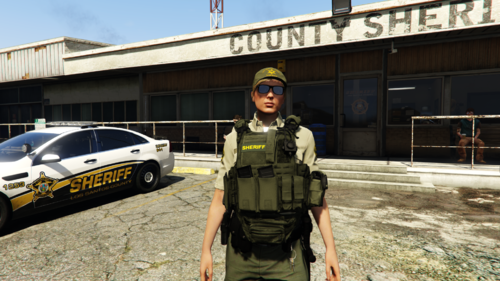 Great work! For Vest 001, textures can be added for SASP and SAHP. There is already sheriff texture, but maybe make the vest and 'SHERIFF' a different color to differentiate between BCSO and LSSD?
- 1 comment
- 1 review
-
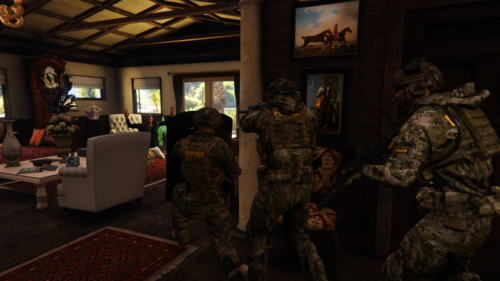 Got it, great work. If I have any more suggestions or constructive criticism I'll let you know. And thanks for including SASP - I forgot to mention it.
- 15 comments
- 1 review
-
I think female (or maybe additional male) vest textures for the following units would work: Los Santos County Sheriff's Department (LSSD) Blaine County Sheriff's Office (BCSO) San Andreas Highway Patrol (SAHP) Los Santos Police Department (LSPD) Federal Investigation Bureau (FIB) Commercial Vehicle Enforcement (CVE) for SAHP and maybe for LSPD/other agencies K9 Units for the agencies + anything you or Hanako (if I missed anything from the male vest pack) have already created For sheriff vest textures, I don't think they exist in either the female or male vests for Hanako (although I might be wrong), which can be immersion breaking since I don't exclusively play as LSPD/SAHP. For SAHP, a POLICE HIGHWAY PATROL vest texture instead of just POLICE would be cool. The task_001 vest in Female EUP Vest has 'POLICE' in gold in the back, with it being white in the front. This is more of nitpick or anything, but I'd like both of them to be the same white color, or I might just have to go to doing it myself, but making all the pixels the correct color without messing anything else is annoying. Of course, doing all of this is up to you. Let me know what you think.
- 15 comments
- 1 review
-
-
-
 Not working for me. I sent you a friend request through my Discord, DarkLord2346#1416
- 556 comments
- 28 reviews
-
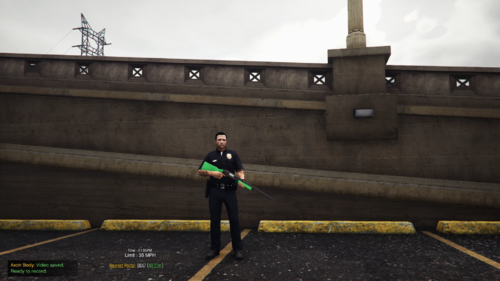 Could you add an optional yellow or orange texture?
 -
 One of the best callout packs out there. What car pack are you using the screenshots?
- 127 comments
- 13 reviews
-
-

- 1
-
-
 Sorry for taking a while to do an update on this, but everything seems to be working just fine now after playing LSPDFR a few times with the mod installed. This was before the most recent update, to be clear.
 -
When you use the camera animation through the menu it works fine, but assigning the camera to a keybind in the ini makes it so it doesn't work. I looked at my RPH log and it's saying that the animation is starting and stopping even when that isn't the case when I use a keybind. My character does do a slight animation, but not one where he actually pulls out the camera and takes pictures. I haven't tested if it's a specific keybind, but I used the J key and another key I don't remember. RagePluginHook.log




.thumb.png.fc8bcf4c49efb0f46604702b368d2431.png)
.thumb.jpg.0189516cd1c33d5f29068a78fea7ea7b.jpg)