


JustZach
Members
-
Joined
-
Last visited
Everything posted by JustZach
-
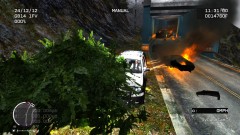 Is this vehicle from the Los Angeles Car Pack?
 -
4) Just adding to this, the car doesn't say anything when pulling someone over such as "Pull over to the side of the road!" and other sounds.
-
MERRY CHRISTMAS EVERYONE! Well, for Christmas I got everything I wanted and now I can play LCPDFR. I've downloaded it, I have added new police cars, I have added ELS, I just have a few problems that I need help with. 1) The mouse is dead jumpy. It will suddenly freeze and then appear where it should have been if the mouse hadn't frozen. Sometimes I will be aiming and it will just stop aiming. It isn't the mouse that is the problem as it is new today, and my old one was doing it yesterday so must be something with the game. Does anyone know how to stop this, it is very annoying? 2) How do I use native trainer. Last time I installed it, I had to uninstall it because it stopped my ELS working. Can anyone help me with this please? 3) Finally, does anyone have a link to some cool sirens that also explains how to install them? I'm loving LCPDFR upto now, just need a few of these things so my gameplay is better. Thanks and Merry Christmas to everyone again!
-
Uninstalled native trainer and it works. Although I do have a few more problems. Please check my new thread! Thanks.
-
I had to uninstall native trainer because when I did like Alt+M or whatever it is to put on police hat it used to spawn things. Will have to see if it has fixed the ELS problem tomorrow! Thanks.
-
I've added ELS to my directory and when I'm in the car, the sirens turn on but no lights. Won't let me open the little dialog box for ELS when I'm in the car either.
-
Anyone know what this is?
-
No one understands how long I have been waiting to see this! As soon as I finish work at 7pm tonight, I will be setting up GTA IV and LCPDFR! Can't wait!
-
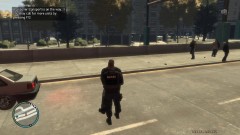 Link to this uniform please!?
 -
Wowowowowow, the screenshots they release just get better and better! Never been so excited for a game to come out!!
-
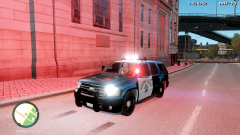 Link to this vehicle?
 -
Someone else has said this, I do have a wired one incase the wireless doesn't work! Thanks.
-
I've just upgraded to an i3 and 16GB Memory, graphics card to be updated next!
-
Cheers, will have a look at these!
-
These are my specs, will they do? Processor: http://ark.intel.com/products/53491/Intel-Pentium-Processor-G850-(3M-Cache-2_90-GHz) Hard Drive: 500GB Windows 7 Graphics: http://www.nvidia.co.uk/object/product_geforce_9600gt_uk.html DirectX 10 Sound Card
-
Cheers for all the feedback guys! I might look at using both then.
-
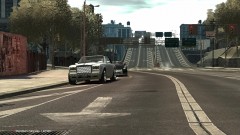 What's the script for the new road markings?
 -
Ah I see. Is it a bit pointless if your cars are all ELS compatible then?
-
It allows you to check the speed of other drivers etc, and tells you when they are speeding.
-
What does strobes actually do?
-
Snow mod makes the game quite cool? http://www.gtagarage.com/mods/show.php?id=5740
-
Hmm, I might give both a try then. I can understand using a controller for cinematic videos, I wonder what like an hours gameplay with it is like.
-
Great videos. Maybe look at getting more people to play MP, makes it a bit more exciting.
-
Simple, answer the poll for me please, and feedback.
-
Cheers. I will give this a try!


