


Medicmojo
Members
-
Joined
-
Last visited
Everything posted by Medicmojo
-
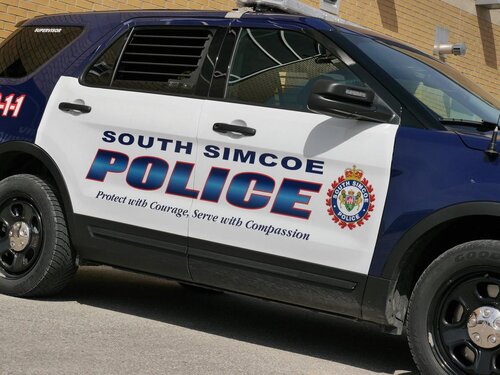
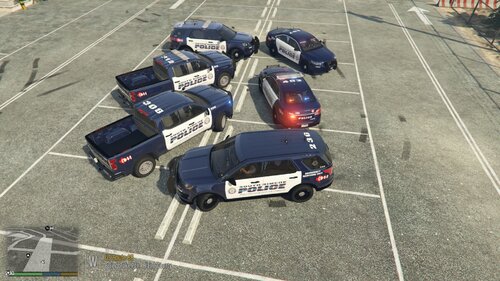 Hello again! Back in October, I released a single vehicle (lightbar and slicktop versions) livery for the South Simcoe Police Service, as "memorial" for the two officers that were killed that month. For that livery, I had used their badge numbers as the unit callsigns, and created my own angel wing "in memory of" decal. As part of that release, I mentioned really liking the overall design of the livery, and being interested in making a full pack. I had asked for someone to suggest a pack to use. Someone took me up on that offer, and I am pleased to release the final result. All vehicle models or packs are linked further below. The photos above show a number of their actual vehicle photos for comparison, as well as in game pictues of my liveries on the vehicle models - I strive for accuracy, and am very pleased with the results! All liveries have a unique callsign, and I made a number of specialty unit liveries as well. I have also included as part of each livery, the "official" Heroes in Life Memorial decal that South Simcoe Police designed and (I believe) started placing on all their units. The suggestion/request I received was to go with Ripples LSPD Legacy pack, as it was one DLC add-on that included the 3 types of vehicles that SSPS currently uses - FPISs, FPIUs, and a pickup truck. Plus, we all know that Ripple does great work! The pack gives a good sized selection of vehicles, with lightbar and slicktop versions of each model. I only worked on those particular SSPS vehicles in this pack - so, sorry......no Crown Vics or Chargers. And, the pick-up is a Silverado, instead of the F150 that SSPS uses. As a side note, there is a known problem with the slicktop Silverado model (lspd18) - it spawns with weird textures and colours. You can either chose to not use that model........or, I found that the problem could be resolved by replacing the lspd18.ytd file. Looked like that ytd mistakenly had a number of textures meant for one of the Charger models. I copied/pasted the matching lightbar Silverado model's (lspd8) .ytd file somewhere outside of OpenIV - renamed it to lspd18 - then copied/pasted it back into OpenIV, which overwrites the file with the errors. Have had no issues with the slicktop model since. Once again, I have tried to make my download file very organized and (hopefully) self-explanatory. Dig your way through the folders, choose the 4k or 2k quality, and instalI via the usual process in OpenIV, into the matching vehicle .ytd file. All the individual textures should be named properly, to allow for a drag/drop install. If you want to keep it simple, just use Ripple's Legacy pack addon and my associated liveries. Good variety of vehicles in that pack, and I have included some of the "specialty" unit liveries - Supervisor, Canine, ERU, and Community Services. Remember that the slicktop verisions will also come with an "unmarked" livery texture, courtesy of Ripple. Some of the models came with window texture templates as well - I put those to use for some of the unit callsigns (as they are on the real units).........don't forget to install those as well. But, if you are willing to go with a few more addon packs for some more variety........please consider and help yourself to the other livery options I have included. If you are a die-hard Ford fan and want an F150/250 model to use, like South Simcoe does, I got you covered! Chose Big G 069"s F250 model. I haven't personally used it much in game yet, but it has some great comments and reviews If you want to have an actual K9 model to use in game, I went with Rabbit's 2016 FPIU K9 model. I do use this vehicle in my game, and it is fantastic! Finally, if you want to have a couple more FPIUs to use in game, I tweaked my first Memorial livery a bit - taking off my original "angel wing" Memorial decal, and replacing it with the official decal. I hope you enjoy! As always: - please let me know if you have any issues with the liveries. - feel free to use these liveries on any other vehicles in your game that they happen to fit/work with, but I can only guarantee that they will work with the vehicles/packs that I have listed - while I strive for accuracy on the livery itself, I may have had to take some artistic license to "fill in the blanks" where I could not find a photo reference - while I tried to match the vehicles in general terms to what the agency uses, I make no guarantee that these vehicles are exact matches in regards to model year, equipment, lighting, etc - if there is another vehicle/pack that you want the livery to work with, please let me know in the comments or by a DM - I am sure we can work something out. Or, if you are able, go ahead and rework the livery to another template yourself to use - but, for use in your game only.........please don't repost and claim the work as your own - feel free to share photos or use in videos (would love to see some of those!)........just give credit back to me - please do not repost/upload or claim the liveries and work as your own, on this or any other site - I would appreciate and look forward to any feedback, comments, or reviews.......still pretty new at this - I am not responsible for "breaking" your game........none of these files will do that, if installed properly. If you are not sure on how to do so, YouTube and Google are your friends!
 -
Maybe check out this mod.....I haven't used it personally, yet - but the dev has a good rep.
-
 Developer, is maybe the better word you are looking for? Разработчик, может быть, это лучшее слово, которое вы ищете?
- 24 comments
- 2 reviews
-
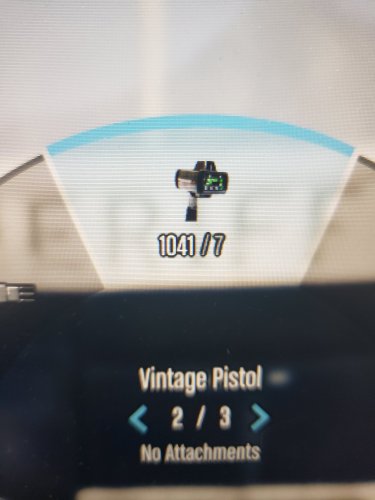
OK, so I used Google translate for your message, and my reply back. If I understand correctly, you are having an issue with using F7 and the menu key for the radar gun itself. I believe that would be a question to try asking the actual LIDAR mod developer (Opus49) for help with. My simple mod here was just a change for the icon and text that would show up in the Weapon Wheel in game. Итак, я использовал Google переводчик для вашего сообщения и своего ответа. Если я правильно понимаю, у вас проблема с использованием F7 и клавиши меню для самого радара. Я полагаю, что это вопрос, который стоит попробовать обратиться за помощью к фактическому разработанному моду LIDAR (Opus49). Мой простой мод здесь был просто изменением значка и текста, которые будут отображаться в Колесе оружия в игре.
- 24 comments
- 2 reviews
-
-
Yeah........I guess that is what I get for just throwing some stuff out, without double-checking it first. Once again, sorry - looks like JJDawkins has pulled his models from this site. Like you mention, the tough part is now finding other vehicles to match those liveries. Do you have a vehicle pack that you typically use in game, as your favourite? I spent half an hour or so, poking around through my "go-to" packs. Seems that Ripple's LSPD Legacy pack will work with the this Corpus Christi Tahoe and Taurus/FPIS livery - but the FPIU/Explorer doesn't. Maybe you could find a single FPIU model that would work? But, then the vehicles themselves wouldn't match (lightbars and such).
-
*cringe* ........sorry! Honestly, did not notice that one! Guess that is why it is from 2016! Sorry about that. The other one looks pretty good, though.........looks like the current livery scheme, and gives you 3 vehicles to work with. I do make liveries, and this one doesn't look too complicated. I do have a couple other projects on the go right now. I will it in mind, and maybe check back in with you - maybe in a month or so - and see if you still needed some done up.
-
There are a couple livery packs for Corpus Christi already available here. A few years old now, but........might be what you are looking for.
-
.thumb.png.e069bfa97b20e55e660c6279f47f2440.png) Nice work! Can certainly appreciate the effort involved in gettin the all the striping to line up on the different sections of the template!
Nice work! Can certainly appreciate the effort involved in gettin the all the striping to line up on the different sections of the template! -
 Hey - thanks for the note! I did end up going to Barrie for their joint funeral service on Oct 20th. If you are interested, I will be making some more SSPS liveries soon, as per the other comment here. We decided to use Ripple's Legacy pack. Keep an eye out for that.......hopefully in a couple weeks!
 -
My second livery-related question has to do with adding custom license plates......... As part of "upping my game" with making liveries, I've started trying to add custom plates to match what the agency would be using. I know many templates come with those small slots for "FRONT PLATE" and "BACK PLATE", and I can work with those as part of the actual livery design. But, what about models that don't have plates slots as part of the template - is there anyway to add plates on those? For example, I am currently working on a Georgia State Patrol livery pack for a guy. He asked me to work with a specific vehicle pack. A couple of the model templates in that pack have the plate slots - so, those I worked with as part of the livery itself. Searched out GSP plates online, designed my own Georgia state plates (the "peach" and the "...on my mind" style), added the GSP logo and "STATE TROOPER" across the bottom, and then added text to match the unit callsign number (which is what GSP plates seem to be). That works fine - looks great in OpenIV and in game..........maybe a bit flat, like a decal. Although, I am working on figuring out embossed text in GIMP - that should help get rid of that flat look. But, other models in the pack do not have plate slots on their template. However, I was scrolling through those models .ytd files, and noticed that most have a plate texture in there - usually just one of the standard San Adreas or SA EXEMPT plates. Got me thinking.........maybe I could just import my GSP style plate onto that texture - no different than changing a lighting texture from red/blue to blue/blue, right? So, I did that - exported that plate texture into GIMP, brought in my GSP plate and scaled it to fit properly. I even found the "normal-map" online tool, to create the bump(?) map/normal map to match my new plate. Got the names to match, as "plate01" and "plate01_n" or whatever, and then moved those into the OpenIV .ytd file. Should be set! That worked and looked great in OpenIV. But.........not so great in game. Didn't work at all, actually. Seemed like the game was generating and overlaying the standard vanilla plate texture - which made it unreadable. On the one hand, it makes sense that the game will always put on the vanilla plates - and then a plate design that is part of the livery, will just overlay a "decal" on it. But, I do have another add on car where there is a custom plate that is part of the .ytd - and, it works just fine in game. It has a slightly diferent name - going with "plate1" instead of "01". I did read somewhere to name a plate anything but 01 through 05, but I think that was more on the modeling side of things. I know the base vanilla plates in the vehshare file are 01 through 05. I tried renaming my plate to just "plate1", but that didn't work either. I know I could probably replace one of the vanilla plates in the vehshare with mine - but, then that would become part of the pool the game draws on......not just the vehicle I want it to work with. Any ideas? Am I missing something obvious to add a custom plate into the .ytd for a model? Or, are the plate textures in the .ytd something that can only be changed in the model itself? Thanks in advance again!
-
Hey everyone! I actually have two questions related to livery textures - I will post them seperately to keep things from getting tangled up! First question is about adding mulitple liveries to a single model .ytd file. Say, for example - you want to have the same Department livery, but maybe "TRAFFIC" and "PATROL" markings on the same vehicle model, or even different unit callsigns, to randomly spawn. Or even something as simple as having both and unmarked and a marked/slicktop version of the same vehicle. It is great to have those pre-installed on your model, and then in game just use a trainer to cycle through. The standard naming scheme for livery textures is along the lines of "whateverthecaris_sign_1", right? That is what is mostly seen in the .ytd. I know that I can add other liveries to the .ytd by simply keeping the same name and increasing the number sequentially - making the next one "sign_2", "sign_3", etc. What happens, though, when the naming scheme for a particular model doesn't follow that standardized format? For example, in a car pack I am making liveries for right now, some do follow the standard format. But, on other models within the pack, the livery texture file is named "2018 Charger 4K", or something simliar. I can change that livery, by keeping the name and importing my own........but, what about multiple liveries? I have tried adding variations of "_sign_1", or "_2" to that texture name, but it doesn't seem to work. Typically, the entire model then goes white - making me think that maybe the model now can't find the livery texture with the changed name. Is there any way to change that name, where the model will still recognize it as a livery, and allow for multiple liveries to be installed? Or, does that different naming format mean that the model is "locked" to only the one livery slot? Thanks in advance!
-
Hey!! I know you posted this back in September..........I was just scrolling through posts on here today. Did you ever figure out the font? Not sure what you typically do to figure out a particular font. I usually try with a website like "What the font?" (https://www.myfonts.com/pages/whatthefont) or "What Font Is" (https://www.whatfontis.com/?s2o). Sometimes I get good results......sometimes, not so much, lol. These sites will list both paid/commercial and free fonts, though. Many results will be paid fonts. However, the site will often give a list of "free alternative similar fonts". Or, you can just search out the name of the font, and add "free font download" to your search. Some of the links may be a bit sketchy, but have had good luck so far. For the Newark font, this is what I came up with in a couple minutes, using What the Font........ Integral CF Demi Bold Oblique Here is a link to the entire Integral CF font family - free download that worked for me. https://xfonts.pro/font-family/integral-cf Initially, I thought that the word POLICE was the same font - it is pretty close, but the "O" doesn't match (in the Integral font, it comes out as rounded). For simplicity sake, maybe you are OK with that small variance.......everything else seems to match. If not, try this font for the word POLICE - https://xfonts.pro/fonts/tactic-sans-extra-extended_black-italic Conversely, you could probably try this font for NEWARK as well - looks pretty close, except the W is really widespread?? This will just give you the "inner" text, of course - you would still have to create the double outline effect in your graphics program. For that, I usually just convert my text to an object - then "grow" it a bit, new layer, bucket fill.......then grow that new layer a bit more, another new layer, bucket fill.......then drop those two new layers in order under the original text layer.
-
Any Canadian (specifically, Ontario) law enforcement fans out there? If so......this might be a livery for you! Last Tuesday evening, October 11th, two officers with the South Simcoe Police Service were shot and killed attending a "domestic situation" in the small, rural town of Innisfil - about 90 mins north of Toronto, and south of Barrie. Limited information released due to the ongoing investigation - so far, reports are that they were shot by a 22 y/o male, shortly after arriving on scene. Weapon used was an SKS semi-auto rifle. A third officer arrived, and "exchanged gunfire" with the male - who was later found dead in the home (unknown if struck by the other officer's shots, or by his turning the gun on himself). Both injured officers were transported to a larger center hospital in the area. One was pronounced dead shortly after arrival. The second officer was transported by helicopter air medevac to a trauma center in Toronto, but succumbed to his injuries overnight. This was a personal project for me, and meant to be a tribute of sorts. Hit close to home - close(-ish) to where I live, and I may well know some of the Paramedics that were involved at the scene. Couldn't find any other liveries for SSPS online, and decided to make one as a "memorial". The primary livery is as accurate as possible to the real livery currently used by SSPS. I have included 4 photos above of their vehicles as a reference. I went with a single vehicle model pack, a 2021 FPIU - as from the photos I found online, that is one of the primary vehicles that SSPS uses. Even on the real vehicles, there seems to be some small variations in the livery - placement of unit number indentifiers, social media logos, Canadian flag, etc - so I went with what I felt was the best looking average. For the "memorial" aspect, I added a few things. The officer's badge numbers are used as the unit number identifiers. I also created a small memorial decal (inspired by others I saw online) using the SSPS crest, a blue/black ribbon, and angel wings - along with both of their numbers. The base template I used to make the livery was from this 2021 FPIU pack (link below), by @nm416. It was released this summer, and has numerous great feedback comments and reviews. Particularily about the lighting. It is ELS, and is an "add-on" pack - so you can put it in your game without impacting your default vehicle fleet. A couple of things to point out about the pack. It does come with both red/blue, and blue/blue lighting options. Please pay attention to the README provided in the pack dowload, as well as the options within the "ELS" folder provided. I did notice that - as it comes setup in the download - the lightbar FPIU is red/blue, while the slicktop is blue/blue. However, the all the changes to go one way or the other are provided in the vehicle pack download ELS folder - just have to drag/drop the light colours you want into the OpenIV .ytds, as well as drag/drop the .xml VCF into your OpenIV ELS folder to make the environmentals match. https://www.lcpdfr.com/downloads/gta5mods/vehiclemodels/39973-els-2021-fpiu-pack-lightbarslicktop/ In regards to my actual livery file - once you open the main download file, you will see two folders labelled as per nm416's model names. One for the lightbar FPIU, one for the slicktop FPIU. In those, you will find folders for either the 2k or 4k versions of the livery .png files. Install those onto the vehicle models as per the usual process in OpenIV. You can certainly swap the liveries between the two models if you prefer - I just set one up specifically for each unit number identifier. Also - while I will gaurantee the livery fit to this model template, I know it will fit other vehicles out there that use the same template. I believe nm416 credits Emergency Distributors with the 2021FPIU model base......so likely would work with other 2021FPIUs from Emergency Distributors. Constable Morgan Russell (#133) and Constable Devon Northrup (#229).........May They Rest in Peace. *** on a happier note, I actually really like the overall design of this livery. I am thinking of doing up a "regular" release for it sometime soon. Does anyone have any suggestions of a vehicle pack they would like to see it based on? Maybe one of the smaller 3 or 4 car packs out there? How about a lore-friendly version - maybe for LSPD? I know South Simcoe PS uses FPIUs.....but I did see some pics of an FPIS and an F150. Didn't see any Chargers.....but, could always make one. If you have any ideas of a favourite pack to use, let me know in the comments below or send me a DM here. Thanks! I hope you enjoy! As always: - please let me know if you have any issues with the liveries or all-blue lighting textures - feel free to use these liveries on any other vehicles in your game that they happen to fit/work with - if there is another vehicle/pack that you want the livery to work with, please let me know in the comments or by a DM - I am sure we can work something out. Or, if you are able, go ahead and rework the livery to another template yourself. - feel free to share photos or use in videos (would love to see some of those!)........just give credit back to me - please do not repost/upload or claim the liveries and work as your own, on this or any other site - I would appreciate and look forward to any feedback, comments, or reviews.......still pretty new at this - I am not responsible for "breaking" your game........none of these files will do that, if installed properly. If you are not sure on how to do so, YouTube and Google are your friends!
-
 This texture file is awesome........thank you so much!
 -
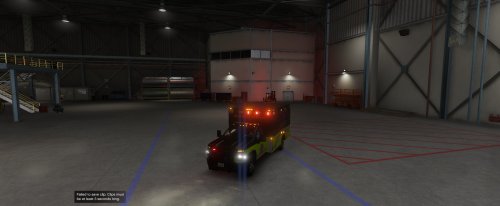 Yeah, no worries. Just wanted you to know - like I said, changing the "sirensettings" value seemed to work for me. Here are a couple pics of the private livery request I worked on - turned out great!
- 23 comments
- 1 review
-
 Thanks for releasing these - definitely some fantastic logos in there!
 -
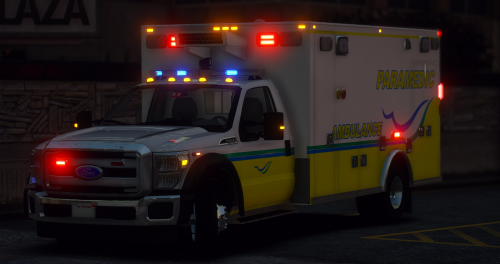 Thanks for info, I will check that model out for sure.
 -
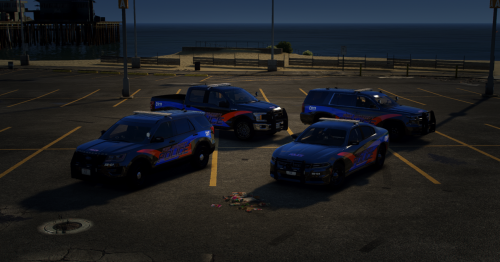 LOL.....work alongside Port Hope Police almost every day. Nice work!
 -
Hey!! LOL.......I actually work here as a Paramedic! This is awesome - too funny seeing "your" vehicles ingame! Although, you beat me to making the livery............ 😒 Nice work on getting the design translated into the game! Pretty close to the real thing - here are a couple photos for reference. In case anyone is wondering about the green/blue striping and the green/blue "swoop" (as we call it) lines logo........those are meant to represent the "rolling hills" of Northumberland County, and Lake Ontario. Can I ask what ambulance vehicle model you used? We actually don't use Type I (pickup chassis) - only Type III. And Tahoes for the Supervisor and First Response units (hmmmmm........maybe I should work on one of those! lol) This ambulance model looks like a good one......I like the lighting.
-
Hey man - great ambulance model!! I noticed while driving Code 3, that AI vehicles weren't responding to it - not moving aside, stopping at intersections, etc. Did a bit of research online in the forums here for solutions. Checked the vehiclemeta file first - the FLAG lines were good (EMERGENCY_VEHICLE and LAW_ENFORCEMENT).......those are the usual suspects, lol. The other possiblity - I checked the carvariation.meta file. One the last lines is "sirensettings". In your file, it is given a value of "0". I changed it in my game to be "1", and now AI do react to Code 3 driving. One other thing I have noticed - the emissives from the lightbar are pretty low-key, compared to the flasher modules on the box. Is that something you can change as the model dev? Or something we can change to preference in one of the data files? Have been working on a private livery for your model. Might release a lore-friendly version of it someday soon!
- 23 comments
- 1 review
-
 Hey there DcK !! Did you ever finish and release your new ambulance model? Hope so - looks like a beauty!!
- 209 comments
- 40 reviews
-
Hey there - just wanted to let you know.......this is frickin' AWESOME!! Thank you so much for putting this written tutorial together. I only wish I had found it about 4 or 5 months ago, when I first started stumbling around in the world of livery-making........instead of just today. Honestly, it is good to see/read that eventually, I've ended up following the same processes more or less (I use GIMP) - might try your way of organizing the layers better. I guess you ultimately figure out whatever works best for you! I have posted up a couple of liveries so far, bot a few more in the works. Check them out, if you are interested. Always appreciate feedback!
-
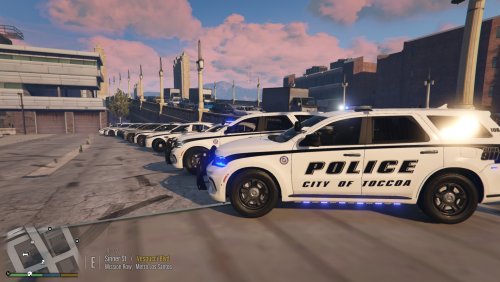 Hello again!! Here is another Gerogia law enforcement agency livery pack that I made, on request by someone that wanted their hometown Police to use in game...... We chose to work with Ripple's (ELS) LSPD Legacy Pack (linked below), as it seemed to be a great option to give the most accurate match to the Toccoa Police fleet. It is a large vehicle model mega-pack, with great lighting and interior details - we all know Ripple does awesome work! To the best of my knowledge, Toccoa primarily uses CVPIs, Chargers, and FPISs - to be accurate to that, I only made liveries for those vehicles out of this pack. I did stumble across a random photo of a Toccoa Police Durango online - although it had a different livery. Thought that would make for a great SUV addition to your Toccoa Police fleet in game, and I used Rabbit's 2021 Dodge Durango PPV model for that livery (linked below). Both Ripple and Rabbit offer these in both "replacement" and "add-on DLC" options. All vehicles are offered with full lightbar, as well as slicktop options. I have included a handful of the reference photos I used, to show the accuracy and details of the livery. For consistency, I went with the standard livery on the Durango as well. Please note, while I chose vehicle models that generally represented the Toccoa fleet well, and strove for accuracy with the livery itself, I make no guarantees that the exact model years, lighting equipment used/placement, etc are entirely accurate. Toccoa Police does use all-blue lighting - I have included the texture files to make those changes for these particular vehicle models, if that is something you are interested in. I also used different unit numbers for all vehicle liveries - a few are even accurate to the real vehicles! At the risk of making the download file look overly complicated, I organized everything into multiple sub-folders with all .png and .xml files named exactly as needed to allow for drag/drop install. (*** PLEASE NOTE - the main download file was organized with the "add-on DLC" option in mind. While the end-result livery/lighting texture files should still be named the same, you may have to do some extra sorting to figure out what the matching "replacement" model names are.) Once past the Rabbit and Ripple stage - you will find each vehicle grouped into its lightbar/slicktop pair; inside that are the 2k, 4k, and all-blue lighting folders. Work your way throught the folders. Choose 2k or 4k - inside that are the unit number choices. You certainly can put either unit number livery on the lightbar or slicktop version of that particular vehicle model, but please ensure you use the correct ELS lighting texture .png files and VCF .xml files for the specific vehicle as labeled (as there are some differences between the lightbars and the slicks). Within the two Charger folders, there is an extra folder for the grey/black ghost livery, specifically for the Charger slicks. I intentionally named those as livery #3, so you won't lose the standard unmarked livery alternative that is offered with all the slicktops. I do plan on making a "lore-friendly" City of Los Santos Police version of this livery pack in the near future - will likely expand that to include all the vehicles in Ripple's Legacy pack. Keep an eye out for that! I hope you enjoy! As always: - please let me know if you have any issues with the liveries or all-blue lighting textures - feel free to use these liveries on any other vehicles in your game that they happen to fit/work with - if there is another vehicle/pack that you want the livery to work with, please let me know in the comments or by a DM - I am sure we can work something out. Or, if you are able, go ahead and rework the livery to another template yourself. - feel free to share photos or use in videos (would love to see some of those!)........just give credit back to me - please do not repost/upload or claim the liveries and work as your own, on this or any other site - I would appreciate and look forward to any feedback, comments, or reviews.......still pretty new at this - I am not responsible for "breaking" your game........none of these files will do that, if installed properly. If you are not sure on how to do so, YouTube and Google are your friends!
 -
 OK, well.........sorta getting above my head here, lol! Had to Google where to find the vehshare.ytd files. Searched it out in my OpenIV - that gave me 4 locations: x64e, x64w, patchday9ecng (or something like that), and patchday27ng. Checked those - found the "black" and "blank normal" textures in all 4........I think they looked ok. The "black" was a small black square, and the "blank normal" was a small silver or grey (clear, maybe?) square. But, I never found the "spec 2" or "env" textures in any of those vehshare.ytd files. Should I be looking somewhere else? I thought about it some more........those texture names sounded familiar - and went into your BCSO DLC pack, and checked the actual .ytds for the 2014 Tahoes that I am finding the golden highlights on. Found the black on all 3 - looked like a black square. Only the 2014K9 had the blank normal - was that same small silver grey square. All 3 had the spec2 - looks like a small blue square. I couldn't find the "env" texture on any of them? Any thoughts? If not, no worries from me - I like the vehicle pack so much, it certainly isn't a deal breaker for me..........just maybe won't use the 2014 Tahoes, lol.
- 200 comments
- 16 reviews

.thumb.png.e069bfa97b20e55e660c6279f47f2440.png)


