



.png.f6e5ff7488dfe04aa5fdaefbbe086c7f.png)
Coldalliance
-
Joined
-
Last visited
Everything posted by Coldalliance
-

From the album: Colds Vehicle Gallery
-

From the album: Colds Vehicle Gallery
-

From the album: Colds Vehicle Gallery
-

From the album: Colds Vehicle Gallery
-

From the album: Colds Vehicle Gallery
-

From the album: Colds Vehicle Gallery
-

From the album: Colds Vehicle Gallery
-

From the album: Colds Vehicle Gallery
-

From the album: Colds Vehicle Gallery
-

From the album: Colds Vehicle Gallery
-

From the album: Colds Vehicle Gallery
-

From the album: Colds Vehicle Gallery
-

From the album: Colds Vehicle Gallery
-

From the album: Colds Vehicle Gallery
-
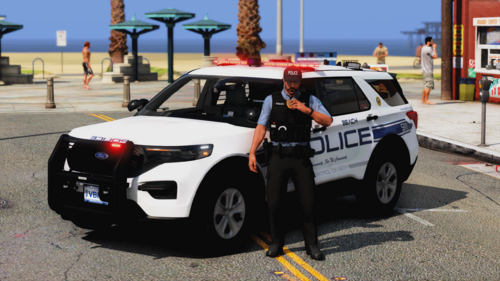 They look really good! Can't wait to get them installed and give them ago! Will drop a review for you after I've given these vehicles ago!
 -
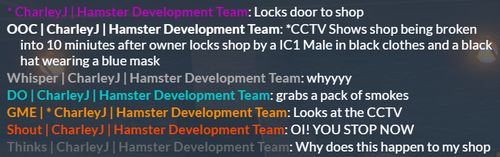 Configurable Roleplay Chat Script for FiveM: A Basic Yet Advanced Chat System Elevate your FiveM roleplay server with our Configurable Roleplay Chat Script—a chat system that’s as powerful as it is user-friendly. Crafted by passionate roleplayers and developers in a small team called Hamster Development, this script combines simplicity with sophistication, allowing server admins to manage in-game chat interactions with ease and flexibility. Key Features for Immersive Roleplay Basic Yet Advanced Configuration: With straightforward setup options, this script can be customized to enable or disable specific commands, letting you control everything from /me actions to /OOC messages. Distinct Color-Coded Commands: Roleplay chat is made clearer with unique colors for each command—whether it’s shouting, whispering, narrating actions, or sharing thoughts. Optional OOC as Default Setting: Make normal chat default to out-of-character (OOC) mode for smoother gameplay, keeping roleplay interactions well-organized. Server-Side Optimization: Designed to run on the server side only, this script ensures performance stays smooth without taxing client resources. Quick & Simple Setup: A few edits in the configuration file allow for total customization—no coding expertise is required. Developed by Roleplayers, for Roleplayers At Hamster Development, our passion for roleplay drives us to create tools that enhance and simplify the experience. As a dedicated team of developers and RP enthusiasts, we build each product with the community in mind, ensuring practicality, immersion, and ease of use. Have Ideas? Share Your Suggestions! We’re always looking to improve and expand our offerings. If you have ideas for new features or products that would enhance your roleplay experience, we’d love to hear from you! Together, let’s continue creating tools that make roleplay even more immersive and enjoyable. With Hamster Development, you’re not just getting a product—you’re supporting a team that cares deeply about the roleplay community. Take your FiveM server to the next level today with our Configurable Roleplay Chat Script!
 -
 This plugin is utterly amazing! Something you don't realize you need/want till you have! I enjoyed it as it makes the feeling of speeding at high speeds during rain/thunder/snow more real and less like you can get away with it. I left a review in my video as well on YouTube!
 -
 I have just downloaded it! I will get it installed and will review it 🙂
 -

From the album: Coldalliance LSPDFR Gallery
-
-
 Amazing; Exactly as it says some great audio making certain callouts feel insanely real.
 -
 I was very skeptical about this script, But after downloading and installing the script works as described and intended. Would love to see the future of this script!
- 6 comments
- 6 reviews
-
This is where I post my LSPDFR patrol pictures!
-

From the album: James Nick - LSPDFR Patrols
-
From the album: New York Sanitation Police
© Charley J. - Chops Development
.thumb.png.d7d34f55f1da52d81c07a7eb41ac97f2.png)

