Skip to content
View in the app

A better way to browse. Learn more.

LCPDFR.com

A full-screen app on your home screen with push notifications, badges and more.

To install this app on iOS and iPadOS
  1. Tap the Share icon in Safari
  2. Scroll the menu and tap Add to Home Screen.
  3. Tap Add in the top-right corner.
To install this app on Android
  1. Tap the 3-dot menu (⋮) in the top-right corner of the browser.
  2. Tap Add to Home screen or Install app.
  3. Confirm by tapping Install.

aidey1234

Members
  • Joined

  • Last visited

  1. Tony Memphis     Responded to a Arrest Warrant in Rockford Hills, Eastbourne Way
  2. Tony Memphis     Finished responding to a [686] Disorientated Individual in GWC Golf Club, West Eclipse Blvd
  3. Tony Memphis     Responded to a [686] Disorientated Individual in Del Perro, Del Perro Fwy
  4. Tony Memphis     Finished responding to a ActiveShooter in Del Perro Beach, Red Desert Ave
  5. Tony Memphis     Responded to a ActiveShooter in Del Perro, Prosperity St
  6. Tony Memphis     Finished responding to a [686] Vehicle On Sidewalk in Del Perro, Prosperity St
  7. Tony Memphis     Responded to a [686] Vehicle On Sidewalk in Rockford Hills, Dorset Dr
  8. Tony Memphis     Finished responding to a [686] Kidnapping in Progress in Richman, West Eclipse Blvd
  9. Tony Memphis     Performed a traffic stop on a Blaze Red Pounder Custom with registration 83NIE273 in Richman, West Eclipse Blvd
  10. Tony Memphis     Performed a traffic stop on a Steel Gray Unknown Vehicle with registration 06DHX123 in GWC Golf Club, Picture Perfect Drive
  11. Tony Memphis     Arrested Angela Austin in GWC Golf Club, Picture Perfect Drive
  12. Tony Memphis     Responded to a [686] Kidnapping in Progress in West Vinewood, San Vitus Blvd
  13. Tony Memphis     Finished responding to a [686] Stolen Item in West Vinewood, San Vitus Blvd
  14. Tony Memphis     Responded to a [686] Stolen Item in Alta, Occupation Ave
  15. Tony Memphis     Finished responding to a CarSetOnFire in Paleto Bay, Paleto Blvd
  16. Tony Memphis     Took the easy way out in Paleto Bay, Paleto Blvd
  17. Tony Memphis     Went on-duty at Paleto Bay Sheriff Station in Mission Row, Atlee St
  18. Tony Memphis     Finished responding to a LowValueCarStolen in The Redwood Lights Track, Senora Rd
  19. Tony Memphis     Performed a traffic stop on a Sunrise Orange Riata with registration 46SYM414 in Gd. Senora Desert, Baytree Canyon Rd
  20. Tony Memphis     Responded to a LowValueCarStolen in Gd. Senora Desert, Baytree Canyon Rd
  21. Mod has issues and doesn't allow most of Bejoijo mods too load. How unfortunate
  22.    aidey1234 reacted to a comment on a file: reshade any game better
  23. I have installed the 2006 CVPI Arjent in as "sheriff.ytd" and lights are none existent and or/ not forward facing, TA bar light sequence and primary/secondary is bouncing off onto walls with wrong light patterns being projected from both lightbars, any fix?
  24.    aidey1234 reacted to a comment on a file: 686 Callouts
  25.    Charlie686 reacted to a comment on a file: 686 Callouts
  26. Hey man I love this callout pack and only one that I would continue using even after the use and abuse as they say hah! A suggestion that I think would just add another customizable ability is: ManualCallStatus = true //If true the call will still stay active until manually changing status via radio, allowing you to stay on the call and unavailable after investigation. It's just another alternative of the ContinueAfterSuspectDeath line. I normally radio into dispatch and confirm my availability even after hearing that automatic line of call stating the call is code 4 if it doesn't involve a dead suspect. Thanks for your dedication on this callout pack! I look forward for the future with this 😄
  27.    aidey1234 reacted to a comment on a file: LASD 2016 Ford Explorer
  28. great mod keep up the good work
  29. Definitely crashing at the jewelry store heist every time.
  30. aidey1234 started following EmergencyDistributors
  31. aidey1234 started following Bxbugs123
  32.    aidey1234 reacted to a comment on a file: LASD 2016 Ford Explorer
  33.    aidey1234 reacted to a post in a topic: NaturalVision Evolved Crashing LSPDFR
  34.    aidey1234 reacted to a comment on a file: BMW r1200rt Metro-State
  35. aidey1234 changed their profile photo
    • 1,360 downloads
    • Version 1.0.0
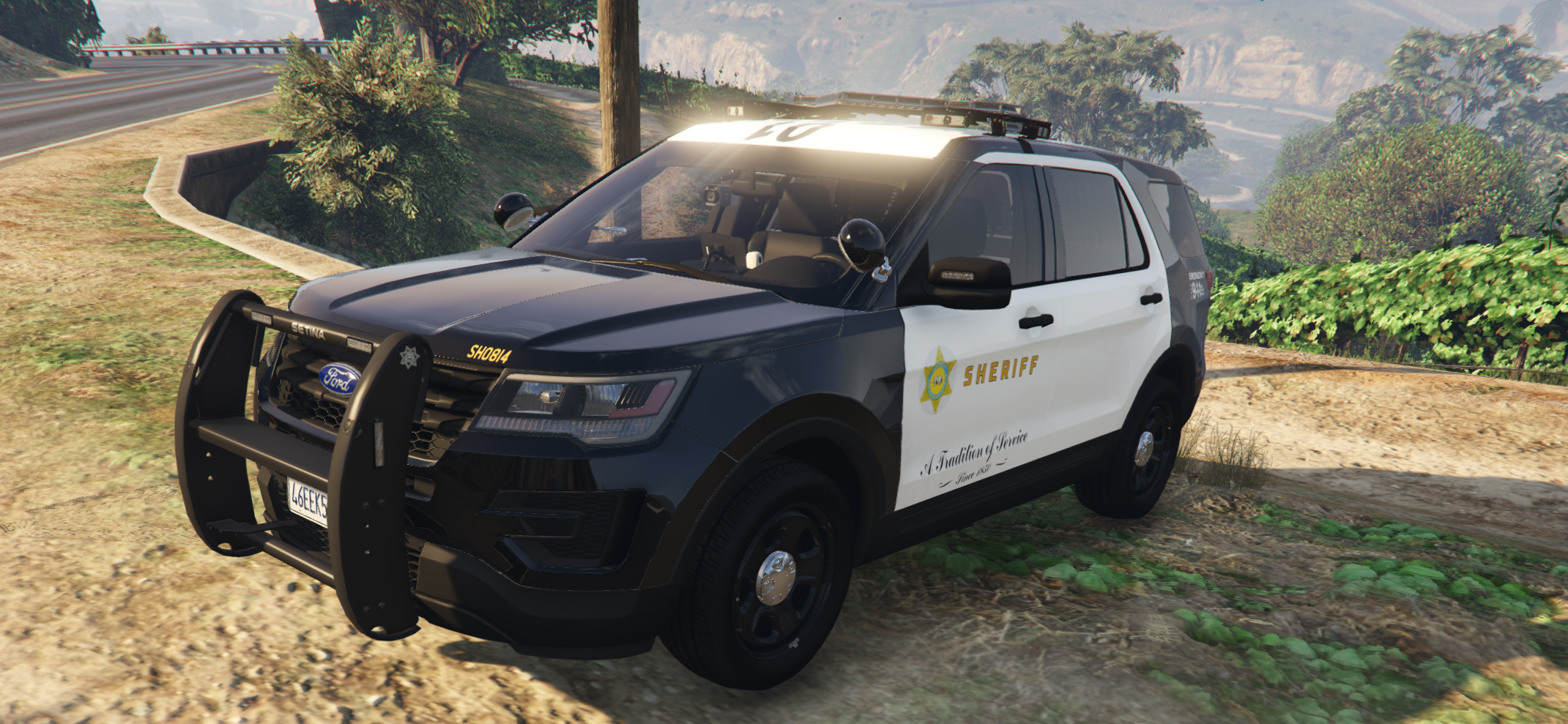
    A LASD skin for KLE0's [ELS BCSO 2016 FPIU with Federal Signal Valor 1.2] First time creating a skin, I have high consideration in altering the sheriff text in a future update. Skin is an accurate copy of the current Los Angeles Sheriff Department livery.
  36. Hands down the best FPIU I have driven since first playing LSPDFR years ago. High Quality and such a small size? Mind=blown I modified the vehicles.meta for personal preference: <handlingId>GRESLEY</handlingId> <audioNameHash>BALLER4</audioNameHash> I am also currently working on an Accurate Los Angeles Sheriff County skin [4K] I'll be here for all your future models!
  37.    aidey1234 reacted to a gallery album: KLE0 Work In Progress
  38. Love the pack, little bit upset about the front door frame panels not getting white texturing, currently in the process of modifying for personal preference
  39. Chris I fixed your lightbar texture, for me its opacy isnt weak enough
  40. Appears its value is already set on that, I have just reset all my visual settings so fingers crossed its something on that line. Otherwise I have zero clue. Would love some in-sight for any further assistance. Update: I have managed to resolve it by spawning vehicle in via f4 and taking it into the garage and pulling it back out.
  41.    aidey1234 reacted to a comment on a file: RADIANCE V
  42. For some reason the lightbar is black and doesn't project any lighting?

Account

Navigation

Search

Search

Configure browser push notifications

Chrome (Android)
  1. Tap the lock icon next to the address bar.
  2. Tap Permissions → Notifications.
  3. Adjust your preference.
Chrome (Desktop)
  1. Click the padlock icon in the address bar.
  2. Select Site settings.
  3. Find Notifications and adjust your preference.