



Mantas Na
Members
-
Joined
-
Last visited
Everything posted by Mantas Na
-
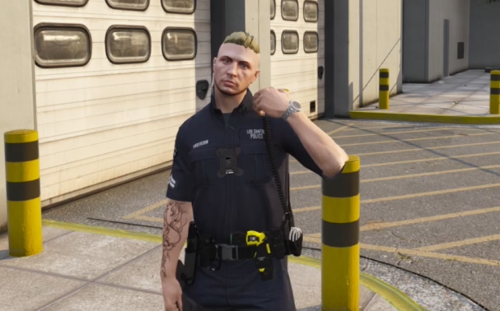 Free to use for content creators as well, although a shout out is always appreciated 🙂 If you have any issues with the download or files, either leave a comment or contact me directly through discord - mantasna. You can also directly donate to me through paypal, which is linked below the download button. Showcase below Installation Tutorial
 -
-
Yea, but I would still recommend setting that option to false regardless.
-
Inside your GTAV directory go to your lspdfr folder, and open the lspdfr configuration settings file. Inside at the top you should see " Main.PreloadAllModels = true " just change that to " false " and save it.
-
it's probably the vehicles themselves. Like some just have 1 headlight stage which is takedowns.
-
-
To be honest, you are able to use one for both as fivem is seperate. But if you want to use two separate copies, then yes you can. I would recommend just having 2 copies of steam as it's a lot more common that people mod on the steam version (unless you know how to mod on epic games). So basically, if you want to use one copy for LSPDFR for example, then just have the main folder named " Grand Theft Auto V " and just deactivate the other copy by calling it something like " Grand Theft Auto VV ". And when you want to play on the other copy just do the same thing the other way round. If you have any more questions please ask.))
-
With max graphics and other graphics mods (like NVE) LSPDFR should run pretty smoothly. You should average around maybe 45-50+ FPS, which doesn't sound great but it's completely normal when you mod your game so much with LSPDFR. I recommend for you to play around with all of that yourself, and if you have any issues let me know.
-
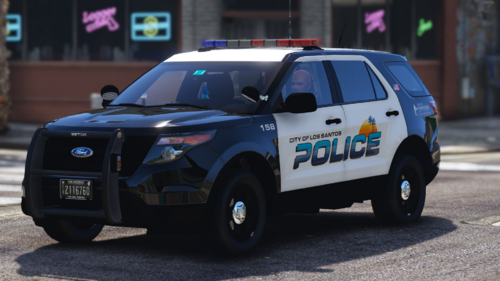 What about the 2018 charger with the light bar, that's featured in the images? I can only find the slicktop version.
 -
This is just outdated for the newest version of EUP. The slots often change when EUP is updated.
-
Could be something in your mods folder, or maybe a DLC u downloaded is messing something up. Try to rename your mods folder to _mods and see if it fixes anything.
-
Right click GTAV on steam and click on properties. Go to local files which is third in the list and click "Verify intergrity of game files..." this should fix it.
-
doesn't look like it, but i can also suggest to go in your "graphics" settings while in-game and play around with the "Extended Texture Budget" slider that's below the distance scaling setting. This depends on your video memory, hence why i'm saying play around with it, because it's different for everyone.
-
Yes, that's how addon vehicles work. They won't be driving around on the streets like the replacement cars though. Here's a good tutorial on how to install them: If you still have any questions feel free to ask.
-
Could be an issue with your hardware, like having settings too high. If not then maybe a specific mod is messing something up.
-
Make sure you do this in your mods folder. Try patchday26 ( mods>update>x64>dlcpacks>patchday26ng>dlc.rpf>x64>levels>gta5>vehicles.rpf ) and in there just drop the vehicle files in. Try to just install one named police and name all 3 files the same (like in the screenshot). And try to just spawn it in game via a mod menu or look for it driving around. That should work.

-
You might wanna clear what's inside of the sheriff.ytd and just re-install the sheriff model. If that doesn't help with anything, the vehicle itself could be bugged, as those issues sometimes happen to old and outdated models.
-
To install heapadjuster just drop it in your GTAV main files, and then to install gameconfig you need openIV, mods>update>update.rpf>common>data , just drag & drop the gameconfig files in there via openIV.
-
Inside your GTAV directory go to your lspdfr folder, and open the lspdfr configuration settings file. Inside at the top you should see " Main.PreloadAllModels = true " just change that to "false" and save it.
-
Install Game config - https://www.gta5-mods.com/misc/gta-5-gameconfig-300-cars Install Packfile Limit Adjuster - https://www.gta5-mods.com/tools/packfile-limit-adjuster Install HeapAdjuster - https://www.gta5-mods.com/tools/heapadjuster these should fix it, i recommend to just install all of them, as if you keep modding more then you will need all of them eventually anyway.
-
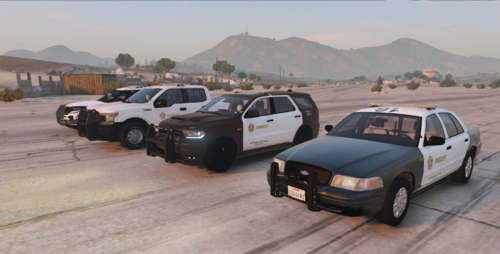 The original vehicle models are ELS, so yeah
 -
Idk but I am able to pull people over with addon vehicles, really not sure about that. And I forgot to mention that when you change addon cars to replacement, some of them might be a little glitchy texture-wise, so not all DLC vehicles will work. Not sure why but that mostly happens to me with reflective vehicles.
-
.thumb.png.52184f6024d0144e57bfcdb18ab803f6.png) Could you add a vehicle template for the texture to the .ytd?
Could you add a vehicle template for the texture to the .ytd? -
Go into your rage Plugin Hook menu (hold left shift when u start it.), then click on Plugins and select "Dont load any plugins on startup". then, just click on "Save and launch" in the bottom right of the menu. This should fix it!
-
To make addon vehicles replacement you have to find the vehicle files in the DLC folder that you download, then just copy them somewhere where you can rename them. And then just rename them to the ones you want to replace. And then rename the ELS file for that vehicle as well. After that just drag and drop the files just like you would when downloading replacement cars. Also addon vehicles should function as cop cars too, but idk about that issue, sorry.



.thumb.png.52184f6024d0144e57bfcdb18ab803f6.png)