
vad1m4
Members
-
Joined
-
Last visited
Everything posted by vad1m4
-
 I get the realism part, but lspdfr is a game for a reason. it doesn't have to be exact match to real life, so I'd love to have the option to turn off overlay and use your own. besides that the plugin is amazing, but I'm forced to use the older version for now to avoid double overlay
- 294 comments
- 29 reviews
-
i feel like it should be more on the top right corner, it doesn't feel right when it's so far away from the screen borders. also I kinda dislike the fact that the second line of text isn't the same length as the first one, so there's that
- 294 comments
- 29 reviews
-
-
-
please add an option to disable the overlay, i like the sebo's overlay more and they lay on top of eachother as result
- 294 comments
- 29 reviews
-
any chance you can add a pushbar to the ELS version?
-
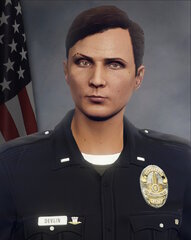 I would really appreciate you sharing them!
 -
-
Looks amazing! Can I get that background with American flag? Would be great!
-
-
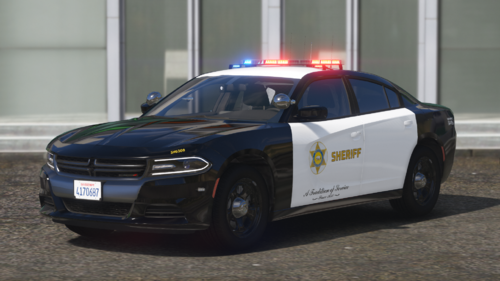 Hmm, I'll think what I can do. Sadly the process is going to be slow due to my arm bring broken 👀
 -
-
Fixed! New version is awaiting for approval, shouldn't take too long. Apparently, I forgot that I've placed the 2014 FPIU model before, since I disliked the one included, and made a texture for the replaced one. Thanks for pointing this out
-
Weird, I'll take a look!
-
Wheneve I find myself near the mission row PD, a random BMX spawns on me when I'm exiting/entering the vehicle. This is really annoying and when this happens, I can't delete them through the Object spooner, since they don't show up as a vehicle/entity. I want to use menyoo but that thing is do annoying and bad LSPDFR just crashed, they stopped spawning and now object spooner can delete them. Weird
-
What's wrong with it?
-
sorry it just seems weird to go in someone's file and say that you released a car pack on patreon.
-
Don't get me wrong, but are you advertising your pack?
-
This CVPI looks way better than mine lol!
-
Numbers on roof, "SD____" on the trunk and hood
-
No problem! I already uploaded a little update and another one is coming (Fixed some stuff). Glad you liked it!
-
THIS PACK IS OUTDATED SINCE APRIL 13, 2024 There are currently NO plans to update this pack LASD Liveries that were originally intended to be used in personal mod pack without sharing it, but I've decided to post hem due to some people asking. This texture pack is for TacticalDonut's LAPD Based Los Santos PD Mega-Pack, you can download it here: This pack is published only on this site, do not reupload it to the other sites. If you believe you've found my texture pack on the other site, contact me via discord: vad1m4#9679. If it's not working you can contact me using email: *****@*****.tld All liveries are based on the real life ones, if you find any mistakes, point it out in the comments or through my discord. All liveries are lore non-friendly. Don't be afraid to mention anything you dislike/like in this pack. I will be fixing all mistakes you find asap. This LASD pack inculdes textures for all marked vehicles from the original pack. (Released (included in pack), Work in progress, Planned) Features: - 2010 Dodge Charger (Slicktop) - 2010 Dodge Charger (Arjent) - 2011 CVPI (Slicktop) - 2011 CVPI (Arjent) - 2013 Ford Expedition (Arjent) - 2014 Dodge Charger (Arjent) - 2016 FPIS (Arjent) - 2016 FPIU (Valor) - 2016 FPIU K-9 (Valor) - 2016 Chevy Impala (Arjent) - 2018 Dodge Charger (Valor) - 2020 Chevy Tahoe (Valor) - 2011 CVPI K-9 (Arjent) How to install: In pack, in each folder there are 2 ways to install: "Drag and drop" and "Add manually" Drag and drop: - Open "OpenIV*" - Turn on "Edit" mode - Navigate to Mods -> Update -> x64 -> dlcpacks -> lapdaddon -> dlc.rpf -> x64 -> vehicles.rpf - Simply drag files from the "Drag and drop" folder to "Vehicles.rpf" Add manually: - Open "OpenIV*" - Turn on "Edit" mode - Navigate to Mods -> Update -> x64 -> dlcpacks -> lapdaddon -> dlc.rpf -> x64 -> vehicles.rpf - Find the carname.ytd** - Double click on carname.ytd** - Drag liveryname.dds*** file from "Add manually" folder - Click "Save" * - OpenIV is a tool for modding GTA 5 and some other games. You can download it here: https://openiv.com/ ** - If you wonder what's "carname", it's the name of the model, you can find it in the name of each folder (for instance: 2011 CVPI (police, police1) *** - Unlike .ytd file, each livery is named NOT based on the car model's name, it's actually named based of the car model itself, and I/you can't change it I'm not responsible for any damage to your game. If you ran into some problems you can try to reinstall the pack or troubleshoot by yourself. If that didn't work, use LSPDFR Support servers (linked below) to get your game fixed Links: https://discord.gg/FK3EyDJctR https://discord.gg/xsdAXJb Commonly asked questions: - I still don't understand how to install textures, can you help me? I would love to help everyone, so if you experienced troubles in installing my texture pack, you can try to contact me in any way, and I'll do my best to find time for you. (Not guaranteed) - Can you make a texture for ________? I mainly do real life cars, so it's not something fictional, I will try to recreate it. (Also not guaranteed, but I'll most likely do it) - Why can't you also include .ytf (model) files? Unfortunately, I can't include original pack's files due to the rules of texturing, so you'll have to install the LAPD pack first, and only then install my LASD texutres. I tried to make the installation process as simple as possible. - Can I make a showcase video? Can I use your pack in my videos? Go for it! I would love to see you using my pack! - The version of the ______ is not realistic. Can you fix? Yes, if you point out the issue and get the actual photo of the car in real life, I will fix it. - There are plenty of LASD packs already, why did you have to make another one? As I mentioned, this pack was made with not intend to publish it, but due to some people asking, I decided to post it. Known issues: On police and police1 the sign on the back that says "Los Angeles County Sheriff" is obstructed by the Ford logo. It's the model issue itself and I can't fix that without unlocking, editing and posting the original models which is not allowed. ELS lighting setup on 2016 FPIU is not accurate. Not sure about other models (Fixed, Fixed, waiting for more changes to release, Work in progress, Not fixed) Known accuracy issues: Some of the numbers on roof are not realistic/mirrored/flipped. On 2013 Ford Expedition the number is not "SD****" and it's actually just normal LAPD number. On some cars hood number is a bit messed up, if you think that it's too bad, ask me in comments/discord/any way. On 2016 Chevy Impala there's only "Sheriff" sign on the trunk since it had problem as police & police1 has, and I decided to change it so it doesn't look very bad. I'm not sure if this is inaccurate, but on 2010 Charger (Slicktop and Arjent) the LASD logo is pretty big, but it's also big in real life. For every slicktop car, textures are the same as for their Lightbar version one's. That means that number on top/hood/trunk/etc. are the same. If this is unacceptable, I can add multiple liveries in future updates. On 2016 Chevy Impala, "SHERIFF" sign is messed up On 2014 Dodge Charger, "SHERIFF" sign and logo is not in place No "A tradition of service' on 2016 FPIS Some fonts are not ideally accurate since no-one knows which fonts do LASD use. ¯\_(ツ)_/¯ If you're planning on using my textures as a base for something else, just add me to credits. These models are NOT mine and I do NOT take any credits for them.
-