Hessen Mods
Members
-
Joined
-
Last visited
Files posted by Hessen Mods
-
DE:
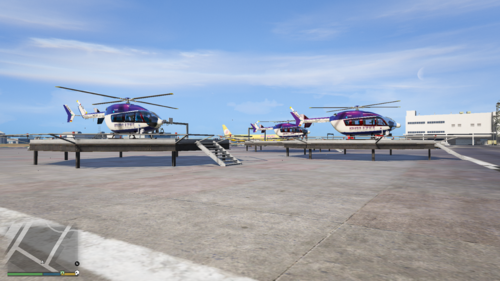
Als ich den Heli von der Polizei Rheinland-Pfalz hochgeladen habe, hatte ich richtig bock die Helis aus Bayern zu machen
FiveM Nutzungserlaubnis:
Ich bitte euch unter https://discord.gg/P9MBtDNYD7 ein Supportticket für die Nutzungserlaubnis zu erstellen.
EN:
When I uploaded the helicopter from the Rhineland-Palatinate police, I was really keen to make the helicopters from Bavaria
FiveM Use Permission:
I ask you to create a support ticket for permission to use at https://discord.gg/P9MBtDNYD7
- 908 Downloads
- 2 Comments
Updated -
DE:
Als ich den Heli von der Polizei Rheinland-Pfalz hochgeladen habe, hatte ich richtig bock die Helis aus Bayern zu machen
EN:
When I uploaded the helicopter from the Rhineland-Palatinate police, I was really keen to make the helicopters from Bavaria
- 937 Downloads
Updated -
DE:
Dieser Add-On / Replace Helikopter ist von der Landpolizei Rheinland-Pfalz. Auf die Idee kam ich, als in Frankfurt eine Bombe aus dem 2. Weltkrieg entschärft wurde. Er flog dort zur Luftüberwachung. Und weil es ihn so wie es bis jetzt ausgesehen hat, noch nicht gab, habe ich mir gedacht "Jo komm, setzt dich ran, und mach ihn selbst 🙂.
EN:
This add-on / replace helicopter is from the Land Police of Rhineland-Palatinate. I came up with the idea when a World War II bomb was defused in Frankfurt. He flew there for air surveillance. And because it didn't exist the way it looked until now, I thought to myself, "Come on, sit down and make it yourself 🙂.
- 2,830 Downloads
- 8 Comments
Updated -
Preview:
English text bellow
Deutsch:
!!!WICHTIG!!!
Du benötigst zur Installation OpenIV. hier der Link: https://openiv.com/
1. Installation:
GTAV\mods\x64\audio\sfx\STREAMED_VEHICLES.rpf ersetze dort die "cargobob_helicopter.awc" zu meiner.
2. Installation:
GTAV\mods\x64\audio\sfx\STREAMED_VEHICLES_LOW_LATENCY.rpf ersetze dort die "cargobob.awc" zu meiner.
English:
!!!IMPORTANT!!!
You need OpenIV to install. here is the link: https://openiv.com/
1. Installation:
GTAV \ mods \ x64 \ audio \ sfx \ STREAMED_VEHICLES.rpf replace the "cargobob_helicopter.awc" with mine.
2. Installation:
GTAV \ mods \ x64 \ audio \ sfx \ STREAMED_VEHICLES_LOW_LATENCY.rpf replace the "cargobob.awc" with mine.
- 612 Downloads
- 4 Comments
Updated -
English text bellow
DE:
Da dies eine Lackierung ist, musst du einmal den original Helikopter herunterladen. Hier der Link dazu: https://www.gta5-mods.com/vehicles/eurocopter-ec135-npas-replace
!!!!WICHTIG!!!!
Du benötigst OpenIV. Hier der Link zu OpenIV: https://www.gta5-mods.com/tools/openiv
Installationspfad:
Grand Theft Auto V\mods\update\x64\dlcpacks\patchday25ng\dlc.rpf\x64\levels\gta5\vehicles.rpf\
(oder den neusten patchday)
Meine Empfehlung:
Wenn du den Heli nicht ersetzen möchtest, aber du nicht weißt wie man ein Add-On erstellt, kann ich dir nur den "Addon Creator Vehicles" wärmstens ans Herz legen.
mit dem Addon Creator Vehicles kannst du Add-Ons one mühe erstellen, und damit z.b. meine skinns installieren wenn du absolut kein replace fan bist. Ich selber nutze den auch für etwas was ich gerne hätte, aber nicht das GTA Fahrzeug ersetzen möchte.
Hier der Link zu Addon Creator Vehicles: https://de.gta5-mods.com/tools/addon-creator-vehicles-v1-0-7ddf2ca5-ffdf-45e3-93f5-fd8fe36f3de5
EN:
Since this is a paint job, you have to download the original helicopter once. Here is the link to it: https://www.gta5-mods.com/vehicles/eurocopter-ec135-npas-replace
!!!!IMPORTANT!!!
You need OpenIV. Here is the link to OpenIV: https://www.gta5-mods.com/tools/openiv
Installation path:
GTAV\mods\update\x64\dlcpacks\patchday25ng\dlc.rpf\x64\levels\gta5\vehicles.rpf\
(or the latest patchday)
My recommendation:
If you don't want to replace the helicopter, but you don't know how to create an add-on, I can only warmly recommend the "Addon Creator Vehicles".
With the Addon Creator Vehicles you can create add-ons one effortlessly, and thus e.g. install my skinns if you are absolutely not a replace fan. I myself use it for something I would like to have, but don't want to replace the GTA vehicle.
Here is the link to Addon Creator Vehicles: https://de.gta5-mods.com/tools/addon-creator-vehicles-v1-0-7ddf2ca5-ffdf-45e3-93f5-fd8fe36f3de5
- 542 Downloads
- 1 Comments
Updated -
English text bellow
!!!!!Wichttig!!!!!
Du benötigst zur Installation OpenIV. Hier der Link: https://openiv.com/
Da dies eine Lackierung ist, musst du den Original Helikopter herunterladen. Hier der Link: https://www.gta5-mods.com/vehicles/mps-npas-ec145
Installation:
GTAV\mods\update\x64\dlcpacks
Kopiere hier d-hhea, d-hheb, d-hhec rein, und füge die beiden .yft Dateien in allen drei Ordnern unter folgendem Pfad ein: dlc.rpf\x64\levels\gta5\vehicles\vehicles.rpf
dlclist.xml:
Kopiere dort folgendes ein:
<Item>dlcpacks:\d-hhea\</Item>
<Item>dlcpacks:\d-hheb\</Item>
<Item>dlcpacks:\d-hhec\</Item>
!!!!!Important!!!!!
You need OpenIV for the installation. Here is the link: https://openiv.com/
Since this is a paint job, you have to download the original helicopter. Here is the link: https://www.gta5-mods.com/vehicles/mps-npas-ec145
Installation:
GTAV \ mods \ update \ x64 \ dlcpacks
Copy d-hhea, d-hheb, d-hhec in here, and paste the sworn .yft files in all three folders under the following path: dlc.rpf \ x64 \ levels \ gta5 \ vehicles \ vehicles.rpf
dlclist.xml:
Copy the following there:
<Item>dlcpacks:\d-hhea\</Item>
<Item>dlcpacks:\d-hheb\</Item>
<Item>dlcpacks:\d-hhec\</Item>
- 184 Downloads
- 2 Comments
Updated -
English text bllow
DE:
Da dies eine Lakierung ist, musst du das Original Modell herunterladen. Hier der Link: https://www.gta5-mods.com/vehicles/lancashire-police-ford-kuga
!!!WICHTIG!!!
Du benötigst zur Installation OpenIV. Hier der Link zu OpenIV: https://openiv.com/
Installationspfad:
GTAV\mods\x64e\levels\gta5\vehicles.rpf
EN:
Since this is a paint job, you have to download the original model. Here is the link: https://www.gta5-mods.com/vehicles/lancashire-police-ford-kuga
!!!IMPORTANT!!!
You need OpenIV for the installation. Here is the link to OpenIV: https://openiv.com/
Installation path:
GTAV\mods\x64e\levels\gta5\vehicles.rpf
- 85 Downloads
- 3 Comments
Updated -
Preview:
Update Video:
english text bellow
DE:
Ich empfehle dir, vor der Installation ein Backup vom mods-Ordner oder von STREAMED_VEHICLES_LOW_LATENCY.rpf zu machen, falls was sein sollte.
!!!! WICHTIG !!!!
Du benötigst zur Installation OpenIV. Hier der Link zu OpenIV: https://openiv.com/
Installationspfad:
GTA V\mods\x64\audio\sfx\STREAMED_VEHICLES_LOW_LATENCY.rpf
Ersetzte dort die hunter_helicopter.awc indem du meine per drag and drop reinziehts.
EN:
I recommend that you make a backup of the mods folder or STREAMED_VEHICLES_LOW_LATENCY.rpf before the installation, if that should happen.
!!!! IMPORTANT !!!!
You need OpenIV for the installation. Here is the link to OpenIV: https://openiv.com/
Installation path:
GTA V \ mods \ x64 \ audio \ sfx \ STREAMED_VEHICLES_LOW_LATENCY.rpf
Replace the hunter_helicopter.awc there by drag and drop mine into it.
- 424 Downloads
- 1 Comments
Updated -
English text bellow
DE:
Da dies eine Lackierung ist, musst du das Original Modell herunterladen. Hier der Link: https://www.gta5-mods.com/vehicles/mercedes-benz-vito-nef-lsrd-version
!!!WICHTIG!!!
Du benötigst zur Installation OpenIV. Hier der Link zu OpenIV: https://openiv.com/
Installationspfad:
GTAV\mods\update\x64\dlcpacks\patchday25ng\dlc.rpf\x64\levels\gta5\vehicles.rpf
Meine Empfehlung:
Benenne die 2 .yft Dateien des Original NEF zu "police" um. (Nur wenn du meinen RTW drin hast). Dann füge zuerst die beiden .yft Dateien vom Original ein, dann meine beiden .ytd Dateien. Fertig 🙂
Bekannte Fehler:
Wie man es auf dem Screenshots sehen kann, sind die Hinteren Fenster nicht durchsichtig. Ich habe vor, es beim nächsten Update zu beheben. Zumindest werde ich es versuchen zu fixen.
EN:
Since this is a paint job, you have to download the original model. Here is the link: https://www.gta5-mods.com/vehicles/mercedes-benz-vito-nef-lsrd-version
!!!IMPORTANT!!!
You need OpenIV for the installation. Here is the link to OpenIV: https://openiv.com/
Installation path:
GTAV \ mods \ update \ x64 \ dlcpacks \ patchday25ng \ dlc.rpf \ x64 \ levels \ gta5 \ vehicles.rpf
My recommendation:
Rename the 2 .yft files of the original NEF to "police". (Only if you have my RTW in there). Then insert the two .yft files from the original first, then my two .ytd files. Finished 🙂
Known bugs:
As you can see on the screenshots, the rear windows are not transparent. I plan to fix it with the next update. At least I'll try to fix it.
- 61 Downloads
- 1 Comments
Updated -
English text bellow
DE:
Da dies eine Lakierung ist, musst du das Original Modell herunterladen. Hier der Link: https://gfp-modding.de/shop/mercedes-benz-sprinter-516-bluetec-rettungsdienst-hamburg-els-enterable-reflection-extendable-stretcher/
!!!WICHTIG!!!
Du benötigst zur Installation OpenIV. Hier der Link zu OpenIV: https://openiv.com/
Installationspfad:
GTAV\mods\x64e\levels\gta5\vehicles.rpf
EN:
Since this is a paint job, you have to download the original model. Here is the link: https://gfp-modding.de/shop/mercedes-benz-sprinter-516-bluetec-rettungsdienst-hamburg-els-enterable-reflection-extendable-stretcher/
!!!IMPORTANT!!!
You need OpenIV for the installation. Here is the link to OpenIV: https://openiv.com/
Installation path:
GTAV\mods\x64e\levels\gta5\vehicles.rpf
- 808 Downloads
- 4 Comments
Updated -
English text bellow
DE:
Da dies eine Lakierung ist, musst du das Original Modell herunterladen. Hier der Link: https://www.gta5-mods.com/vehicles/polizei-german-police-bmw-x5-els
!!!WICHTIG!!!
Du benötigst zur Installation OpenIV. Hier der Link zu OpenIV: https://openiv.com/
Installationspfad:
GTAV\mods\update\x64\dlcpacks\patchday25ng\dlc.rpf\x64\levels\gta5\vehicles.rpf
EN:
Since this is a paint job, you have to download the original model. Here is the link: https://www.gta5-mods.com/vehicles/polizei-german-police-bmw-x5-els
!!!IMPORTANT!!!
You need OpenIV for the installation. Here is the link to OpenIV: https://openiv.com/
Installation path:
GTAV \ mods \ update \ x64 \ dlcpacks \ patchday25ng \ dlc.rpf \ x64 \ levels \ gta5 \ vehicles.rpf
- 456 Downloads
- 1 Comments
Updated -
English text bellow
DE:
Da dies eine Lakierung ist, musst du das Original Modell herunterladen. Hier der Link: https://www.gta5-mods.com/paintjobs/cisterna-e-camion-shell
!!!WICHTIG!!!
Du benötigst zur Installation OpenIV. Hier der Link zu OpenIV: https://openiv.com/
Installationspfad:
GTAV\mods\update\x64\dlcpacks\patchday25ng\dlc.rpf\x64\levels\gta5\vehicles.rpf
Viel Spaß!
EN:
Since this is a paint job, you have to download the original model. Here is the link: https://www.gta5-mods.com/paintjobs/cisterna-e-camion-shell
!!!IMPORTANT!!!
You need OpenIV for the installation. Here is the link to OpenIV: https://openiv.com/
Installation path:
GTAV \ mods \ update \ x64 \ dlcpacks \ patchday25ng \ dlc.rpf \ x64 \ levels \ gta5 \ vehicles.rpf
Have fun!
- 30 Downloads
- 2 Comments
Updated -
DE:
Da dies eine Lakierung ist, musst du einmal das Original Modell herunterladen. Hier der Link: https://www.gta5-mods.com/vehicles/hindenburg-zeppelin-addon-replace-i-lods
!!! WICHTIG !!!
Du benötigst zur Installation des Luftschiffes OpenIV. Hier der Link zur OpenIV: https://openiv.com/
Installation:
Als erstes musst du das Addon / Replce in dein GTA mods Ordner installieren. Die ReadMe des Original Luftschiffes musst du für die Installation durchlesen.
Installationspfad: GTAV\mods\update\update.rpf\x64\dlcpacks\hindenburg\dlc.rpf\x64\vehicles.rpf\hindenburg.ytd
Dort gibst du in die Suchleiste der .ytd datei "Sign" ein. Dort findest du alle 3 Texturen des Luftschiffes. Du kannst dir aussuchen, welche Textur du ersetzen möchtest, und wählst oben rechts "Ersetzen". Nun musst du meine .zip entpacken und in den "File" Ordner gehen. Wähle "TEMPLATE.bmp" aus und klicke auf "Öffnen". Wenn das Template fertig gelden hat, wähle "Speichern" Fertig. Genau so geht es ach mit dem replace Luftschiff
diese Dateien heißen dort allerings "blimp" dort musst du auch einfch nur in die .ytd gehen, und alle Schritte wiederholen.
EN:
Since this is a paint job, you have to download the original model once. Here is the link: https://www.gta5-mods.com/vehicles/hindenburg-zeppelin-addon-replace-i-lods
!!! IMPORTANT !!!
You need OpenIV to install the airship. Here is the link to OpenIV: https://openiv.com/
Installation:
First you have to install the addon / replce in your GTA mods folder. You have to read the ReadMe of the original airship for the installation.
Installation path: GTAV \ mods \ update \ update.rpf \ x64 \ dlcpacks \ hindenburg \ dlc.rpf \ x64 \ vehicles.rpf \ hindenburg.ytd
There you enter "Sign" in the search bar of the .ytd file. There you will find all 3 textures of the airship. You can choose which texture you want to replace and select "Replace" in the upper right corner. Now you have to unzip my .zip and go to the "File" folder. Select "TEMPLATE.bmp" and click on "Open". When the template has finished loading, select "Save" Done. That's exactly how it goes with the replace airship
these files are called "blimp" there, however, you just have to go to the .ytd and repeat all the steps.
- 52 Downloads
- 1 Comments
Updated