


Nightz Development
Members
-
Joined
-
Last visited
Everything posted by Nightz Development
-
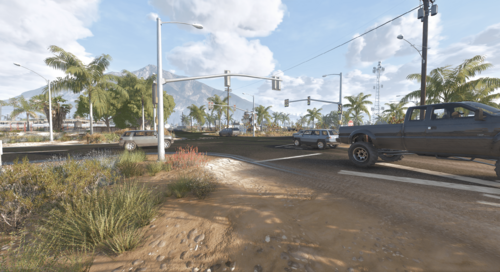 If you ever felt Blaine County looked Empty or Dead and it was not a vibing little Town Well Time to Introduce Blaine County Traffic Lights & Signs Remastered. Features: Adds Traffic lights to 21 intersections in Blaine County. [More to Come] Adding Traffic Signs soon DISCLAIMER, THE ROUTE ONE UPDATED MAP IS NOT COMPATIBLE JUST YET. WE WILL RELEASE A PATCH SOON. Join Our Discord For News & Sneaks Peaks that are Coming Soon https://discord.gg/UpJKHT3hUN Remastered/Patch Fix By Nightz Development Original Creator FAQ Q: How can I download or purchase additional Nightz Development products? A: You can join our Discord server to browse and download products. Some items may also be available on LCPDFR. Q: How can I get in touch with Nightz Development for collaboration or other inquiries? A: Feel free to reach out through Discord or on LCPDFR. We’re open to collaborations, feedback, and any questions you may have. Q: How often are maps and products updated? A: Updates are released based on ongoing development and user feedback. Some updates may coincide with new map releases or enhancements. Q: What should I do if I encounter an issue with a map, even after reading the provided documentation? A: Please join our Discord server and open a support ticket. A developer or support team member will assist you as soon as possible. TOS [1] You shall not claim any products, scripts, or items created by Nightz Development as your own. Respect the effort and originality put into these creations. [2] You are not permitted to rip, modify, or alter any of Nightz Development's files without express permission. [3] These files are approved for use in FiveM servers only. Any other usage must receive explicit consent. [4] Do not redistribute, resell, or upload these files anywhere else without direct permission from Nightz Development. Unauthorized distribution, whether free or for profit, will result in the removal of these files from your possession and potential further action.
 -
.thumb.png.5dc63bb71c4b3eb3c8f5dda1569962d8.png) Hello, it is the BCTLS FiveM Ymap. We currently are working on our own at the moment to fix the bug with the lights where they don’t turn on or go blank within his ymap. If you have anymore questions or suggestions please feel free to join the discord. As we are more active on their.
Hello, it is the BCTLS FiveM Ymap. We currently are working on our own at the moment to fix the bug with the lights where they don’t turn on or go blank within his ymap. If you have anymore questions or suggestions please feel free to join the discord. As we are more active on their. -
.thumb.png.357e181d277b211b0cb22f8acbe294de.png) Paleto Bay Updated by Nightz Development is a comprehensive YMAP modification designed to breathe new life into the Paleto Bay area of the game. This mod goes beyond simple tweaks, introducing a wealth of changes and additional details that significantly enhance the environment and overall player experience. Expect to discover: Extensive Detailing: The mod focuses on adding intricate details throughout Paleto Bay, making the area feel more lived-in and realistic. New Elements & Additions: Beyond existing structures, this YMAP introduces new objects, props, and potentially even small structures to enrich the landscape. Enhanced Immersion: With a focus on visual improvements and environmental additions, Paleto Bay Updated aims to create a more immersive and engaging experience for players exploring this northern region of the map. FAQ Q: How can I download or purchase additional Nightz Development products? A: You can join our Discord server to browse and download products. Some items may also be available on LCPDFR. Q: How can I get in touch with Nightz Development for collaboration or other inquiries? A: Feel free to reach out through Discord or on LCPDFR. We’re open to collaborations, feedback, and any questions you may have. Q: How often are maps and products updated? A: Updates are released based on ongoing development and user feedback. Some updates may coincide with new map releases or enhancements. Q: What should I do if I encounter an issue with a map, even after reading the provided documentation? A: Please join our Discord server and open a support ticket. A developer or support team member will assist you as soon as possible. TOS [1] You shall not claim any products, scripts, or items created by Nightz Development as your own. Respect the effort and originality put into these creations. [2] You are not permitted to rip, modify, or alter any of Nightz Development's files without express permission. [3] These files are approved for use in FiveM servers only. Any other usage must receive explicit consent. [4] Do not redistribute, resell, or upload these files anywhere else without direct permission from Nightz Development. Unauthorized distribution, whether free or for profit, will result in the removal of these files from your possession and potential further action.
Paleto Bay Updated by Nightz Development is a comprehensive YMAP modification designed to breathe new life into the Paleto Bay area of the game. This mod goes beyond simple tweaks, introducing a wealth of changes and additional details that significantly enhance the environment and overall player experience. Expect to discover: Extensive Detailing: The mod focuses on adding intricate details throughout Paleto Bay, making the area feel more lived-in and realistic. New Elements & Additions: Beyond existing structures, this YMAP introduces new objects, props, and potentially even small structures to enrich the landscape. Enhanced Immersion: With a focus on visual improvements and environmental additions, Paleto Bay Updated aims to create a more immersive and engaging experience for players exploring this northern region of the map. FAQ Q: How can I download or purchase additional Nightz Development products? A: You can join our Discord server to browse and download products. Some items may also be available on LCPDFR. Q: How can I get in touch with Nightz Development for collaboration or other inquiries? A: Feel free to reach out through Discord or on LCPDFR. We’re open to collaborations, feedback, and any questions you may have. Q: How often are maps and products updated? A: Updates are released based on ongoing development and user feedback. Some updates may coincide with new map releases or enhancements. Q: What should I do if I encounter an issue with a map, even after reading the provided documentation? A: Please join our Discord server and open a support ticket. A developer or support team member will assist you as soon as possible. TOS [1] You shall not claim any products, scripts, or items created by Nightz Development as your own. Respect the effort and originality put into these creations. [2] You are not permitted to rip, modify, or alter any of Nightz Development's files without express permission. [3] These files are approved for use in FiveM servers only. Any other usage must receive explicit consent. [4] Do not redistribute, resell, or upload these files anywhere else without direct permission from Nightz Development. Unauthorized distribution, whether free or for profit, will result in the removal of these files from your possession and potential further action. -
Added you
-
Because we are going have to Figure out how to do all the patches since some people use custom stations
-
 Yes for Now but Single Player Is coming soon. But if you have FiveM Use the Client Sided One
 -
 I believe I fixed the error
 -
We Got you, Give Us about Day or Two to Get it
-
Thanks for the Report, I will look into it.
-
I appreciate the feedback. You definitely could look forward to a SP version in the future
-
That was a year ago. I won’t release a SP Version unless I’m done with the Map completely
-
-
From the album: Route One Updates
© Nightz Development
-
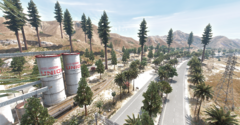
From the album: Route One Updates
© Nightz Development
-
 No Config File
 -
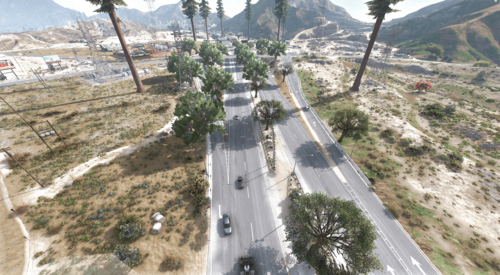
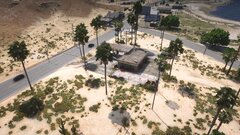
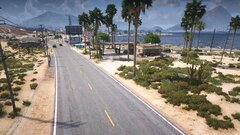
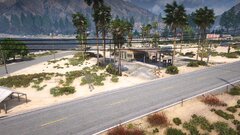
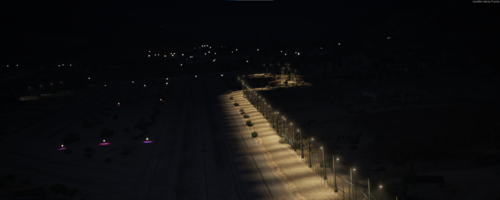 This is With Max Distance Scaling and Max Extended Distance Scaling. White Trees For your Next Maps I would make the LOD Distance a Bigger Number Also for a Realistic Stand Point The Trees do not match the Area Like Desert Feel Some Pops are Colliding with each other and Floating Everything else Looks Good
 -
-
-
-
-
-
-
-
-





.thumb.png.5dc63bb71c4b3eb3c8f5dda1569962d8.png)
.thumb.png.357e181d277b211b0cb22f8acbe294de.png)


