


Nightz Development
Members
-
Joined
-
Last visited
Everything posted by Nightz Development
-
-
-
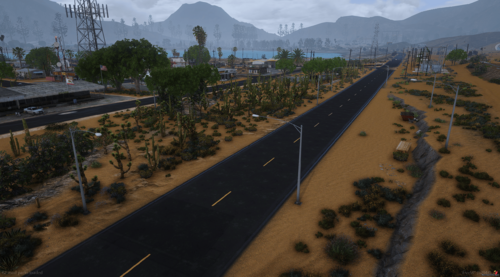 Hey @ChapterDonut! Thanks so much for the feedback! We're glad you're loving the map. 😊 About that dirt texture you're asking about... 😉 It's actually custom-made not by us. But here's a little secret for ya: we've got something else super special coming soon that we think you'll really like! Keep an eye out for more updates...
 -
Sandy Shores Refresh by Nightz Development is the ambitious successor to our previous project, Sandy Shores Updated (available at https://www.lcpdfr.com/files/file/43226-sandy-shores-updated-nightz-development-read-new-update/). Blaine County Traffic Lights & Signs Map (available at https://www.lcpdfr.com/downloads/gta5mods/misc/48159-blaine-county-traffic-lights-signs-remastered-nightz-development/). The BCTLS map matches Sandy Shores Refresh in so many ways. This new YMAP modification represents a significant leap forward, offering a completely overhauled and heavily optimized version of Sandy Shores. This "Refresh" isn't just an update; it's a complete reimagining, focusing on unprecedented detail, immersive environmental enhancements, and a much more performance-friendly experience compared to its predecessor. While "Sandy Shores Updated" laid the groundwork, "Sandy Shores Refresh" rebuilds upon it with a focus on efficiency and visual fidelity. Expect to discover: Extensive Environmental Detailing: Every corner of Sandy Shores has been meticulously re-examined and enhanced. Experience a far more intricate and realistic environment with new props, textures, and nuanced placements that breathe life into the desert landscape. Optimized Performance: A core focus of "Sandy Shores Refresh" was to drastically improve performance. While any detailed map will have some impact, this version is engineered to be significantly less demanding on your system than our older Sandy Shores project, allowing for a smoother and more enjoyable experience. Comprehensive Overhaul: This YMAP introduces a multitude of changes, from subtle refinements to major additions across the entire Sandy Shores area. Discover new points of interest, reworked existing locations, and a general elevation of the area's visual appeal. Immersive Atmosphere: With enhanced detailing and thoughtful additions, "Sandy Shores Refresh" aims to create a deeply immersive atmosphere, making Sandy Shores feel more authentic and engaging than ever before. Sandy Shores Refresh is designed to be the definitive visual upgrade for Sandy Shores, offering a richly detailed yet highly optimized experience for players. ⚠️ IMPORTANT DISCLAIMER ⚠️ Please note that the visual fidelity and perceived "quality" of this YMAP, as shown in screenshots or videos, may vary significantly based on individual user graphics settings, other installed modifications, and hardware capabilities. This is a heavy performance YMAP designed primarily for users with high-end gaming PCs to fully appreciate its detailed enhancements. While efforts have been made to optimize, users with medium-end PCs may still experience performance impacts. Your mileage may vary. Furthermore, please be aware that this version of Sandy Shores Refresh is currently NOT compatible with any other Major Location Objects (MLOs) or significant YMAPs that extensively modify the Sandy Shores area. Installing this mod alongside such additions may result in conflicts, visual glitches, or crashes. Full compatibility will be addressed in future updates closer to the final release. File Contents Include: This download package is structured to support various installation methods: Single Player: Contains files specifically prepared for Grand Theft Auto V's single-player mode. FiveM Server Side: Includes resources and configurations for server-side implementation on FiveM servers, allowing all connected players to experience the refreshed map. FiveM Client Side: Provides files for client-side installation on FiveM, intended for personal use or specific server setups that require client-side map streaming.
-
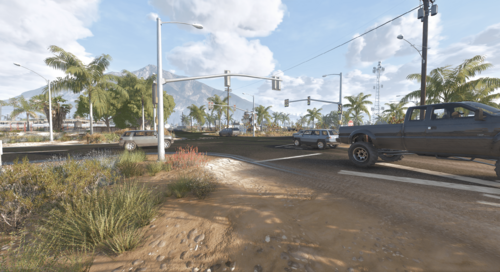 I'm not to sure. If you can check it out and report it back to us
 -
Haha hopefully everyone is enjoying the updates. Especially you!
-
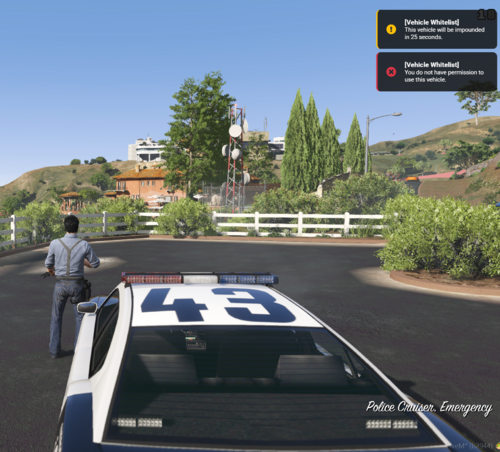 Overview ND_VehicleWhitelist is a comprehensive Discord role-based vehicle permission system for FiveM servers. This script allows server administrators to restrict vehicle usage based on Discord roles, ensuring that only authorized players can use specific vehicles. Key Features - Role-Based Vehicle Permissions - Restrict vehicles to specific Discord roles (police, EMS, tow, admin, etc.) - Automatic ejection of unauthorized players from restricted vehicles - Support for Discord role mapping to simplify configuration - Admin override for full access to all vehicles Vehicle Handling Options - Configurable immediate vehicle deletion for unauthorized access - Delayed vehicle deletion with customizable timer (default: 25 seconds) - Smart cancellation of deletion timers when authorized players enter vehicles - Visual effects when vehicles are deleted (smoke grenade effect) Player Experience Improvements - Players are moved to the driver's side when ejected from vehicles - Clear notifications when players are ejected from unauthorized vehicles - Warning notifications for delayed vehicle deletion - Success notifications when deletion timers are cancelled Discord Webhook Integration - Comprehensive webhook logging for all vehicle permission events - Detailed player information including identifiers (steam, license, discord) - User-friendly vehicle names in webhook messages - Configurable webhook events (ejections, deletions, timer cancellations, admin overrides) - Test command to verify webhook functionality Performance Optimizations - Configurable check intervals for player and world vehicles - Debug message throttling to reduce console spam - Vehicle distance checking to ignore distant vehicles - Role check caching to reduce API calls Configuration Options - Separate configuration files for core settings, vehicle lists, and performance options - Customizable notification messages and types - Adjustable deletion delay times - Toggle options for immediate or delayed deletion - Debug mode for troubleshooting Commands - /checkvehicle [model] - Check if you can use a specific vehicle - /myvehicles - List all vehicles you have access to - /refreshvehicles - Force update your vehicle permissions Future Plans - UI for in-game vehicle management - Support for temporary vehicle permissions - Vehicle class-based permissions - Enhanced logging and analytics - Expanded vehicle lookup database
 -
Hello LCPDFR Community, I understand that this website is primarily focused on Single Player, Not to much FiveM. However, I’m quite certain that there’s a significant number of FiveM players on here. We’re actively seeking ideas to enhance our scripts, including our Discord API and many others. Your assistance would be greatly appreciated. Alternatively, if you have any suggestions for what we should focus on developing for FiveM, I’m open to trying LSPDFR Plugins, although I’d need to learn how to make them. We have a new Script for FiveM that are in the works below.
-
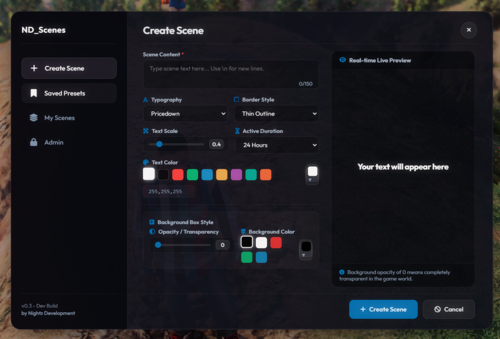 Overview: ND_Scenes is a fully reimagined and modernized scene placement script for FiveM. Based on the original DPScenes concept, ND_Scenes brings performance improvements, clean visuals, and a streamlined workflow — designed specifically for police, fire, EMS, and event RP. Features: Simple and intuitive command system Customizable fonts, sizes, colors, glow, and text alignments Fully editable scenes — no need to retype or delete ACE/role-based permission support Optional map markers and persistence toggle Built-in night mode for low-light readability No framework dependency — 100% standalone Framework integration optional (vMenu, QBCore, ESX compatible) Commands: /scene - Place a scene text at your location /sceneedit - Edit a nearby scene /sceneremove - Remove your nearby scene Ideal Use Cases: Police: Evidence tags, roadblocks, traffic notices Fire/EMS: Medical scenes, staging points Admin/Staff: Event signs, RP guidance, rule reminders RP Events: Custom signs for immersive world-building Requirements: FiveM server (no external dependencies) Optional Discord role permissions or ACE setup Performance: Highly optimized Minimal resource usage No persistent tick usage unless scenes are active Support: Active support provided through Discord. All ND scripts are fully maintained and regularly updated. Credits: Developed by Nightz Development in collaboration with Windsurf. Special thanks to the FiveM & RP community for ongoing feedback.
 -
Correct
-
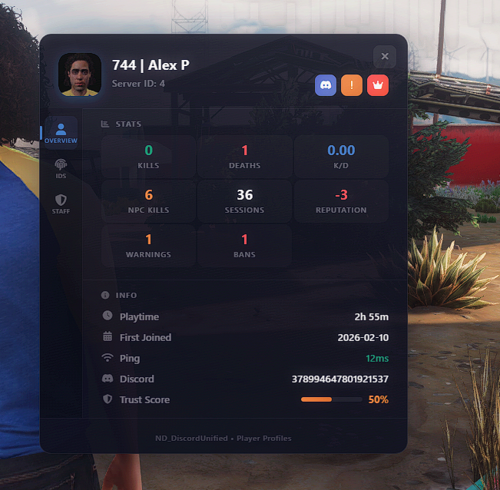 ND_DiscordUnified combines 30+ powerful modules into a single, unified resource. Built for RP servers that demand seamless Discord integration, real-time role syncing, and comprehensive server management. What's Included Core Systems | Module | Description | |--------|-------------| | Discord API | Real-time role syncing with intelligent caching & rate limiting | | Permissions | ACE permissions automatically granted via Discord roles with group inheritance | | Whitelist | Role-based server access control with priority queue | | Priority Queue | VIP/Staff queue priority system | | Moderation | Full kick/ban/warn system with Discord DMs & database integration | | Admin Roles | Global admin role configuration shared across all modules | Player Systems | Module | Description | |--------|-------------| | Chat Roles | Custom prefixes & colors by Discord role | | Tag IDs | 3D overhead name tags with role-based styling | | Weapon Perms | Restrict weapons by Discord role | | Vehicle Whitelist | Role-based vehicle restrictions | | TrustScore | Player trust & reputation scoring system | | Player Profiles | In-game profile cards with stats, reputation & moderation history | | Reputation | Community-driven player upvote/downvote system | | Welcome | Customizable player welcome experience | Security & Monitoring | Module | Description | |--------|-------------| | Alt Detection | Automatic alt account detection via HWID/Discord/IP | | IP Reputation | VPN/Proxy/Tor detection & blocking | | Auto-Moderation | Chat filter, spam detection & caps detection with configurable actions | | Link Verification | Require Discord account linking before joining | | Session Tracker | Playtime tracking with leaderboards & player stats | | Staff Activity | Staff action logging & duty tracking | Communication & Events | Module | Description | |--------|-------------| | Notifications | Beautiful in-game NUI notifications | | 911 Emergency | Custom dispatch system with configurable blip duration | | Report Player | In-game player report system | | Announcements | Scheduled server announcements via Discord & in-game | | Advanced Logging | 13+ log categories with Discord webhooks & rate limiting | Server Management | Module | Description | |--------|-------------| | Restart Scheduler | Automated restart warnings with Discord notifications | | Maintenance Mode | Maintenance mode with role-based bypass | | Role Sync | Two-way Discord role synchronization | | Event Scheduler | In-game event scheduling with RSVP system | | Custom Commands | Create custom commands with Discord slash command sync | | Multi-Server | Cross-server player data sync (advanced) | Rich Integration | Module | Description | |--------|-------------| | Discord Rich Presence | Custom Discord status with live player count & buttons | | Voice Sync | Discord voice channel sync with in-game proximity | | Appeals | In-game ban appeal system with Discord integration | Key Features - Single Resource — One `ensure`, all features - 30+ Modules — Every module toggleable independently - Real-time Sync — Discord roles update instantly in-game - Smart Caching — Reduces API calls with configurable expiry & deduplication - Database Integration — MySQL support (oxmysql & mysql-async) for bans, warnings, sessions, reputation & more - Comprehensive Logging — Joins, deaths, chat, commands, explosions, teleports, noclip, vehicles & more - Discord DM Notifications — Players receive ban/warn/appeal notifications via Discord - Webhook Rate Limiting — Built-in queue with backoff to prevent Discord 429 errors - Auto-Moderation — Chat filtering, spam & caps detection with mute/warn/kick actions - Modular Config — Per-module config files with validation & secret masking - Module Guards — Disabled modules have zero performance overhead - Admin Dashboard — NUI-based admin panel for server management Support Need help with setup or configuration? Join our Discord: https://discord.gg/UpJKHT3hUN Built by Nightz Development Version: 0.3.3 | Last Updated: March 16, 2026
 -
Hey MadMod101, Appreciate the detailed feedback as always. If you’re free sometime, hop in our Discord and join a VC — would be great to go over some of this live. Thanks again!
-
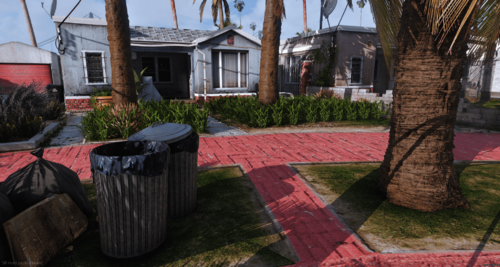 Hmmm
Hmmm -
-
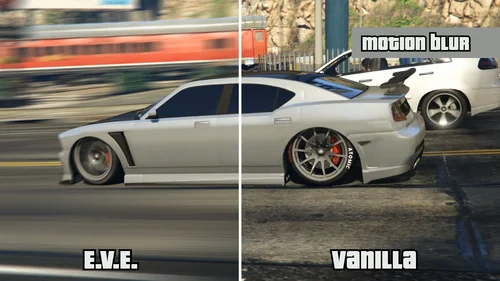 Hi Karen, To clarify, all we do is update the FiveM game build compatibility—there were no changes made to the source code. This allows players on newer FiveM builds to still use the ASI/plugin for editing or enhancing their Rockstar Editor clips. The original creators of this ASI haven't yet updated it to support the latest FiveM game builds. We don’t modify or claim ownership of the source code, and the same goes for the Rockstar Editor components. Once the original developers release an update, we’ll either mark our version as outdated or remove it entirely. Appreciate you telling us your concern. Best regards, Nightz Development
 -
If you are able to Join the Discord and we can help you further by screen share
-
If you have any other mods like DNX you need to follow the Read Me for DNX
-
We are back We are currently unsure of the matter, you are the first person to report these issues. We will investigate the matter, and if anyone else comes forward, we will escalate it accordingly.
-
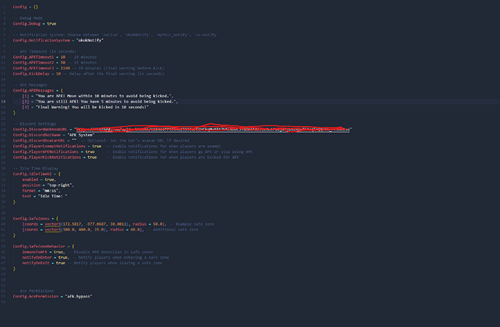 A Complete workup from the old V1 Config = {} -- Debug Mode Config.Debug = false -- Notification System: Choose between 'native', 'okokNotify', 'mythic_notify', 'sx-notify' Config.NotificationSystem = "okokNotify" -- AFK Timeouts (in seconds) Config.AFKTimeout1 = 600 -- 10 minutes Config.AFKTimeout2 = 900 -- 15 minutes Config.AFKTimeout3 = 1120 -- 19 minutes (Final warning before kick) Config.AFKTimeout4 = 1200 -- 20 minutes (Additional warning before kick) Config.KickDelay = 10 -- Delay after the final warning (in seconds) -- AFK Messages Config.AFKMessages = { [1] = "You are AFK! You have been AFK for 10 minutes!", [2] = "You are still AFK! You have been AFK for 15 minutes!", [3] = "Your still AFK! You have been AFK for 18 minutes! Move now or be kicked.", [4] = "Final Warning! You have been AFK for 20 minutes! Kicking after this message" } -- Discord Settings Config.DiscordWebhookURL = "" Config.DiscordBotName = "AFK System" Config.DiscordAvatarURL = "" -- Optional: Set the bot's avatar URL if desired Config.PlayerExemptNotifications = true -- Enable notifications for when players are exempt Config.PlayerAFKNotifications = true -- Enable notifications for when players go AFK or stop being AFK Config.PlayerKickNotifications = true -- Enable notifications for when players are kicked for AFK Config.DiscordDetailedNotifications = true -- Idle Time Display Config.IdleTimeUI = { enabled = true, position = "top-right", format = "mm:ss", text = "Idle Time: " } Config.AFKDetectionSensitivity = 0.5 -- Lower value means more sensitive Config.SafeZones = { {coords = vector3(172.5817, -977.0687, 30.0011), radius = 50.0}, -- Example safe zone {coords = vector3(300.0, 400.0, 25.0), radius = 60.0}, -- Additional safe zone {coords = vector3(500.0, 600.0, 35.0), radius = 70.0}, -- New safe zone } Config.SafeZoneBehavior = { immuneToAFK = true, -- Disable AFK detection in safe zones notifyOnEnter = true, -- Notify players when entering a safe zone notifyOnExit = true -- Notify players when leaving a safe zone } -- Ace Permissions Config.AcePermission = { "afk.bypass" } Config.ExemptFromAFK = { inVehicle = true, -- Exempt players in vehicles inVehicleSpeed = 7.0, -- Minimum speed (in m/s) for exemption to apply (5.0 = ~18 km/h or ~11 mph) typing = true, -- Exempt players typing in chat usingMenu = true, -- Exempt players with menus open Notify = true -- Notify players when they are exempt }
 -
Much appreciated man. Hope to see it soon.
-
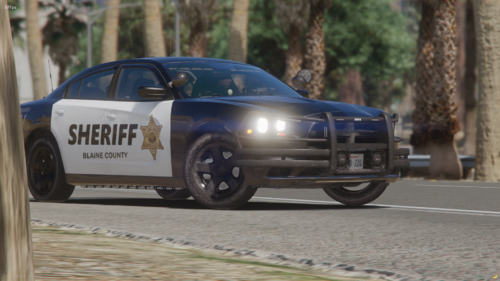 The developer discovered the error prior to uploading the livery pack. Nonetheless, we appreciate you informing us of it.
 -
Nightz Development First ever LEO Livery Pack. We have plans to release more Livery's for this pack to include more support for different Vehicle's like Redneck, Redsaint, ETC Vehicle List 2011 Ford Crown Victoria (11vic.png) 2013 Ford Explorer (13explorer.png) 2014 Dodge Charger (14charger.png) 2015 Ford Expedition (15Expedition.png) 2016 Ford Explorer (16explorer.png) 2018 Dodge Charger (18charger.png) 2018 Ford F-150 (18f150.png) 2018 Ford Taurus (18taurus.png) 2019 Chevrolet Tahoe (19tahoe.png) 2020 Ford Explorer (2020explorer.png) 2021 Chevrolet Tahoe (21Tahoe.png) 2024 Ford Mustang (24mustang.png) Required Pack https://ripplesvehicledev.com/products/mpower-pack FAQ Q: How can I download or purchase additional Nightz Development products? A: You can join our Discord server to browse and download products. Some items may also be available on LCPDFR. Q: How can I get in touch with Nightz Development for collaboration or other inquiries? A: Feel free to reach out through Discord or on LCPDFR. We’re open to collaborations, feedback, and any questions you may have. Q: How often are maps and products updated? A: Updates are released based on ongoing development and user feedback. Some updates may coincide with new map releases or enhancements. Q: What should I do if I encounter an issue with a map, even after reading the provided documentation? A: Please join our Discord server and open a support ticket. A developer or support team member will assist you as soon as possible. TOS [1] You shall not claim any products, scripts, or items created by Nightz Development as your own. Respect the effort and originality put into these creations. [2] You are not permitted to rip, modify, or alter any of Nightz Development's files without express permission. [3] These files are approved for use in FiveM servers only. Any other usage must receive explicit consent. [4] Do not redistribute, resell, or upload these files anywhere else without direct permission from Nightz Development. Unauthorized distribution, whether free or for profit, will result in the removal of these files from your possession and potential further action.
-
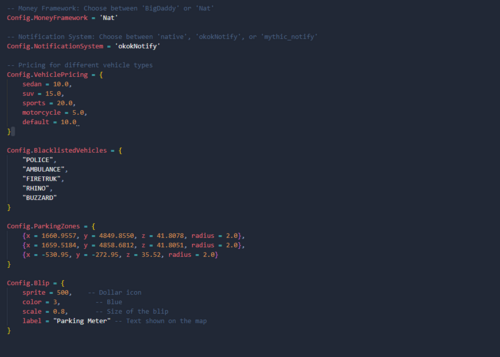 This script idea come from our Grapeseed 3.80 Update that is coming. When it comes to this Script this is User Friendly and has a lot in the config. We may update this in the future but our development team is Focused on other stuff. We have a bunch of new stuff coming soon for 2025 and we are happy to release them to you guys. To get sneak peaks join the Discord Coming Soon: More customisation options for the penalty system. Additional notification methods for expired parking alerts. Integration with more third-party resources for advanced parking logic.
 -
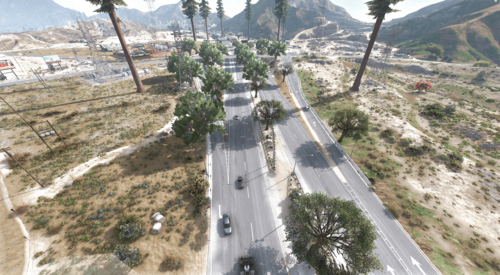 are you able to join the discord and provide screenshots
 -
Have you turned up your distance scaling




.thumb.png.357e181d277b211b0cb22f8acbe294de.png)
