


GamerCop23
-
Joined
Posts posted by GamerCop23
-
-
7 hours ago, unitedOrange66 said:
Hello,
Everything published on LCPDFR.com is safe to download. Files are checked thoroughly before they can be published.
Can I ask where did you get GTA IV from?
Hello - thank you. Got it sorted now.
I think it was one of the patches or " " site I had been on and it gave me the dodgy stuff.
Malwarebites still thinks "PLayGTAIV" is dodgy - but I have worked around htat.
Got the game from R*GSL.
-
Hello,
Managed to get game installed yesterday - and then today my browsers was infected with malware! Took me ages to get rid of the dodgy extension and malware.
Done it though.
Now my Malware Protection just quarantined my GTA IV file (with mods) as it said it had malware in. Delted file.
The downgrader from LCDPFR.com also has a "caution - trojan " sign next to it.
Is there anything safe I can download - to downgrade my game - to get it working again? Or is it all infected online?
I have a backup GTA IV (clean) copy.
-
-
-
1 minute ago, Mistor78 said:
That's why your game doesn't start. Please use Downgrader:
https://www.lcpdfr.com/downloads/gta4mods/misc/38986-gta-iv-downgrader/
Downgrader will add necessary files, then you will be ready to play. (Skip GFWL thing if you dont want to play multiplayer)OK I will try that tomorrow and let you know how it goes. Thank you.
-
-
-
-
Edited by GamerCop23
Hello,
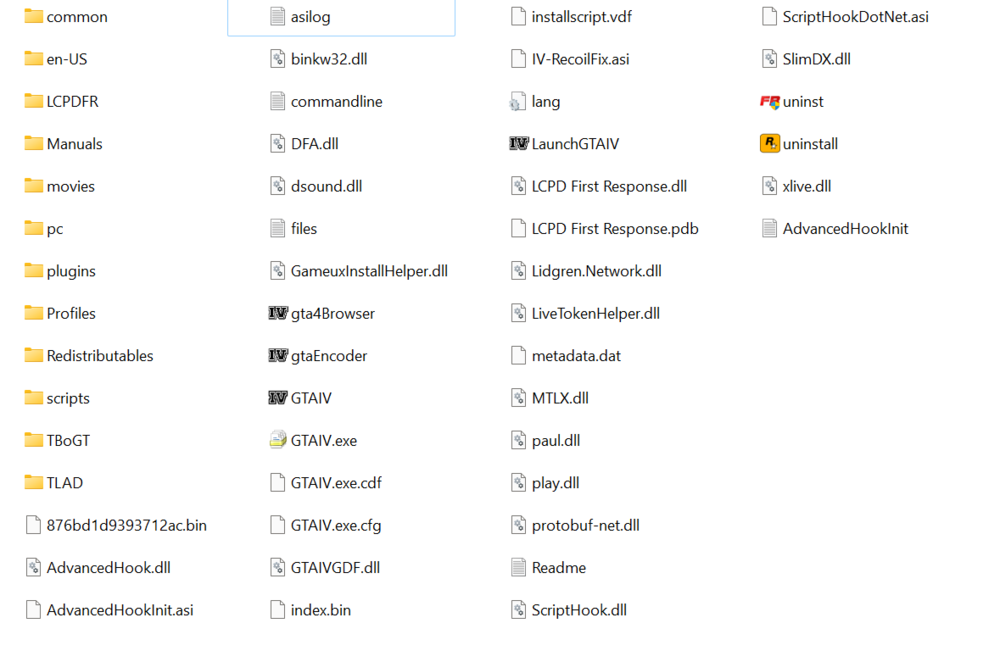
Now, I cannot start the game at all, with 1.0.7.0 downgrade done, commandline in and lcpdfr.
I tried "LaunchGTAIV" or "PlayGTAIV" with admin privileges, without, with combability & without.
Nothing happens!
Here is my GTA IV directory - screenshot below.
And this is what the "AdvanceHookInt" says:
"Log started on: 21:32:23 12-17-2023
------------------------
[INFO - 21:32:23] Failed to get game version!
[INFO - 21:32:23] Shutting down..."Thank you for any help!
-
-
Edited by GamerCop23
40 minutes ago, Mistor78 said:Hello!
For 1.0.8.0 Game version you need: LCPDFR 1.1 Legacy Edition + Compatibility Patch
For 1.0.7.0 Game version you need: LCPDFR 1.1 (Not Legacy) without Compatibility Patch
1.0.8.0 Game version does not support plugins + scripts.
1.0.7.0 Game version does support plugins and scripts.
So I prefer to use 1.0.7.0 - there is more possibilities.
For downgrade you can use Downgrader from:Or use Rockstar Games 1.0.7.0 patch from:
http://updates.rockstargames.com/patches/gtaiv/title_update_7_EN.zip
If you need help with RG patch contact me via my Discord server:
https://discord.com/invite/AnJmaYkUfrThanks for the help - I have got the 1.0.7.0 patch from the auto-loader - but all my textures are gone and I cannot change them in the settings menu!
So then I changed to 1.0;.80. but I had drunk camera, so deleted dsound.dll and now LCPDFR will not load when I do Alt = P (just goes a bit blurry)...
Argh!
So, I will try 1.0.7.0 again - but how do I get my textures back please?
Also, where will I download LCPDFR 1.1 (Not Legacy) without Compatibility Patch from please? Thank you!!
-
Edited by GamerCop23
Hello.
I have returned & am trying to get back into GTA IV & LCPDFR.
But, every time I downgrade the game, or install LCPDFR 1.1 or a combination, I either crash after loading screen, or loading screen goes round and round forever, or there are no textures when I get in ...
When I did LCPDFR without the downgrade, the taser, traffic stop and callouts were not working ...!
So, please help me with the order in which I need to do things?
* Downgrade GTA IV to 1.0.7.0 (tried x2 different ones) - to what, and how, where from please?
* Install "LCPDFR 1.1 manual" - is this correct?
* Install "GTAIV_Complete_Edition_Fix_0_4" - is this correct? When should I do that?
Thank you for any help please.
My laptop:
ACER Aspire 5 (2021) - Windows 11 Home
Processor 11th Gen Intel(R) Core(TM) i7-1165G7 @ 2.80GHz 2.80 GHz
Installed RAM 8.00 GB (7.78 GB usable)
System type 64-bit operating system, x64-based processorI have a Intel iRIS xe graphics.
-
Hello,
I have now reinstalled my game. However, I seem unable to make my detail and distance options higher than "1" in the graphics options menu.
In the past, although always fairly low, I always had them around 15-25, particularly distance.
Is there a fix to this/commandline fix for this, I have tried a few so either that has caused it or it is some default option. Regardless, I would like to change it.
Thank you
-
-
-
29 minutes ago, Prophet said:
No worries!
Right, almost there. It has run finally, but has now stopped temporarily and says " SOurce file not found: ........... "Media1.cab" in my GTA directory.
Is this something that should be there?
Also the MSI file did not work, so I tried the EXE file- this one.
31 minutes ago, Prophet said:No worries!
Actually, the Medai1.cab file was in the rar download, I have moved that to the GTA directory and hopefully that will work.
Great now it is updated! Thanks a lot for the help.
Finally any other main bits needed for the install ofLCPDFR?
-
-
-
-
1 minute ago, Prophet said:
Ah, now things make sense. What program are you using to update?
Yes sorry! I am using the Rockstar one from their website.
2 minutes ago, Prophet said:Ah, now things make sense. What program are you using to update?
From their website, above
-
-
-
-



MALWARE - GTA IV / LCPDFR
in GTA IV & LCPDFR Support
Thanks, no offence meant!