J.J Designs
Members
-
Joined
-
Last visited
Everything posted by J.J Designs
-
thanks man this is my firts one the lights are like every were but like i say i got like 5 models done now so bee each one of them i make im getting batter and batter
- 5 comments
- 5 reviews
-
MY 1st release this was the 1st car i made with the help of Sergeant Perez I-3 after that i made 3 or 4 in with every car i was getting batter and batter thank you hope you all like it CREDITS for parts use on this build: - Especial Thanks to Sergeant Perez I-3 for telling me how to use Zmodel - Model is Ford Crown Victoria from Driver SF, converted to GTA IV by F5544, Modified and enhanced by Tim98. - Rims by Bxbugs123, Textures by Lt.Caine. - Laptop and Divider by Lt.Caine, Modified by Tim98. - Spotlights made by Cj24. - Template made by Cj24, Mapped by Tim98. - Extra lights by Tim98. - Whelen Inner Edge models made & converted for GTA IV by Bxbugs123 - CVPI mirror light by TraumaPak, converted to GTAIV and ELS mapped by Reboot23. - Skin made by my selft J.J disigns(note please do not make copy's of this skin thank you) video on how the light work only primary and secondaries
- 5 comments
- 5 reviews
-
duuuuuueeeeeeeeee. thas what i mean by i made my selft from a model thats was unlock i dint say i made from scratch did i, you little kids are d***m ^_^ thanks jetski343
-
possible releasing soon special thanks to sargent perez to showing me how to use zmodel.
-
-
-
next time wen you make a mark unit dont use lights on the front window other then that car look good
- 21 comments
- 31 reviews
-
-
-
-
i sure can make those skins for you i made skins for my clan and others let me know. PM also got team speak if is batter for you.
-
note: i post these 2 times sorry about that the 2nd was taking care of but is not delete yet sorry
-
man there so many out there that look goo but the best i see so far are these here you have the option of rambar or no rambar '?do=embed' frameborder='0' data-embedContent>> '?do=embed' frameborder='0' data-embedContent>>
-
this is the new ppv that me state police got what you think i think this car looks a lot batter with hups
-
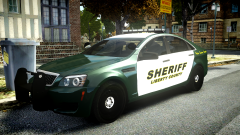 is there any one out there with one of these but the one with the hups cap i think this car look a lot batter with the hups
 -
-
sound good but you need to make the turbo sound come out a little more on idle and wen driving
- 5 comments
- 3 reviews
-
-
-
just a little quick skin for the dart cuz there batter as security car not police cars lo. (joking) ^_^ link to car
- 2 comments
- 3 reviews
-
-
-
^^^ why do people cry over other people using some one cars if there not your stop crying about it and let the actual owner taker of it thas it.
- 19 comments
- 8 reviews
-
hay nickie not sure if you know know but this vic wen in game the rear end is up and the car jump around on the back not sure why
- 23 comments
- 8 reviews
-
o0o0 ok i see lol