
QTexs
Members
-
Joined
-
Last visited
Everything posted by QTexs
-
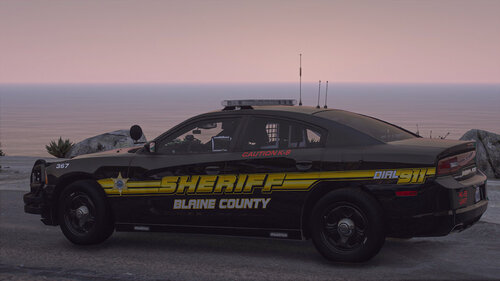 Decided to update this skin from a year ago. The skins are designed for only one pack, minus the exception of keeping one standalone vehicle that I thought would go with this pack. Like always, please let me know of any feedback/suggestions for improvements and/or requests. ------------------------------------------------------------------------------------------------------------------------------------------------------------------------------------ ------------------------------------------------------------------------------------------------------------------------------------------------------------------------------------ Model packs used: (bjackson1991) BCSO 12 Car Sed Pack - Patrol and K9 (Rabbit Development) 2020 Dodge Charger SRT Hellcat ------------------------------------------------------------------------------------------------------------------------------------------------------------------------------------ ------------------------------------------------------------------------------------------------------------------------------------------------------------------------------------ Note: The 2022 Chevy Silverado passenger side back fender has a weird glitch and will make my texture look distorted on that back side only. Please don't ask me about that issue. ------------------------------------------------------------------------------------------------------------------------------------------------------------------------------------ ------------------------------------------------------------------------------------------------------------------------------------------------------------------------------------ Disclaimer: Please do not redistribute these files, claim them as your own, modify them for redistribution, or use any parts of these textures without my permission. Thank you. ----------------------------------------------------------------------------------------------------------------------------------------------------------------------------------------------- ----------------------------------------------------------------------------------------------------------------------------------------------------------------------------------------------- Installation: 1. mods > update > x64 > dlcpacks >YOUR PATCHDAY > dlc.rpf > x64 > levels > gta5 > vehicles.rpf 2. Open the .ytd file of the vehicle you want to change by double clicking or right clicking and hitting edit 3. Scroll through until you find e.g. example_sign_1 and right click and hit replace 4. In my folder just make sure that the first name e.g. fpiu_sign_1 are the same as the models. The "sign_1,2,3,4" can be whatever when replacing. Then hit save.
- 12 comments
- 1 review
-
-

-

- 7
-
-
-
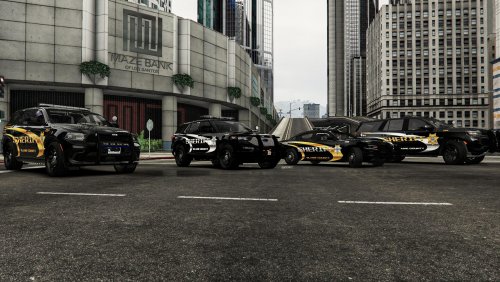 Make sure you are using the exact same models of the 19 charger and the 21 Tahoe, it could be because you are using different models and the templates are different and so it is clipping the text. Here is a photo of a tahoe and charger. The tahoe never had the big "sheriff text" in the back it was always small and, on the bottom, right.
 -
Do you mean the 2021 Tahoe "sheriff text" does not show up on the back of the vehicle in my photos that I posted or in openiv? If in my photos that I posted, I just didn't add a photo of the back of the Tahoe, sorry for that.
-
Each vehicle has certain placements in the back that will fit the best, I try to avoid putting all the "sheriff text" in the same spots because some of the vehicles will make the text disappear or cropped text, I messed with every position of each vehicle placement in the back and found where they are now to be the best fit. The sizes will also vary in terms of how much you can size them before it starts to crop the text of certain vehicles used. I hope that is what you were talking about. If not, could you please explain what you mean?
-
can you show plugins folder in GTA v dir.
-
All I know to do is make sure all other plugins are updated to there latest version. Is crashing in a game or loading screen?
-
Delete Arrest Manager
-
First off go into your commandline.txt in gta V directory and clear everything in it. Second, delete LSPDFR+ as well with anything that has Albo plugin and albo.dll which is causing the crash. Let me know if it still is crashing.
-
its not stp, its another plugin interferring with stp, show rph.log
-
-
Thank you.
-
Thank you.
-
Are you wanting a specific pack?
-
Are you wanting specific vehicles to add my textures? If so, I can transfer the textures to your specific packs no problem.
-
This is my first texture pack that I have made, please let me know of any feedback/suggestions for improvements and/or requests. I mainly would like to focus creating textures for these vehicle models, Chargers, Tahoes, Explorers/FPIU, Durangos, and Challengers. But will create textures on other models if requested. I will be updating this pack into adding more variety of models in the future. Model Packs Used: 2021 Dodge Charger (EmergencyDistributors) 2019 Ford Explorer (EmergencyDistributors) 2021 Dodge Durango (Rabbit Development) 2021 Chevrolet Tahoe (Rabbit Development) ------------------------------------------------------------------------------------------------------------------------------------------- ------------------------------------------------------------------------------------------------------------------------------------------- All 2021 models of these vehicles should work depending on their template design. NOTE: Any side runners on any 2021 Chargers will cover up part of the bottom texture of the vehicle. This texture was created by the idea of no siderunners. Disclaimer: Please do not redistribute these files, claim them as your own, modify them for redistribution, or use any parts of these textures without my permission. Thank you. ---------------------------------------------------------------------------------------------------------------------------------------------------- ---------------------------------------------------------------------------------------------------------------------------------------------------- Installation: 1. mods > update > x64 > dlcpacks >YOUR PATCHDAY > dlc.rpf > x64 > levels > gta5 > vehicles.rpf 2. Open the .ytd file of the vehicle you want to change by double clicking or right clicking and hitting edit 3. Scroll through until you find e.g. 21inter_sign_1/chgr_sign_1 and right click and hit replace 4. In my folder just make sure that the first name e.g. 21inter/chgr are the same. The "sign_1,2,3,4" can be whatever when replacing. Then hit save.
-
-
-
-
-
-
-
your backup files causes the game to crash.
-
 Can you add these callouts? Simple Callouts (v1.3.5.2) (bejoijo.com) Attempted Crime Callouts (v1.7.2.1) (bejoijo.com)
- 311 comments
- 39 reviews
-