




LSPD Snow
Members
-
Joined
-
Last visited
Everything posted by LSPD Snow
-
Your police vehicle slot (POLICE) has a corrupted or unload able model. I suggest downloading a known vehicle pack and switching the police model. LSPDFR Says theres a invalid model in hash 0x79fbb0c5 which is the POLICE slot hash.
-
Okay... I verified the integrity in the morning (after it stopped working) and it said all files are valid and changed nothing... Verifying again ig....
-
Doesnt seem to help...
-
I did that beforehand and it didnt help. I need a d3d9 file as Steam Verify does not give it.
-
I did a verify before. Also the reason they are there is because when i removed them & reshade it still didnt work... Also i verified the game files before so ehh the verify doesnt bring it back
-
I did remove NOGTAVLauncher.It didnt work before, but sure! damn nopeRemove redux reshad filtrs, didnt help. Uninstalling reshade and trying again. Uninstalling reshade did not help. adam enforcers?Ill remove the reshade.I will remove enbseries and see Oh i have no enbsereies...Umm idk it came with Redux (Although i had redux before and it worked so)OpenAllInteriors, ELS, Redux, ScriptHookV.NET (in addition to ScriptHookV obviously) and other then that just mods folder. Oh and Packfile Limit Adjuster and Heap Limit Adjuster INI Oh and reshade + enbseries
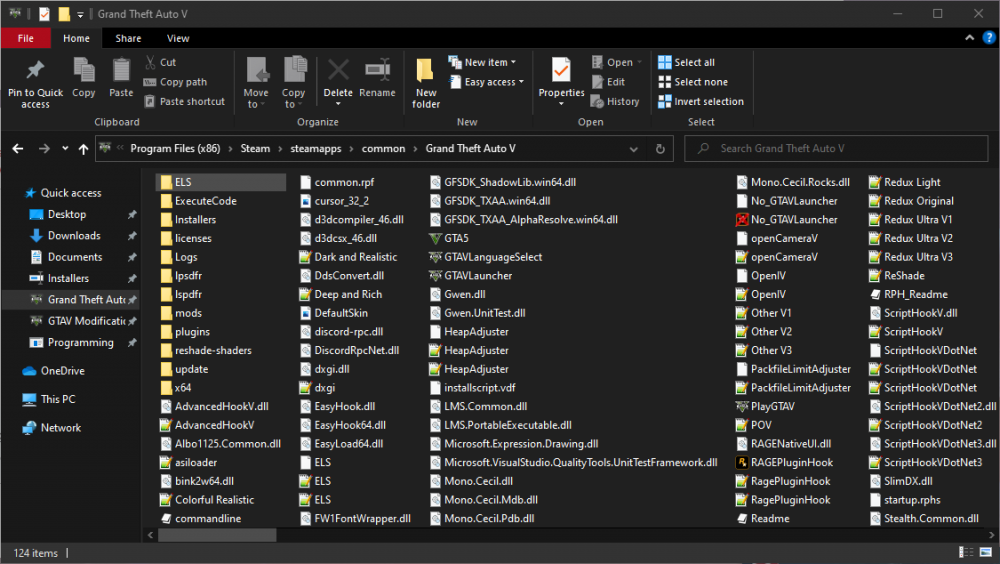 Can you how a image of the file in the direectory? i have nothing called c scenario patch in my root directory or anywhere...Hello! Upon launching my game using RPH or Steam, after passing the Rockstar Games Launcher yet before the game launches i have an Error "Unrecoverable Fault - Please restart your game" and a "Unknown error - please verify integrity of game files". It i causeed by the dinput8.dll file i understood because once removing i had no problem using the game, but not using dinput8.dll renders the mods folder, ScriptHookV and ScriptHookV.NET oboslete (probably wasnt the right word but anyways you understand). I cant bypass Rockstar Games Launcher (which i have identified as the problem) Because the only way i found was NOGTAVLauncher or something like that. Each time i install it i get a different virus! Sometimes its a Trojan, sometimes idk.. thing is, ITS A VIRUS! Also it does not even install the NOGTAVLauncher so yea... so i guess what im asking is: is there any replacement which isnt a virus?Happens to me to... After removing dinput8.dll i have no problem. freacking rockstar.Thanks! Ill search for it...Really? Do you have it open, can i get a link?Is it a callout? If not, put this: while (true){ GameFiber.Yield() if (Game.LocalPlayer.Character.DistanceTo(Suspect.Position) < 30f){ Game.DisplayNotification("put text in here"); break; } } if it is, put this in Process(): if (!NotificationShowed && Game.LocalPlayer.Character.DistanceTo(Suspect.Position) < 30f) { Game.DisplayNotification("text in here"); NotificationShowed = true } And this at the start where you declare variables: private bool NotificationDisplayed = false;Checked them, tasks were useless and so was natives.I just want to say that i downloaded the bypass and Windows Defender straight away detected a trojan right after finishing setup. I DO NOT SUGGEST INSTALLING IT!Hello, I am scripting a helicopter pursuit callout for LSPDFR, and i have a driver and passenger in a buzzard attack heli. How can i make them shoot from the buzzards machine gun or missile launcher?I know how to sort a into list, but vehicle ilist? Whatever.Whelp two weeks without lapstrake oof LSPDFR*How would i godamn do that?




