


Ricky001
Members
-
Joined
-
Last visited
Everything posted by Ricky001
-
 Absolutely, non-negotiably, the best add-on to LSPDFR. Feels like an integral part, without which I can't imagine playing LSPDFR. :)
- 1,365 comments
- 86 reviews
-
-

- 1
-
-
Okay, so I'm returning after quite a while now. Updated everything and fired up LSPDFR after around a year. One thing I noticed is that the roadblocks/ spike strips backup never show up during pursuit. Speech recognition is not the issue, as I get a proper response that backup is being deployed, but the actual backups don't show up in game. Don't remember facing such an issue before. So came here to understand if I'm missing something or don't know about something else that might have changed. Any help here? :)
- 1,365 comments
- 86 reviews
-
 Is an update expected for v3725? I have the v3717 installed, but the game crashes on the "Loading and Populating game world" step during startup.
 -
I've been thinking this over for some time now, and although I don't know the feasibility/ challenges of the task, just wanted to know if the EUP Character creation system can somehow be extended to spawn the ped in game and not just apply it to the player character? Basically I want the exact characters as created in EUP and use them as partners in Ultimate Backup. And by characters, I mean everything that's created - the heritage, face, nose, eyes, skin details, etc. and then the selection for one of the created uniforms from the wardrobe. So if anyhow I can spawn the character as an NPC, UB already has a feature to recruit the nearest ped as a partner and the requirement would be fulfilled. Either this or a new mod/ plugin that reads the EUP character/ wardrobe files (or its own *.ini files with same format) and helps create the ped?
-
I have been facing this (weird?) issue suddenly since the last few days: While calling for backup through Grammar Police or Ultimate Backup menu (Code 2/3, Traffic/ Felony stop, etc.) the backup units never show up, neither do I hear any radio communication. This sometimes also happens when requesting EMS/ Fire Dept. but those are rare. For any kind of police backup, this is consistently happening. However, I also noticed that sometimes, during the GP status OnScene, when dispatch asks "Is backup required?" and I respond positively, the backup does show up, so I'm not sure how consistent this behaviour is, because if I try calling for backup immediately after, they don't show up. Q) Does this happen for some specific locations? A- NO. It happens regardless of the location. Q) Have I made any changes to UB configurations recently? A- Not in the past year (or more) - only recent changes were installing the latest version of LSPDFR I am attaching the RPH log file, and the below lines have caught my attention: [11/11/2023 11:09:39 AM.072] LSPD First Response: UB: ATTENTION!!! RPH cannot spawn any vehicles or peds. Please make sure your model is valid [11/11/2023 11:09:39 AM.072] LSPD First Response: UB: If this only happens on certain areas, It might be caused by 'Bermuda Triangle' bug. Try to reinstall GTA V to fix the issue. As for the points mentioned there: 1. I have made sure that my models are valid (this issue just started a few days back, everything was working fine with the same files/ config) 2. This does not happen in certain areas. And I'd very much appreciate any possible fix/ suggestions without reinstalling GTA V (I did some research online and found in forums that Menyoo was causing similar issues, but I don't use it either.) Any help is greatly appreciated. Thanks in advance. 🙂 RagePluginHook.log
-
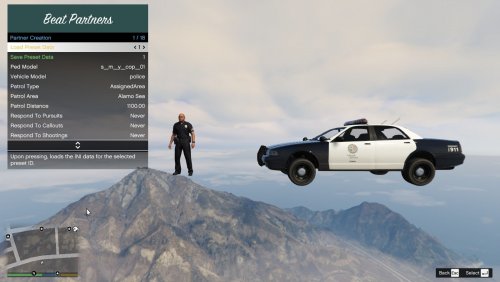 Hi, great plugin so far, would LOVE to see support for EUP peds tho. However, in the INI file, there are 2 instances of Model8 under PedModels set to s_m_m_snowcop_01 and s_f_y_ranger_01 ... was wondering whether it was intentional. Can it be an issue in stability? Is it safe to rename the last model as Model9 (and can this be done to add more models likewise)? I have tried selecting partners with either of those models in game and everything seems to work as expected as of now.
 -
Sure! Glad to help. Do reach out if you need further assistance 🙂
-
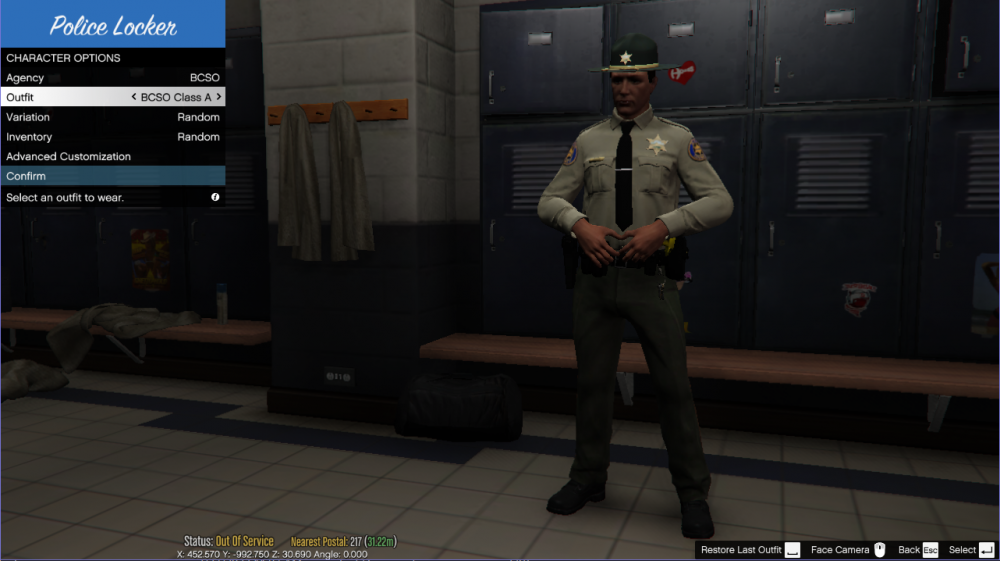
Hi, by the sound of it, BCSO is not there in the default list of agencies. Have you changed the config files in LSPDFR folder to add this agency? (Don't worry if you don't understand what I'm saying, it takes a while to get used to these stuff) Also, no matter which station you go to, you should be able to get access to all agencies (at least the default ones like LSPD, LSSD, SAHP, etc.) You can change the agency via the menu to get the corresponding vehicles and uniforms. As you can see above, the agency selected in the first menu item is changed and you can select the corresponding outfit from the next row. This snap is from the Downtown Police Station, with the BCSO agency and outfits added. (Note:- Even if you have EUP installed, you will again need to change the config files to have them reflected while going on duty, so let's save that for later and make sure you can add an agency first) Now coming to the next part of your question, you generally have to wait for the dispatch calls. There are ambient events as well (that can be turned on or off in the lspdfr.ini file) or by installing other mods that add ambience. I'd suggest, just to get a hang of it, you can try going on duty as a LSPD cop for now and try playing with the default agencies and change them if required. To add new agency (like the BCSO among others), you might want to go through these documentations already available to understand how the config files actually work:- 1) Using the custom folder 2) Using backup.xml 3) Agency (you can always copy-paste one of the default agencies and change the necessary tags to make it easy) Also, you can write back here and I will definitely try to help you out if you get stuck.
-
I'm not sure if it's only an issue with me, but the recently added Radio key doesn't seem to correspond to any of the *.ini files (whether custom or default) I tried changing the default key C to something else, but no matter which file I edit, the radio only comes up with the C key. I even tried setting it to None just to see what happens, but it simply doesn't respond to this particular setting. Everything else is fine - being read from the custom.ini file when it's available, or the default otherwise. Can this please be looked into? Or guide me if I'm doing something wrong?
- 1,365 comments
- 86 reviews
-
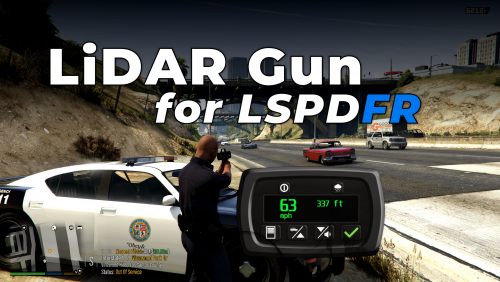 Hey! As much as I love this amazing mod, I noticed it's being a little weird with UB's partners. Once I have this radar activated and have the vintage pistol in my inventory, UB partners with option of handguns set to "Copy from player" always bring out this model regardless of whether I am holding a taser or the combat pistol (the two models I mainly use). It doesn't happen when I keep their weapon specified to a particular model. Is it only me? Can it be fixed? Or should I just set the UB partners to have a specific model instead? (cuz I'm not gonna give up Lidar Gun for sure)
- 141 comments
- 16 reviews
-
Did you do something to your "CustomRegions.xml" file from the Ultimate Backup mod? I'm no expert, but your game can't find that file. Maybe try to ensure it is there in your GTAV > plugins > lspdfr > UltimateBackup folder or try reinstalling the mod.
-
Is your RageNativeUI updated? Sounds like it might be not. Please manually download fit from HERE and drag & drop the dll (and optionally XML) files into your GTAV main directory.
-
Not sure if you have DirectX installed properly, but one of the issues I came across was about it. Maybe you want to download and install DirectX End-User Runtime as advised in this forum.
-
 One of the best, if not the best (at the time of writing this at least) callout packs out there! ❤️ The variety & immersion are the best part without a doubt. I mean, it doesn't really make sense that every call I respond to either takes off on a high speed chase, ramming through everything in the city, or in a shootout, destroying everything in the city. There are other stuff that the LEOs attend to and get them taken care of! This pack makes this later idea implemented in probably the best way possible! Eagerly looking forward to being with this pack for a long time through the future! 🙂
- 319 comments
- 62 reviews
-
-
-

- 2
-
-
Exactly my point of complaint, too.. but there's unfortunately no other way out at the moment. For what we want to happen, Compulite has to be integrated into the LSPDFR system or something like that so that it can work as the primary computer itself.
-
Oh I get you now.. Yeah, Compulite will not register a suspect until the ped is available in the LSPDFR systems. And in this case, once you look up the ped in the default computer, Compulite will register the ped and you will be able to search them up again in Compulite. But first, you will have to use the default computer.
-
Not sure how exactly are you approaching this call, but you need to search up the suspect and then go to their location. I'll share the steps below:- 1) You receive the callout - the notification mentions a name of the suspect 2) Bring up the default LSPDFR police computer (default key: Q, if I'm not wrong) 3) Search for the name of the suspect in the search box 4) A small popup will appear with the details of the suspect 5) A few seconds later your mini map will update with the GPS location of the suspect. - Go there 6) While nearby the location, you will be given a search area (marked in yellow) - search for the suspect within that area 7) Once you locate the suspect, they'll generally try to run. Apprehend and arrest them.
-
Please attach the RagePluginHook.log - a file found in your GTAV main folder. That's the file you need to attach for any kinds of crash you may face.
-
Sounds similar to a crash caused by outdated RageNativeUI.dll Please download it from THIS LINK and simply drag & drop the RageNativeUI.dll (and optionally the xml) file from the archive into your GTAV main folder.
-
Please attach a file called "RagePluginHook.log" - this can be found in your GTAV main folder. Whatever problem or crash you face, you would need to attach this file for anyone to be able to help you out.
-
UB does not REQUIRE police smart radio. I've been using it for years now without PSR. Also, you can try Grammar Police if you want. It also has a panic response system, although it's best used with OP Immersive Dispatch (now no longer required, but I personally prefer) as well as very well integrated with UB.
-
Either this or something like the Modding DLC Pack - a little tricky to get started, but works without fail, specially with replacing stuff.
-
A little more explanation would be really helpful as @SwitchedDreams mentioned. And if I had to conclude from what you said, there are still further questions... "Are you using the Epic Games Launcher?" If yes, it happens as you mentioned. You need to launch GTA5 normally from EPIC Launcher, and when the game launches, then start Rage Plugin Hook. That's it for now with the limited information provided.
-
Not exactly sure, but the log still seems to be similar to the one created by outdated RageNativeUI. You sure you downloaded version 1.8.2.0? If unsure, please try again from THIS LINK - from the archive just drag & drop the dll (optionally also the xml) file into your GTAV main folder.
-
Please attach the RagePluginHook.log file found in your GTAV main folder. The log is a necessity for whatever crash you face for anyone to be able to help you (whether me or someone else)


