Huki
Members
-
Joined
-
Last visited
Everything posted by Huki
-
Люблю смотреть английские сериалы с русским переводом, ммм.. А так, единственное что я смотрел из английских сериалов про копов, так это "Сатуленд"
-
Вряд ли найдутся такие люди. Мало кому интересна разработка да и собственно работа даже в не нашумевшей кампании. Просто согласись. Если даже и будут платить-то только на один раз. Вряд ле у них будет даже 100+ сотрудников.
-
-
-
Это прекрасно работает, братан.
-
У меня очень дерьмовые компьютерные спецификации, но я скажу вот что. Что на железе меньше 2011 года, то игра идет отлично, что с модом, что без него, что онлайн.
-
Нужно понимать, что разработчики не будут делать отдельный симулятор. Это очень большие производственные затраты. (Это первое). Для этого требуется довольно большая команда знающих разработчиков. Чего на самом деле у них нет. Грубо говоря, не ждите никакого отдельного симулятора. Разработчики уже многое сделали для нас.
-
Пожалуйста, ответьте. Я хочу начать играть как можно скорее.
-
Всем привет. Я недавно присоединился к сообществу. Я не знаю, что сказать. Возможно, кому-то это действительно будет интересно, поэтому я отвечу. Нет, я не случайно выбрал Россию в своем профиле, я действительно русский и живу в России. Я занимаюсь моддингом для GTA SA. Да, не удивляйтесь. В 2020 году моды для GTA SA все еще актуальны, как и сама GTA SA. Я играю на проектах ucp,мне нравится полное сообщество rp. Но именно GTA 5 я начал интересоваться в последнее время, до сих пор я не могу найти реальных и чего-то стоящего UCP-проектов в rage mp, особенно российских. Так что я все еще в сампе. Вы можете задавать вопросы, если мне интересно)
-
I advise you not to set the fashion for clothes, uniforms, as well as all sorts of weather changes. For even being in the community for 1 week, I very much fooled my head with problems when crashing with these mods.The maximum that I install from this is cars and flashing lights. In the main menu, there are always scripts for calls, partners, etc. Here are the scripts install 100%
-
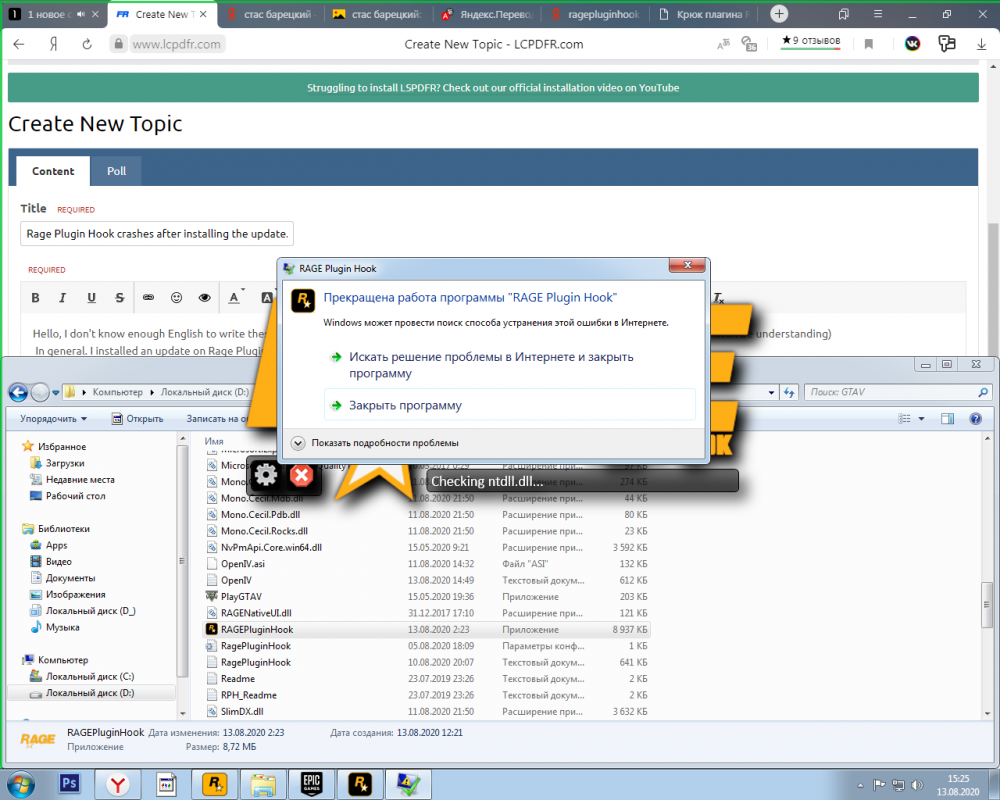
Hello, I don't know enough English to write these essays on a question. Therefore, everything written below is done through Google translator. Be understanding) In general. I installed an update on Rage Plugin Hook by installing a new version from this site. https://ragepluginhook.net/ Accordingly, when I went to this site, I read the news that there was an update for LSPD:FR . I installed it, too. Installed everything correctly by transferring the necessary files to the game folder. The game is licensed from EGS. After that, I decided to launch the game and play a little. I got a crash from Rage Plugin Hook with the following problem. "Checking ntdll.dll..." After this phrase and procedure, my Rage Plugin Hook crashes. I thought it was a simple flight, restarted, got the same result. I decide to start the game first, and then, after collapsing it, run the Rage Plugin Hook. I get the same result. It is noteworthy that GTA 5 itself works without problems and does not crash in any way, unlike the same Rage Plugin Hook . Can you tell me what to do in this situation?