



DanielPD
Members
-
Joined
-
Last visited
Everything posted by DanielPD
-
I've recently installed two new mods, one of which were an automatic install via OpenIV. This is a vehicle model mod for a new car set, and I'm just wondering if there's any way at all to uninstall this, because this has to be the issue. If anyone can help out or give me some advice on this, it'd be appreciated! ❤️ I've narrowed this down by the obvious recent installs and also I've renamed my mods folder to _mods and everything is working as it should. Do I have to delete the mods folder? RagePluginHook.log
-
that's sick thanks!
-
So right now I'm totally addicted to Netflix's S.W.A.T (Based in LA) and it's inspired me to play through LSPDFR Based in L.A. I'm looking for EUP LA Uniform. Is there anything out there that's good quality?
-
 I'm actually excited to use this plugin, man but I'm constantly crashing when loading up LSPDFR when this plugin is installed. Any fixes? RagePluginHook.log
- 95 comments
- 16 reviews
-
-
.thumb.png.99a519b4490b6c8348791d4a6f65d2fb.png) What a shame, alright thanks! 🙂 Oh and another question. Where can I find this 'Task' section in trainer?
What a shame, alright thanks! 🙂 Oh and another question. Where can I find this 'Task' section in trainer?- 78 comments
- 3 reviews
-
I saw you had an issue with the police badge not showing. Do you recall how you fixed this issue? Thanks 🙂 What Vehicle pack are you using there?
- 78 comments
- 3 reviews
-
I did what you suggested and I've crashed again when in pursuit. Could you take another look pal? RagePluginHook.log
-
I were responding to a callout and were enroute and my LSPDFR crashed. Here's my RPH Log; RagePluginHook.log Thanks for the assistance in advance 🙂
-
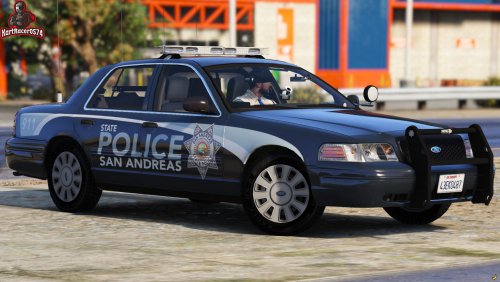 What pack is this pal?
 -
Have you tried verifying the integrity of your files via steam?
-
From the album: LSPDFR: Frontier
Heading out for night shift patrol! -
-
What ELS vehicle(s) are you currently using? If you have indeed installed an ELS pack on this website, I would suggest you reinstall that pack and remember to read through the 'Readme' text documents that are almost always contained inside the .zip files that you downloaded. 1) .ytd & .yft files be installed through OPENIV 2) Inside the 'VCFs' folder of your download, install all .xml files to (Grand Theft Auto V\ELS\pack_default)
-
I'll let you know how it goes, thanks again for your prompt reply 🙂
-
Ah! That would be my Cruise Control, but it doesn't work at all. I moved it in to Plugins instead of Scripts, lol. I deleted that anyhow. Is there anything else?
-
As always fantastic work, guys! Thank you so much 🙂
-
Lovely to know, I thank you 🙂 So after a couple more hours, I were filling out a short note on a citation and my entire game did indeed crash (I've updated everything btw). Here's my RPH_Log RagePluginHook.log
-
I've had no troubles so far with crashing. LSPDFR has a mind of its own lol. Will keep up to date within an hour or two! Thanks for the patience, my dude.
-
You'll need to make a new thread there, my friend 🙂
-
Of course, I'll let you know mate. Will this thread stay open?
-
You've been a great help nonetheless, my friend 🙂 Cheers!
-
RPH 1.81.1410.16064 LSPDFR 0.4.8
-
I've had a look for myself also. It seems that it's not outdated. LSPDFR crashes when I perform most actions such as leaving my car, evidence checking via STP etc.
-
Sorry, I edited the post! Try now 🙂 Furthermore, the game itself didn't crash, only the LSPDFR plugin right after leaving my car. I have DoorControl downloaded.

.thumb.png.99a519b4490b6c8348791d4a6f65d2fb.png)
