




DanielPD
Members
-
Joined
-
Last visited
Everything posted by DanielPD
-
Ah, I only installed the RPH folder to my main dir. I feel like a prat now 😂 I'll lyif it works, thanks! Edit: It fully works now, thanks man!
-
ScriptHookVDotNet.log Here ya are, mate.
-
I've installed LemonUI to my GTAV Main directory, and made a scripts folder for my SimpleHUD and installed it's prerequisites and requirements, I'm sure. I've then installed the interface Gfx to my OpenIV, and when loading in to the game (and entering a police vehicle) I press the key to open that I assigned, and SimpleHUD doesn't open, and provides no source of information as to what's wrong. Has anybody got any idea what's happening here, and if there's a fix? As far as I'm also aware, ScriptHookVDotNet is "broken" according to SimpleHUD's mod page - does that have anything to do why my SimpleHUD fails to start?
-
Recommended Mods 1. Stop the Ped 2. Grammar Police _______________________________________ 3. Police Menu (Alternative to Compulite)
-
Well it's a shame, but a good thought anyway.
-
So I've got the very foundations and an idea of what C# is but I'm actually intimidated by the language for some reason and I'm wondering what the best way is to learn C#. I've been learning over some website for the past two days and literally all that sunk in is Console.WriteLine("My writing here"); 😂 I want to learn off you guys because nothing at the moment is sinking in my head. So tell me, how did you guys learn and how long did it take you to finally grasp it? Maybe where to start when learning? Should I start off by learning how to code a basic Callout?
-
-
-
-
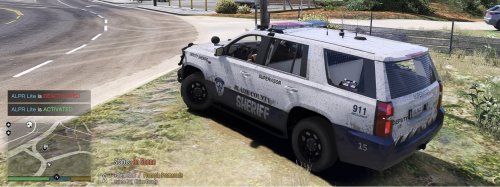 Deputy Tomb has been an asset to this community of late. Sure, these are only edited .ini files, but some people don't like editing these for understandable reasons and rely on developers to give them a hand. Props to you, @Deputy Tomb and I hope to see more of your work. Developers have to start from somewhere, even if it's simplistic 🙂
 -
An update like that would amaze the entire community it'd be amazing, tbh. I'd love to know if it's possible to work around 🙂
-
I've no experience in this area but a search on YouTube might enlighten you, my mate. Take a look at this tutorial, it's a short series on how to create callouts 🙂 Create a Callout - Need-to-Know basics
-
I apologise for that stuff like this is just annoying is all, lol. I did eventually delete the mods folder and I have re-installed EUP and everything runs good now. The last couple of mods I installed, one of which were a new Coroner service vehicle and I think I messed up in one of the meta folders. I think I'll need to do some research before installing complicated things that involve having to edit meta folders and such next time hahah. @unitedOrange66 I apologise for being passive with you and seriously, thanks for the help 🙂
-
I'll just open a ticket on Discord. Thanks for your extensive "help" anyway - There has to be more solutions than simply deleting the mods folder. If I find a solution there, I'll post it to here just in case anybody else runs in to the same issue in the future.
-
So when I disabled the mods, this does something to EUP? How can I fix this? I highlighted mpluxe2 because if you look at the image of my console, it says I don't have mpluxe2 in my dlc meta file, which I have 😛
-
Hey guys, I were testing out a couple of things earlier and to do that I were forced to rename my mods folder to _mods (I think I made an oopsie) Ever since doing this, my EUP has been going crazy and I've no idea how to fix this. Everything does look fine from my perspective, what can I do here?
-
 How have I just come across this? I've been looking for something like this for ages! Can't wait to try it 😄
- 690 comments
- 28 reviews
-
Over the years of playing LSPDFR, I've only ever used Stop The Ped and when I saw Sync became a thing around a year a go, I thought Why not? Only to find out Stop The Ped doesn't Sync with this website because "it overrides the default LSPDFR arrest function". Now from Bejoijo's website statistics, around 1,500,000 Million users has viewed this product and at least 1/4 of these viewers has played with Stop The Ped at least once. My suggestion is LSPDFR should integrate arrests functionality together with Stop The Ped. It would be a nice thing, although it isn't necessary. If this isn't possible, could you explain why?
-
Check above, pal. You found the issue and it's now fixed. Thanks.
-
Yeah, sorry about that - deleted the upload 😛 I did exactly as you said, and I'm still crashing because that meta file is already on my /mods directory Nope now I did exactly as you said. The game's now working 😅 Thank you for your assistance! ❤️
-
Yeah, that's the file I messed up. Now all I have in here is uploaded below;
-
So I were installing an LSPD Non-ELS vehicle and I accidentally replaced the file Vehicles.meta and now I can't run RPH. Is there a clean vehicles.meta file out there I can replace this with? I don't wanna have to delete & reinstall my mods folder 😛 Thanks in advance for your help 🙂
-
Sorry for the late reply, Cyan. I'm scrolling through via mouse and arrow keys both. Should I not do that?
-
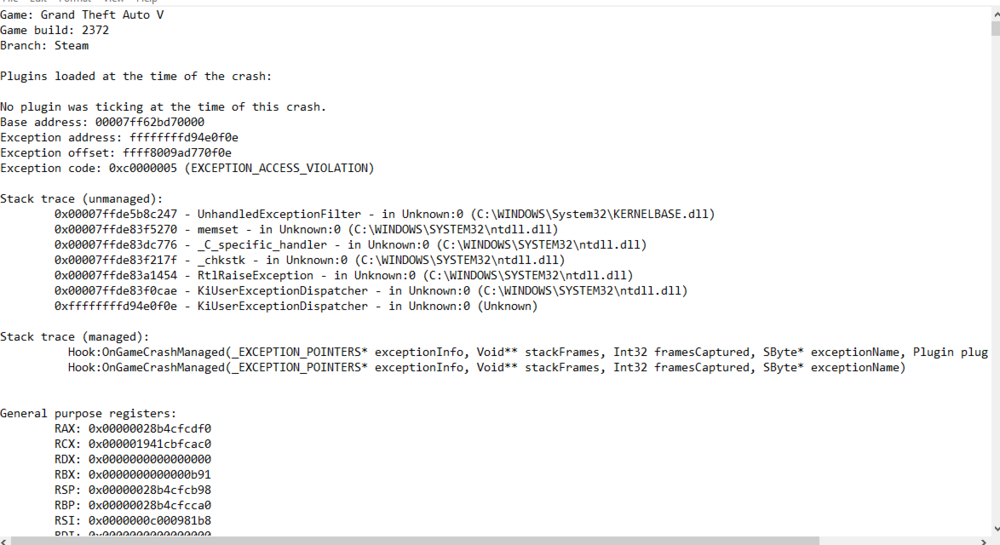
Okay so I've had this issue since day one and never paid much mind as it happens rarely, although has started happening more frequently. I were on-duty outside of the Police station and I were on the pause menu editing my keybinds and my LCPDFR crashed. I do have LSPDFR & EUP Menu loading upon start, and I've set my tick to 60,000. I wanna keep it that way where I load in already on my character as it's a good feature... Is there a fix I can try before disabling plugins opening on start or? Here's my RPH.log and and ScriptHookV.log thanks for your help also your interest in advance, guys you do a great job! ❤️ RagePluginHook.log ScriptHookV.log
-
Already did this. Also I've solved the issue, for some reason the auto install created an entirely new DLC pack in /dlcpacks instead of installing in /patchday22ng. I deleted that DLC and I just unzipped my cars in to the /patchday22ng and deleted the dlc item in Vehicles.meta and everything actually works 100%. I'm gonna think before doing auto installs again, manual is the safest way! xD Thanks for your help nonetheless mate!







