Charlie686
Members
-
Joined
Everything posted by Charlie686
-
What is wrong with Deadly Weapons & Riskier Traffic Stops? 🙂
-
In which case can I have an up to date screenshot of your main directory where I can see everything, alongside your asiloader.log. 🙂
-
Fantastic! Enjoy 😄
-
Then show me where it is on your screenshot of your main directory 😉
-
You've got an error in your SpecialUnits.xml file. It is: The 'LocalPatrol' start tag on line 12 position 3 does not match the end tag of 'CustomRegion'. Line 108, position 5. Make sure you haven't removed the </LocalPatrol> end tag!
-
Thank you! You are missing AdvancedHookV.dll for ELS, which is included in the ELS download. 🙂
-
That should no longer be needed. Instead, please send me an updated log file! (Be sure to attach it this time :))
-
Your game version can be updated! 🙂
-
Hey there, Please attach a screenshot of your GTAV folder. Thanks! 🙂
-
Hey there, While I can't see your log, you've provided me with enough information anyhow! Can you please rename your mods folder to _mods and try again? This will temporarily disable your mods folder. Thanks! 🙂
-
Just the .ls file. The .bak file serves as a backup.
-
[9/11/2023 5:10:00 PM.593] LSPD First Response: [TRACE] Failed to decrypt file:lspdfr/chars/Jack Brown.ls There appears to be an issue with your character. Please delete it from GTAV/lspdfr/chars & retry. If it works, feel free to try reverting the backup .bak file of your character by changing the file extension to .ls. 🙂
-
Hey there, Please add the VCF file then when it crashes, attach your ELS log - a text document called 'ELS' found in your GTAV directory. Thanks! 🙂
-
Thanks for your patience. In this log there is nothing to corroborate a LSPDFR crash. Please try disabling your mods folder temporarily by renaming it to _mods, and seeing if the issue persists. 😄
-
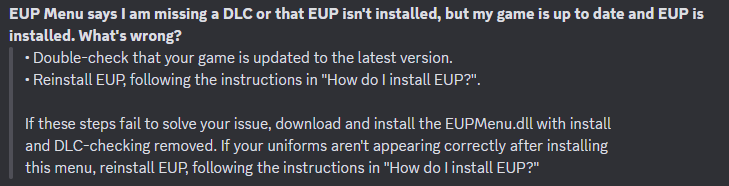
Please follow this as from the EUP Discord.
-
-
That log seems to be labelled as 'unavailable'. Could you replicate your issue & attach an updated log? Thanks! 😄
-
Hey there, Please attach a screenshot of your: mods/update/x64/dlcpacks mods/update/update.rpf/common/data/dlclist.xml Thanks. 🙂
-
Hey there, Please attach your RagePluginHook log. This is a text document found in your main GTAV directory. Thanks! 🙂
-
Hey there! Please attach a screenshot of your GTAV/Plugins folder. Thanks! 🙂
-
Hey there, If you could attach a screenshot of the crash you experience & the corresponding message, that'd be great. Thanks! 🙂
-
Hey there, To clarify - do you mean the Stop The Ped context menu is not working? That's the menu opened via 'G', which in turn allows you to enable / disable the Stop The Ped Realistic Weapon System.
-
The issue is RAGENativeUI here : )
-
Hey there, Please attach your RagePluginHook log - a text document found in your GTAV directory, not your logs folder. Thanks! 🙂
-