




Charlie686
Members
-
Joined
Everything posted by Charlie686
-
Based off that screenshot, NaturalVision Evolved isn't compatible / has a version lock for the latest GTAV update. You'll probably receive a better answer by getting in touch with them directly! 🙂
-
ScriptHookV needs updating, too.
-
That's good to hear that we've identified the problem. Best of luck & let me know if you need anything else.
-
Please provide a log. 😄
-
I haven't experienced any issues with Stop The Ped's traffic control, but as an alternative you could try GrammarPolice which has included Traffic Control.
-
There's not much you can do to get around that. You'll need those settings on High+ in order to have brighter lights, and higher graphic settings will cause lower frames. I own a Zenbook 14, and I wouldn't really try to play LSPDFR on it (specifications & temperatures). Perhaps you could try altering your settings.xml file (Documents < Rockstar Games < GTAV) which allows you to alter your graphic settings in more detail to achieve a higher frame rate. When I played on a lower-spec PC, editing this file helped me to increase my frame rate even with Shader Quality & PostFX set to High. All the best! 🙂
-
Hey there, Based off the attached section of your log, please update RAGENativeUI. Hope this helps! 🙂
-
Sounds like you installed a faulty modification / installed something wrong in your mods folder! 😄 You can re-create your mods folder, and take extra care. I would recommend installing things slowly & then testing, which makes it easier to determine what the problem is if one occurs.
-
Perhaps one of your vehicle models is faulty. I would recommend proceeding with the initial step I suggested!
-
That's great news! Enjoy.
-
Exception message: Input string was not in a correct format. In other words - a piece of text couldn't be converted into a number. This suggests you've edited a .ini file incorrectly, perhaps for LSPDFR or another plugin. Does this ring a bell? 🙂
-
Hey there, There is nothing to corroborate a LSPDFR crash in your log. If you have a mods folder, please rename it to _mods & retry. This will temporarily disable your modifications. Let me know how this goes!
-
Not too sure, but I imagine it is a value in the vehicles.meta entry for those vehicles that affects this. Perhaps minSeatHeight? You could always try the values of vehicle slots that work. 🙂
-
I'd recommend posting here! It might get lost in the LSPDFR section. 😅
-
You are amazing too! Have a good evening!
-
Hey there, Cannot load invalid model with hash 0x1b38e955. Your issue is that the POLICET model, which corresponds to that hash, is invalid. This suggests you might've modified your vehicles.meta file, in particular the POLICET entry. Make sure you haven't inadvertently deleted it. Please revert your recent vehicles.meta file changes & go from there. Remember, you never really want to drag & drop new vehicles.meta files when installing. Instead, copy & paste desired entries into your existing file. Good luck! 🙂
-
Hey there, Exception message: Cannot load invalid model with hash 0xa7ede74d. Your issue is that the STANIER model, which corresponds to that hash, is invalid. This suggests you might've modified your vehicles.meta file, accidentally deleting the STANIER entry (and perhaps others too). Please revert your recent vehicles.meta file changes. Remember, you never really want to drag & drop new vehicles.meta files when installing. Instead, copy & paste desired entries into your existing file. Good luck! 🙂
-
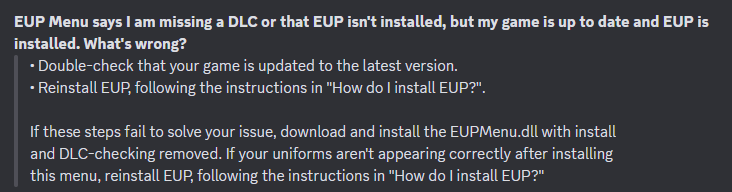
Hey there, In regards to your issue with EUP, please see attached from the EUP team. As for LSPDFR crashing, in your uploaded log you haven't gone on duty. Please replicate your issue & attach an updated log. Thanks! 🙂
-
SuperCallouts was updated 7 hours ago. :))))
-
Could not find a part of the path 'B:\SteamLibrary\steamapps\common\Grand Theft Auto V\plugins\LSPDFR\GrammarPolice\textures\radio Install all the files included in the Grammar Police download. 😄
-
Unfortunately not. However! What you can do is head to your Grammar Police custom.ini file, and go to the [UseNative] section. By setting the Ped & Plate check to false, Grammar Police will not use the default Ped & Plate checks, and instead make use of third-party plugins like Stop The Ped. This doesn't 'fix' the different results, but instead Grammar Police will give you the checks directly from Stop The Ped and as it is from Stop The Ped, it should match with Stop The Ped. 🙂
-
Hey there, Please attach your RagePluginHook log - a text document found in your main GTAV directory. Thanks! 🙂
-
Please explain your problem in detail & attach your RagePluginHook log, a text document found in your main GTAV directory.
-
Why is Stop The Ped correct & Grammar Police wrong? 🙂 Why can't it be the other way round? Either way -- Bejoijo's plugins often make things up on the fly and with limited APIs (how plugins interact with one another), it is impossible for other plugins to match up unfortunately.
-
Immersive Dispatch is fully replaced by Grammar Police, you should use that instead! 🙂




