


Jeffdadawg
Members
-
Joined
Everything posted by Jeffdadawg
-
Indeed it doesn't. But, from what I know, that is the correct active folder for the EPIC Games GTAV.
-
Do so if you wish. Make sure you have all components needed for GTAV (Visual C++ etc.)
-
Try reinstalling RAGE using 0.4.8 manual install.
-
Where did you install the game to?
-
That would be cool. I think the 'Love' Reaction should be 2 Rep points. After all, it has a stronger meaning than 'Like'.
-
@A Stranger, I'm gonna let you handle this problem as you clearly know more German than me🙂
-
If disabling everything doesn't work, that means the game itself has a problem. you say it crashes on Startup? If it does, Go to Documents/Rockstar Games/Launcher and get me your launcher.log
-
Please say it in the language you used before🙂 There are also German and French forums if you want to check that out!
-
What form of help do you need?
-
I'm going to be totally honest, I liked the last website design. But this one is cool though. True. It goes both ways. Sorry mate, they're gone now 😂
-
Please Define 'ran out of character'. It might be that an antivirus is blocking the game from launching. Damn. I was just about to type that 😂
-
Hello, Please delete everything installed by Albo. They can cause crashes. Replace them with Bejo's mods here : https://www.bejoijo.com/
-
Hello, If you haven't noticed already, this forum is old. Please post your own forum.
-
Hello, May I ask, what does 'no star' mean? So, when you Launch RagePluginHook.exe, nothing happens?
-
Glad to hear🙂
-
No comment. Use 17-22.
-
Hello, First of all, why are you liking everything I post? I appreciate it but there really is no need. Second, which Patchday are you using? 23 doesn't work.
-
Hello, Please post your own topic and not hijack other people's topics. As for your plugins, delete them. Delete LSPDFR+,Arrest Manager and Traffic Policer and replace them with Bejo's plugins.
-
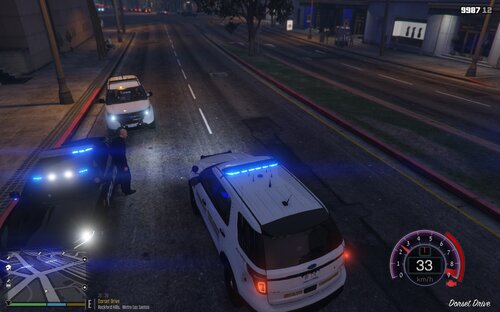 When I see a callout pack, I think 'How can I make this to my own liking? How do I do this better?' and so I start my journey to create my own personal callout pack. I tweak the callouts to my liking and just how I want them to be. Not every callout is the same. It might have the same name but it can contain different storylines.
 -
Delete Traffic Policer and other mods made by Albo. Replace them with Bejo's mods:https://www.bejoijo.com/ You can give a citation using STP and Compulite.
-
Glad to hear🙂
-
Hello, This is the wrong forum. The correct one is Suggestions and Requests. I'm not sure if anyone has made a 2021 version but 2020 Silverado's do exist.
-
Something @UnknownBastion has pointed out: Why did you remove the little dots below our Member Titles? I liked them😢
-
As I mentioned before, you have a problem with SlimDX. This has various solutions and is quite hard to diagnose. I suggest you look in to other topics related to your situation. I'll list a few solutions that @A Stranger have mentioned n other topics. 1. Restart of the PC. 2. A complete sfc /scannow 3. Antivirus exceptions 4. Reinstallation of the .NET packages for Windows. 5. Cleaning the GTA V folder to make it vanilla and starting over. Unfortunately, I cannot help you further than this.
-
So you've reinstalled GTAV and LSPDFR and there still is a crash. Send me another log.




