


CrazyPanda1234
Members
-
Joined
-
Last visited
Everything posted by CrazyPanda1234
-
Whats this program called? Because im a texture artist too?
-
What your describing is Simple Native Trainer or SNT would you like a link?
-
BPM released one on his channel heres the link : https://www.youtube.com/watch?v=CTqSICLbxoA Hope this helps :)
-
Whats your hometown? Theres tons of NYPD cars,well CV's anyway
-
That could have continued for quite a while :p
-
You forgot MPDC Just kidding
-
Off topic : Mmm Starbucks :P On topic : Im not a fan of that style of lightbar except on NYPD cars :)
-
I had a look at it a couple of days ago but it didnt really appeal to me,it looked more like a free online game so their not getting £30 ($37ish) of my money!
-
You must feel bad :P
-
Id like to see the Tow truck first because I use ELS XD
-
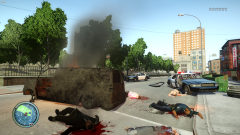 And I though the London Riots were bad...RIP libertonians
 -
Congrats,I got my 600th on Sunday :) On topic : I think they use the thing that makes the taxis pull over so I dont think it can be changed? :S
-
I hate seeing that
-
Is it your because it looks pretty awesome :)
-
Have you pressed "home" ?
-
Ha their hilarious!
-
I dont think you can turn it off
-
Challenge accepted
-
Sorry to post on an "old" thread but I cant help but think my new desktop is the best XD
-
Il keep working on it :)
-
It worked okay its just that the siren stops then restarts after its finished(basically its not looping) but its probably my fault XD
-
Thanks for that,I just need to test it out in game now
-
Thank you :) Thats a great help!
-
Hi everyone! I want to start making my own sirens but there are no good tutorials.If anyone can help me it would be greatly appreciated :) I have Audacity Demo's FRAPS All I need is for someone to guide me through the steps :) Ive tried this tutorial but it misses things out : https://www.youtube.com/watch?v=1SneVKYONHg Thanks :) Scott
-
^ no,I rebuild then save and it works fine with me

