
Wasyl DASH
Members
-
Joined
-
Last visited
Everything posted by Wasyl DASH
-
 As a person who mainly plays LAPD, this is a really good mod. But it definitely needs a customization menu (I'd like to change positioning and hide "Los Angeles".
 -
-
I make copies of gta one on external disk and another on my laptop- just in case, cuz I’ve spent a lot of time modding and configuring everything and don't wanna lose everything. Every time I change something, I update the copies. Unless someone installs huge mods like LA Revo or NVE, I don’t think backups for re-modding are necessary. I also always check what .OIV mods actually change before installing them so they don't replace my already edited files.
-
-
Your videos on YT look smooth, I thought you were getting at least 60 FPS. I’m wondering how many FPS You would get if You had CPU that has more cache, like an AMD with their X3D tech.
-
I’m trying to run LSPDFR and the LA Revo map, but I’m only getting around 30–50 FPS. I’m wondering if this is just my hardware struggling or if 16 GB of RAM isn’t enough for this mod setup. Does anyone play LA Revo + LSPDFR and could share their PC specs and the FPS they get? My specs AMD Ryzen 5 5600 ASRock B450M Pro4 R2.0 GIGABYTE GeForce RTX 4060 EAGLE OC 8G 16 GB (2x8 GB Goodram IR2400D) ADATA 1TB M.2 PCIe Gen4 NVMe LEGEND 960 Resolution 1080p
-
-
Hi, you can try this method: go to \mods\update\update.rpf\x64\data\control open default.meta and search for <Item> <Input>INPUT_PHONE</Input> <Source>IOMS_KEYBOARD</Source> <Parameters> <Item>KEY_UP</Item> </Parameters> </Item> change "KEY_UP" to "none"
-
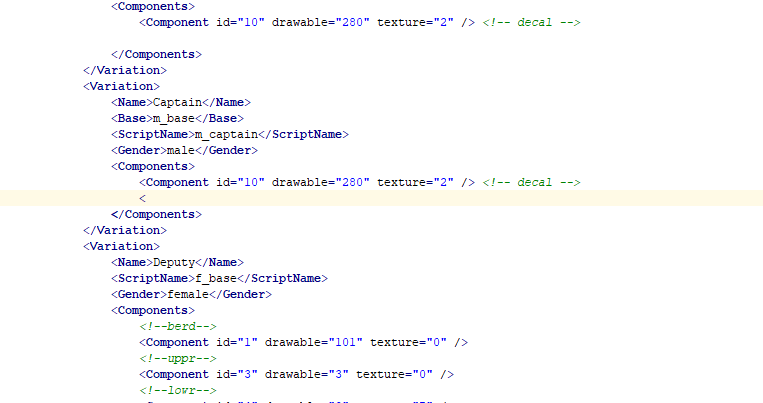
Hi, try to delete "<" line number 183
-
 Sorry, forgot delete this the txt file, it's in the readme me.txt "2. Add "WEAPON_BALL" in the AdditionalLoadouts= (plugins\LSPDFR\StopThePed.ini) e.g. AdditionalLoadouts=WEAPON_FLASHLIGHT,WEAPON_FLARE,WEAPON_NIGHTSTICK,WEAPON_SMOKEGRENADE,WEAPON_BALL"
 -
This mod let you use Stop The Ped's RealisticWeaponSystem and Lidar Gun mod at the same time.Main mod made by BenH and Opus49 (must have) If you have any questions leave a comment or contact me by Steam Known bugs: You can use lidar gun from the vehicle but there's no gun model showing
-
-
-
@nova2727 Let us know how It went.
-
We got GTA 6 before gta v lspdfr enhanced 💀
-
What mods did you download
-
Hi, I wanted to play lspdfr+5real+frame gen and DLSS by PureDark but it seems DLSS crashes the RPH on startup. I tried start normal gtav.exe and then on loading screen start rph which worked, the game with rph loaded but after typing reloadallplugins and pressing f4 to close the console the game crashed. Does someone know if this mods are even compatibile with each other or know how to fix this? I need this frame gen cuz with these mods the game is rly demanding even for rtx4060. sorry for my english im from poor poland
-
-
have u tried going on duty without plugins?
-
-
try this Releases · scripthookvdotnet/scripthookvdotnet-nightly (github.com) it did work for me
-
try to install this Releases · scripthookvdotnet/scripthookvdotnet-nightly (github.com)
-
I managed to fix this (at least for me). I just reinstalled lspdfr and installed new ScriptHookV.dll. I tried this a few time already but it did work this time.
-
same, no mods no scripts no plugins
-