
Scorpionfam
Members
-
Joined
-
Last visited
Everything posted by Scorpionfam
-
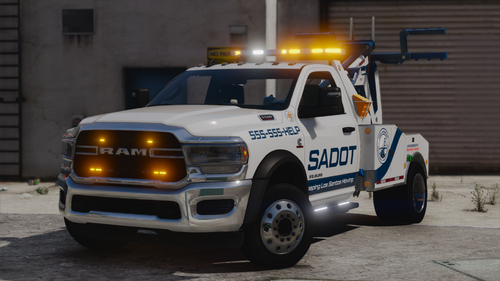 Hello peeps! This is a small tow truck I've been working on and finally releasing. It's marked as SADOT pack in the files because I was originally planning to make this a bigger pack and I probably will sometime in the future All the lighting features shown in screenshots are available with ULC so as always enjoy and lmk if you find issues! Functions: Boom lifts and lowers using the in-game tow mechanics Left side compartment doors open using Left rear door and right rear door Right side compartment doors open using trunk Wheel lift lowers by opening the hood Features: Working Hook Brake Override Scene lighting mode (FiveM Version only) Stop The Ped Small Tow Truck Replacement Openable Toolboxes Singleplayer and FiveM Version -Vehicles- 2024 5500 Ram - 5500wrecker HOW TO INSTALL FOR SINGLEPLAYER!!! Vehicles and Stop the Ped Small Tow Truck Replacement Vehicle Installation: Navigate to GTAV - mods - Update - x64 - dlcpacks Drag and drop the "sadot pack" folder Next Navigate to GTAV - mods - Update - Update.rpf - common - data Open dlclist.xml and add the following line <Item>dlcpacks:/sadot pack/</Item> The trucks will now load ingame! Stop The Ped Tow Truck Replacement: Navigate to GTAV - plugins - LSPDFR - StopThePed.ini When you open the INI. Look for the section near the bottom with the tag [TowService] Here, you will want to change SmallTowTruckModel to SmallTowTruckModel=5500WRECKER Now the ram will respond when called in by stop the ped Having texture problems? Check your graphics setting and make sure your Direct X version is on DX11. Anything lower and it will bug textures. If you have any issues feel free to join the Rocket Mods Discord https://discord.gg/6xHyEE9 As always.... DO NOT rip or republish my work (Don't be one of those people) DO NOT Unlock ANY of my models You are ALLOWED to EDIT the YTD files of the vehicles BUT CANNOT use the textures included on other vehicles WITHOUT my permission. and if able give me credit if this car is used in yt vid or stream(Helps spread the word)
 -
 BC7 shouldn't affect colors. it will only look washed out in openiv. but ingame it should look fine. messing with the compression format in openiv usually just messes stuff up.
- 173 comments
- 17 reviews
-
 They actually might be. It just uses els to toggle the lighting. You could Throw it in fivem and try It out
 -
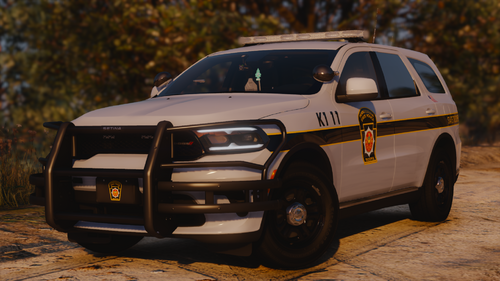
Hello peeps! THIS PACK REQUIRES THE 32 SIREN SETTING LIMIT ADJUSTER SCRIPT (SSLA). WITHOUT IT SOME LIGHTS WONT WORK!!! This pack was a commission by Byrd The liveries are also made by him and they look hot so thank him for those. This pack is a 4 car pack for Pennsylvania State Police featuring a 2024 Durango, 2024 FPIU, 2023 Charger, and a 2018 Charger Enjoy! -Vehicles- 2024 FPIU - psp24fpiulib2 2024 Durango - psp24durangolib2 (4 liveries) 2023 Charger Liberty 2 - psp23chgrlib2 (5 liveries) 2018 Charger Liberty 1 - psp18chgrlib1 (4 liveries) ⛖ Question & Answer ⛖ Q. Will there be a FiveM version? A. Probably not. Q. The pack doesn't work? A. Double check, Especially if no one else is reporting the same issues Q. The Lights wont work or stays on? A. Make sure your ELS is working correctly and you installed the correct XML Q. Some lights work. others don't? A. Make sure you have SSLA Installed. Q. What format will the files come in? A. These files will come as a Addon ONLY HOW TO INSTALL!!! Navigate to GTAV - mods - Update - x64 - dlcpacks Drag and drop the "psp_pack" folder Next Navigate to GTAV - mods - Update - Update.rpf - common - data Open dlclist.xml and add the following line <Item>dlcpacks:/psp_pack/</Item> For the XML files place them in GTAV - ELS - pack_default And your done. go ahead and load up your game! Having texture problems? Check your graphics setting and make sure your Direct X version is on DX11. Anything lower and it will bug textures. If you have any issues feel free to join the Rocket Mods Discord https://discord.gg/6xHyEE9 As always.... DO NOT rip or republish my work (Don't be one of those people) DO NOT Unlock ANY of my models You are ALLOWED to EDIT the YTD files of the vehicles BUT CANNOT use the textures included on other vehicles WITHOUT my permission. and if able give me credit if this car is used in yt vid or stream(Helps spread the word)
-
 if you take my pack out is it working?
 -
Do you have a photo of the error?
-
All i can suggest is to try reinstalling. no one else has reported that issue.
-
Do you have a game config installed?
-
 Looks 🔥 brother!
 -
 It means it uses ELS and NON-ELS for the lighting. similiar to how hybrid cars still use gas but also their eco hybrid stuff.
 -
With this pack no. It's required to be an addon since its a hybrid ELS.
-
 Yeah I could he wrong but I believe when the error was thrown it said fayas needed a higher version then the one this has.
- 54 comments
- 2 reviews
-
its the dependencies. the version of NAudio it uses is incompatible with Faya's seatbelt script because i believe faya is using a newer version and this one is using an outdated version.
- 54 comments
- 2 reviews
-
-

- 1
-
-
I got this error while trying to use it. entered a car and it immediately happened. Also turns out the version of NAudio this uses doesn't work with faya's seatbelt plugin
- 54 comments
- 2 reviews
-
-
 Hurk updated that pack with an els version
 -
The description says if you have texture issues to make sure your game is using a direct x version of 11 or higher
-
 Well, you need one for addon packs https://www.gta5-mods.com/misc/gta-5-gameconfig-300-cars
 -
Do you have a game config installed?
-
Well noone else has had issues so it's something on your end. Can you specify what it's doing. Like, is it not showing uo in game, or is it crashing rhe game, etc.
-
 As said in the FAQ, If your using ELS and DLS just go into the dls.ini and set the extra patch to false. Other instructions on how to install DLS are in the read me
 -
I don't plan on it. This was only made because someone commissioned it to be made.
-
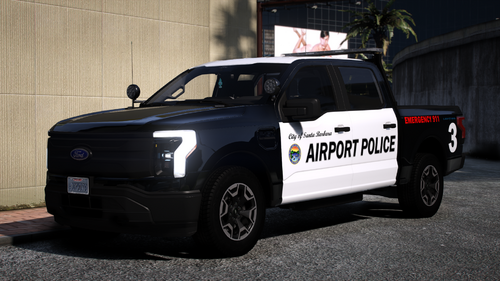
Hello peeps! THIS PACK REQUIRES THE 32 SIREN SETTING LIMIT ADJUSTER SCRIPT (SSLA). WITHOUT IT SOME LIGHTS WONT WORK!!! This is a little commission i made. Big thanks to BFERN805 for commissioning it and working with me ❤️ This is a 2023 Ford Lightning based on Santa Barbara Airport Police. It's supposed to be as accurate as I can get with the resources I have As always hope you all enjoy! - Features - SBAP Realistic Setup Traffic Advisors Takedowns and Alley lights Door Kills Brake Override Realistic Interior and Wiring -Vehicles- 2023 Lightning - SBAPLIGHTNING ⛖ Question & Answer ⛖ Q. Is DLS Compatible with ELS? A. Yes! you just need to disable the extra repair fix in the dls.ini Q. The pack doesn't work? A. Double check, Especially if no one else is reporting the same issues Q. The Lights wont work or stays on? A. Make sure your DLS is working correctly and you installed the correct XML Q. Some lights work. others don't? A. Make sure you have SSLA Installed. Q. What format will the files come in? A. These files will come as a Addon ONLY Q. My cars have wierd textures on certain parts? A. Make sure in your graphics setting your on DirectX11 HOW TO INSTALL!!! Navigate to GTAV - mods - Update - x64 - dlcpacks Drag and drop the "sbaplightning" folder Next Navigate to GTAV - mods - Update - Update.rpf - common - data Open dlclist.xml and add the following line <Item>dlcpacks:/sbaplightning/</Item> Navigate to GTAV - plugins - DLS Drag and drop the DLS XML's into the folder. And lastly, Navigate to GTAV - Plugins and edit your DLS ini. You will do this by going to the DLS ini i provided then copy anything in the bottom of the INI past the "## THE FOLLOWING MODES ARE CUSTOM MADE" and paste them inside of your own INI at the bottom. (or just drag and drop my ini i won't judge.) And your done. go ahead and load up your game! Having texture problems? Check your graphics setting and make sure your Direct X version is on DX11. Anything lower and it will bug textures. If you have any issues feel free to join the Rocket Mods Discord https://discord.gg/6xHyEE9 As always.... DO NOT rip or republish my work (Don't be one of those people) DO NOT Unlock ANY of my models You are ALLOWED to EDIT the YTD files of the vehicles BUT CANNOT use the textures included on other vehicles WITHOUT my permission. and if able give me credit if this car is used in yt vid or stream(Helps spread the word)
-
well it should work with els. since they use both ELS and NON-ELS. The cars just won't have the ability to change the main pattern since i used non els to get it close to life
-
read the description