


AikoCutie
-
Joined
-
Last visited
Posts posted by AikoCutie
-
-
-
-
Edited by AikoCutie
6 hours ago, FileEX said:GTA V crashes when loading story mode. It doesn't show any error, just crashes the game to desktop after a few seconds of loading. I renamed the mods folder to _mods but the problem persists. I renamed the file dinput8.dll and the game works!
Why do I think this crash is weird? Because if I run the game via RPH everything works fine including dinput8.dll, asi mods and the mods folder. The problem is only in GTA V in story mode.Rename back to dinput8.dll. Search up .asi in the main directory and move them to your desktop or a new folder, test each .asi, place one back in and start the game, if your game works, repeat until your game crashes. (I recommend testing out ELS.asi first as its known for most crashes)
-
6 hours ago, Skutela32 said:
My game crashes when i try to load lspdfr. It worked twice but doesnt work most the time. Sometimes gives an error other times it insta crashes with no error.
In this photo the console showed the error but the game still ran for another 30 seconds before crashing.
[5/1/2023 11:41:53 PM.100] Loading plugin from path: F:\SteamLibrary\steamapps\common\Grand Theft Auto V\Plugins\LSPD First Response.dll
[5/1/2023 11:41:55 PM.304] <UNLOADED PLUGIN>: Initializing input system
[5/1/2023 11:41:55 PM.305] <UNLOADED PLUGIN>: Initializing game console
[5/1/2023 11:41:55 PM.306] <UNLOADED PLUGIN>: Initializing forms manager
[5/1/2023 11:41:55 PM.415] Plugin "LSPD First Response" was loaded from "LSPD First Response.dll".
[5/1/2023 11:41:55 PM.550] LSPD First Response: [TRACE] Started loading LSPDFR
[5/1/2023 11:41:55 PM.552] LSPD First Response: [INFO] Running LSPD First Response 0.4.9 (0.4.8433.20359)
[5/1/2023 11:41:55 PM.552] LSPD First Response: [INFO] Compiled on 2 Feb 2023 16:18:39 UTC
[5/1/2023 11:41:55 PM.552] LSPD First Response: [INFO] Copyright © 2015-2020, G17 Media, www.lspdfr.com
[5/1/2023 11:41:59 PM.232] LSPD First Response:
[5/1/2023 11:41:59 PM.232] LSPD First Response: ==============================
[5/1/2023 11:41:59 PM.233] LSPD First Response: UNHANDLED EXCEPTION DURING GAME FIBER TICK
[5/1/2023 11:41:59 PM.233] LSPD First Response: ------------------------------
[5/1/2023 11:41:59 PM.233] LSPD First Response: Origin: Game fiber "Plugin "LSPD First Response" main fiber".
[5/1/2023 11:41:59 PM.233] LSPD First Response: ------------------------------
[5/1/2023 11:41:59 PM.233] LSPD First Response: Exception type: System.AccessViolationException
[5/1/2023 11:41:59 PM.233] LSPD First Response: Exception message: Attempted to read or write protected memory. This is often an indication that other memory is corrupt.
[5/1/2023 11:41:59 PM.233] LSPD First Response: ------------------------------
[5/1/2023 11:41:59 PM.233] LSPD First Response: Inner exceptions:
[5/1/2023 11:41:59 PM.233] LSPD First Response: ------------------------------
[5/1/2023 11:41:59 PM.233] LSPD First Response: Stack trace:
[5/1/2023 11:41:59 PM.233] LSPD First Response: at Rage.Native.NativeFunction.CallByAddress(IntPtr address, Type returnType, NativeArgument[] arguments)
[5/1/2023 11:41:59 PM.233] at Rage.Native.NativeFunction.CallByHash(UInt64 nativeHash, Type returnType, NativeArgument[] arguments)
[5/1/2023 11:41:59 PM.233] at Rage.Native.NativeFunction.CallByHash[ReturnType](UInt64 nativeHash, NativeArgument[] arguments)
[5/1/2023 11:41:59 PM.233] at ZVefVayHggAtFkbSCufMtpzbPhjXA.XEnQWsPBSBBOQlMoUpfwjQqqjVFK() in D:\GTA V\LSPD First Response\LSPD First Response\Mod\LSPDFR.cs:line 459
[5/1/2023 11:41:59 PM.233] at ZVefVayHggAtFkbSCufMtpzbPhjXA.lDjCSHCcktfSqBMBoTBmyDHDLjvg() in D:\GTA V\LSPD First Response\LSPD First Response\Mod\LSPDFR.cs:line 169
[5/1/2023 11:41:59 PM.233] at Rage.GameFiber.Main()
[5/1/2023 11:41:59 PM.233] LSPD First Response: ==============================
[5/1/2023 11:41:59 PM.233] LSPD First Response:
[5/1/2023 11:41:59 PM.235] LSPD First Response: [TRACE] Thread CopManager #1 initialized
[5/1/2023 11:41:59 PM.239] LSPD First Response: [FATAL] Forced termination
[5/1/2023 11:41:59 PM.244] LSPD First Response: [TRACE] Released 0 entities from DefaultContentManager
[5/1/2023 11:41:59 PM.272] LSPD First Response: [INFO] LSPDFR has shut down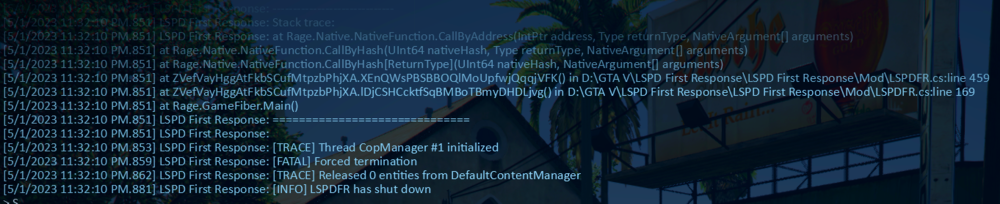
Rename mods to _mods try again
-
-
-
10 hours ago, AP737 said:
I did all of the things you said and took a look at the Google doc, however, it still doesn't work. It still shows "Story Mode, Online, etc." Anything else you recommend?
You have to expand on "it doesnt work", do you still get the same error as you've shown above? or is this a completely different error. saying it shows story mode, online, doesn't mean anything
-
2 hours ago, AP737 said:
Hi when I try to load LSPDFR, it loads into the default GTA 5 load screen with the "Story Mode, Online, etc." The Rage Plug-In Hook will then show this window. Here is the Rage Log.
.png.92460c221fcfce4ddca0ff9539e94722.png)
Add the GTA Main Directory to the exceptions list for your anti-virus. Restart PC.
Remove any in-game overlays such as GeForce experience/Xbox game bar, Then try again. Try running rage as administrator. If the issue still persists, see page 4 for more solutions:
-
1 minute ago, Jacksvn said:
Nope, still crashing.
Rename dinput8.dll to _dinput8.dll see if that helps
-
-
1 minute ago, Jacksvn said:
Still crashing. here's the log
RagePluginHook.log 7.88 kB · 0 downloads
I ran it as admin and added the main directory as an exception in my antivirus
Do you have a scripts folder?
-
1 minute ago, Jacksvn said:
Antivirus exception
Add the GTA Main Directory to the exceptions list for your anti-virus. Restart PC.
Remove any in-game overlays such as GeForce experience/Xbox game bar, Then try again. Try running rage as administrator. If the issue still persists, see page 4 for more solutions:
-
-
Just now, Jacksvn said:
Yeah, I can load into story mode fine and i was playing gta online like 30 mins ago.
Send a screenshot of your entire main directory
-
-
-
-
7 minutes ago, Jacksvn said:
Just reinstalled LSPDFR and RPH again today, I'm really bad at troubleshooting RPH and LSPDFR so I have no idea where to start, here's my log.
Change your plugin time threshold the rage settings to 60,000. Do you have scripthookvdotnet? -
3 hours ago, TheThrone said:
So when i try to go on duty the game frezze with a beeping noise and say that Lspdfr first reponse is no compatible and want me to install lspdfr 4.2 i dont know what to do because when the message pop up First reponse immediately crash and even when i reload all plugin it still say that i dont understand i have the lastest version of first reponse Please help me
There i forgot put my Rage log (There is when i reload all plugin too)
Remove PoliceLifeS, and callout manager, both outdated. Reinstall Rage native UI
Put RageNativeUI.dll and .xml into your root GTA V folder. https://github.com/alexguirre/RAGENativeUI/releases
-
7 hours ago, JeffGemi29 said:
Thank you! Fixed the crashing issue, but now any mods installed via OIV don't function in game.
if renaming your mods folder to _mods worked, that means something went wrong with a mod you installed or a meta file you changed (or its just gta being gta), either try and remember what mod you installed recently and uninstall it / revert the meta file, or, I'm afraid you are going to have to restart your mods folder.
Also, if you haven't already, install the required game configs.
**Modified Gameconfig**
mods > update > update.rpf > common > data
**Heap Limit Adjuster**
Place the .asi file into your main GTA V folder.
**Packfile Limit Adjuster**
Place the .asi and .ini files into your main GTA V folder.
-
1 hour ago, RollingHills said:
Yoo guys.. I have a problem on starting RAGE Plugin Hook, a message pops up: ERROR: Could not hook game process. Unsufficient permissions or bad anti-virus..
I checked the tutorial on YouTube, followed all the steps what in the tutorial, but it did not help at all.

Add the GTA Main Directory to the exceptions list for your anti-virus. Restart PC.
Remove any in-game overlays such as GeForce experience/Xbox game bar, Then try again. Try running rage as administrator. If the issue still persists, see page 4 for more solutions:
-
1 hour ago, JeffGemi29 said:
Recently uninstalled and reinstalled in an attempt to fix crashes. Crash report attached. Crashing prior to plug-ins loading.
Rename mods to _mods try again
-
-
4 hours ago, Kryozz19 said:
Hi guy, i need you beacause my game alway crash after 5-10 min of patrol my last line is the policeb so i unistall my model but it continue crashing. Do you know why ? Thx have a nice day RagePluginHook.log
When you crash do you get a rage has crashed notification? Also is the crash always at random places or at a specific place

.png.92460c221fcfce4ddca0ff9539e94722.png)



Weird GTA V crash
in Legacy
Then unfortunetly you have to do what bastion said.