Legendary6amer9
Members
-
Joined
-
Last visited
Everything posted by Legendary6amer9
-
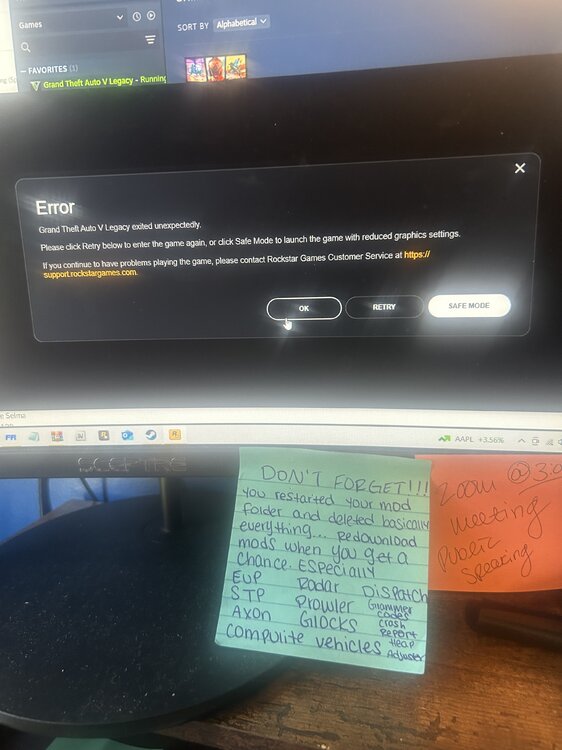
How can I fix this I downloaded the Natural Vision GRAPHICS (I had it before but I restarted my mod folder) and now when I download it back and load my game this message pops up
-
I restarted my game file and now I don't know the latest game version so I looked up RPH and downloaded the latest but now It's saying that it's not supported... What am I supposed to do now?
-
Am I supposed to have 3 things in my mod folder?r update2.rpf update.rpf update (2).rpf
-
Do you think it's because I got a police SUV named under sheriff? Or Can I like ss my mod folder
-
So I added a vehicle, and my game crashed because I probably added something in Open IV. So I took it upon myself and deleted it, and now I think I deleted something important because my game keeps crashing on the loading screen. Will anyone help me, please?
-
WHY DOES MY GAME KEEP CRASHING??? WILL SOMEBODY HELP ME PLEASE RagePluginHook.log
-
Can anyone help me? my game keeps crashing and I don't know what's causing it. RagePluginHook.log
-
Do I add these two vehicles just like I add the other one's Note~ In the file it only have DLC on it add on/replace
-
Did you fix it im having the same problem
-
-
Now I have this problem, i’m finna attract my RPH RagePluginHook.log
-
your right my badd
-
do I delete my original mods folder and just in case that doesn't work what do I do next. because I already did that step
-
there you go
-
I think this the one RagePluginHook.log
-
Every time I load the game rph will automatically crash it won't even take me to the loading screen and it's just a black screen "Grand Theft Auto V has crashed! Please wait while RAGE Plugin Hook generates a crash report. This may take a minute Collecting game details" and it just sits and loads with the green bar going across the screen. HELP ME
-
Does anybody know the latest patchday to install police vehicles (replacements and addon) I want to add these vehicles I was using patchday 25 and only one sheriff's vehicle shows, which makes me mad.
-
And by the way, what is the latest patchday?
-
-
I can use the ELS 2021 Chevrolet Tahoe as a FBI but I want all three in the game if that's possible.
-
Add on Add on and whats the latest patch day that might be the problem?
-
For some reason when I install car packs, I don't see them in my game only one vehicle from the pack shows and I want every car from the pack. Do you have any suggestions?
-
When I press f4 on my keyboard and type force duty a message pops up saying " Unhandled exception in console command" how can I fix this?
-
I've been using the advanced hook, and I still get that error. Should I just keep redownloading it every day, or is there a solution?
-
I fixed my problem I had to update native