



gapcomputer
Members
-
Joined
-
Last visited
Everything posted by gapcomputer
-
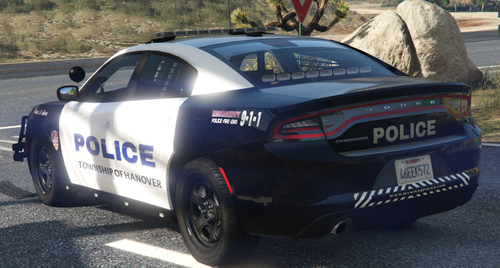 Non Fictional Vehicles Replace Texture With Open IV Vehicles included in the mod Ford Explorer 2016 Ford Taurus 2016 Chevrolet Tahoe 2015 Dodge Charger 2018 Get vehicles from this pack
- 6 comments
- 1 review
-
-

- 1
-
-
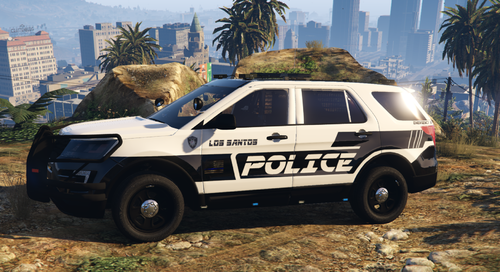 Sorry about that, also add a new link to an FPIU where you can have the custom plates
- 8 comments
- 1 review
-
-
Non Fictional Vehicles / Fictional Vehicles Here are some liveries i did for myself, some are fictional some others not, but you can have it if you wish Replace Texture with Open IV Durham, NC Police and Los Santos Police based on Durham PD As Example i post the Ford Explorer Vehicles in this files are separated in 2 archives Original and mod vehicles in this mod Ford Explorer get it from here for custom plates download this version of Explorer Ford Taurus Ford Crown Vic 2011 Dodge 2018 get it from here
- 8 comments
- 1 review
-
Glad i can help
-
can you post the link to see if can help you out, i can't find that mod, thanks
-
My bad, you right, sorry about that
-
you can not run GTAV via steam, inside the folder you will find RagePluginHook.exe, run it from there, or check the desktop if you have a shortcut, good luck vous ne pouvez pas exécuter GTAV via steam. Dans le dossier, vous trouverez RagePluginHook.exe, puis exécutez-le à partir de là ou vérifiez sur le bureau si vous avez un raccourci, si vous utilisez un traducteur, désolé pour les erreurs de grammaire.
-
did you try uninstalling the mod?
-
try disabling your antivirus and reinstall LSPDFR (or copy all the RPH related files into your GTAV folder) with the antivirus disabled, also add the folder to exceptions or ignore, see if that helps.
-
Traffic Policer compatibility warning: Different LSPD First Response.dll version detected, use at your own risk! This mod was made for LSPDFR 0.4.2 [8/17/2019 10:07:14 PM.765] LSPD First Response: RAGENativeUI.dll out of date. Required version of RAGENativeUI to run this mod: 1.6.3.0 [8/17/2019 10:07:14 PM.795] LSPD First Response: Arrest Manager compatibility warning: Different LSPD First Response.dll version detected, use at your own risk! This mod was made for LSPDFR 0.4.2 [8/17/2019 10:07:14 PM.796] LSPD First Response: RAGENativeUI.dll out of date. Required version of RAGENativeUI to run this mod: 1.6.3.0 [8/17/2019 10:07:14 PM.803] LSPD First Response: AssortedCallouts compatibility warning: Different LSPD First Response.dll version detected, use at your own risk! This mod was made for LSPDFR 0.4.2 [8/17/2019 10:07:14 PM.804] LSPD First Response: RAGENativeUI.dll out of date. Required version of RAGENativeUI to run this mod: 1.6.3.0 It seems like RAGENativeUI.dll is outdated, maybe you install a mod with a older version, try to install the new version of RAGENativeUI.dll and see if that fix the problem, if you keep a copy of the downloaded mods, check Arrest Manager 7.11.0.0, that mod have an updated version of RAGENativeUI.dll
-
do you have a log? try verifying your files from steam
-
.thumb.png.362bb5748fb77b4ad7407c70fc93fef2.png) you're welcome Thanks
you're welcome Thanks -
-
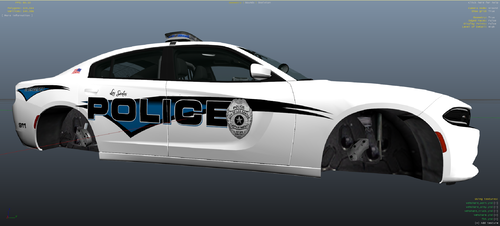 fictional Replace Texture With Open IV Skins in this pack LSPD Ford Explorer Vehicle models from this pack Skins in this pack LSPD Ford Taurus LSPD Dodge Charger (use Charge 2018 version) LSPD Impala LSPD Crown Vic Vehicle models from this pack
 -
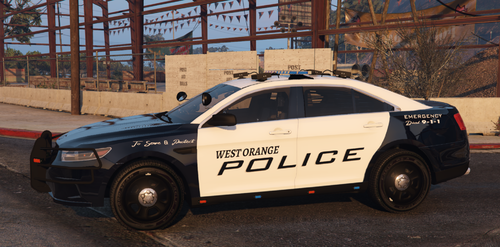 Non fictional Replace Texture in Open IV Follow path mods\update\x64\dlcpacks\[name of you vehicle mod folder]\dlc.rpf\x64\levels\gta5\vehicles.rpf\ replace texture in .ytd Skins in this pack WOPD Crown Vic WOPD Ford Explorer Vehicle models from this pack Skins in this pack WOPD Ford Taurus WOPD Dodge Charger Vehicle models from this pack
- 2 comments
- 1 review
-
glad i can help, have a good one
-
Ok then you may copy the folder Patchday20ng and place it under GTA V\Mods\Update\X64\DLCpack\ (hope that fix your problem)
-
no, open IV, go GTA V\Update\X64\DLCpack\Patchday20ng\dlc.rpf, try to open it, Open IV is going to show you a warning (in red) just click in COPY TO MOD FOLDER PS: Don't go to mods folder, go to your GTA V directory
-
1- real life is a mod that has been discontinued, and a new version (beta) was released 2- i can't tell you how since i don't have the mod, but every mod come with a readme file where explain how install the mod and the step you need to follow in order to make it work. 3- you can do a yutube search with the name of the mod and what you want to do
-
try to change the pluging timeout threshold to 60000, open RPH click on the gear icon and you will see the option there
-
did you try running with admin privileges ?
-
for some people work for others not, i guessing it depend in what mods you have installed
-
out of curiosity, you disable your antivirus?
-
i don't have the mod installed but i had the same issue with other mods (no longer installed) even when the mod was loaded successfully it simply won't work because was an outdated version, maybe you can try disabling the mod, in this case i believe is policesmartradio, and see if everything else work

.thumb.png.362bb5748fb77b4ad7407c70fc93fef2.png)
