



gapcomputer
Members
-
Joined
-
Last visited
Everything posted by gapcomputer
-
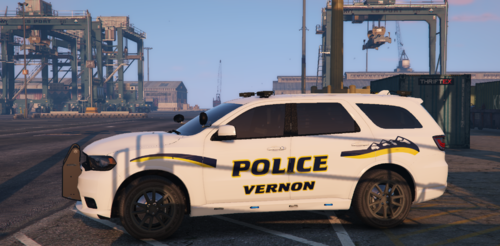 Non fictional Replace Texture in Open IV Follow path mods\update\x64\dlcpacks\[name of you vehicle mod folder]\dlc.rpf\x64\levels\gta5\vehicles.rpf\ replace texture in .ytd Skins in this pack VPD Crown Vic 2011 VPD Ford Explorer 2016 Get the vehicle models from this pack Get the vehicle models from this pack VPD 2018 Dodge Durango
 -
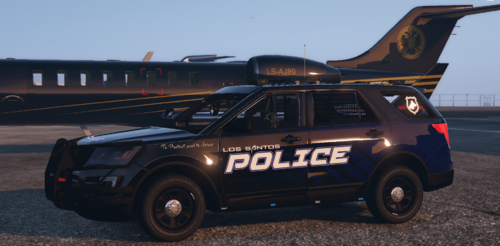 Fictional Replace Texture in Open IV Follow path mods\update\x64\dlcpacks\[name of you vehicle mod folder]\dlc.rpf\x64\levels\gta5\vehicles.rpf\ replace textures in .ytd Skins in this pack LSPD Crown Vic 2011 LSPD Ford Explorer 2016 (K-9 Unit) LSPD Dodge Charger 2018 LSPD Taurus 2016 (Interceptor Unit) 2016 Ford Explorer Includes Window Skin (just replace window template included into the .ytd along with the vehicle skins) Get the vehicle models from this pack
- 1 comment
- 1 review
-
is good to know you found the problem and fix it 👍
-
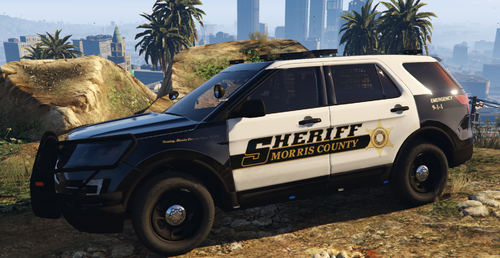 Non fictional Replace Texture in Open IV Follow path mods\update\x64\dlcpacks\[name of you vehicle mod folder]\dlc.rpf\x64\levels\gta5\vehicles.rpf\ replace texture in .ytd Skins in this pack MCSD Crown Vic 2011 MCSD Ford Explorer 2016 MCPD Dodge Charger 2018 Vehicle models from this pack
- 3 comments
- 3 reviews
-
-

-

- 3
-
-
glad to help
-
i believe that if you move everything from the mod folder on desktop to you new mod folder, you're also moving all previous problems that you have with that mods, did you create a backup before install the package? if yes just restore the backup if not, next time you install a mod without uninstaller make a backup.
-
try not to mod police and police2 as they spawn all the time and that can wreak havoc on textures (causing flashing and popping). if you do try to use non-els low poly
-
don't know what is causing that, but you have a lot of pluggins installed and for i saw many are outdated, you should install the new versions, some of them are located here https://bejoijo256.wixsite.com/bejoijo
-
Did you run OpenIV as admin?
-
x64b.rpf > data > cdimages > scaleform_generic.rpf
-
This are all POLICE vehicles ELS you won't see non ELS or other kind of vehicle, takes time to find the right vehicle and nobody can do better job than you, good luck https://www.lcpdfr.com/downloads/gta5mods/vehiclemodels/?since=all_time&advanced_search_submitted=1&csrfKey=963e4502c147f922590710e730f718dc&downloads_field_2=&downloads_field_4=ELS&downloads_field_3=&downloads_field_5=Police&page=1
-
you can use any slot, if you want to be able to select the vehicles in the police station without spawn it, and also see it on the highway you have to go to Grand Theft Auto V\lspdfr\data and edit the file agency.xml, make a backup of the file, take time to read it, look for this lines <Name>San Andreas Highway Patrol</Name> replace the cars or add the cars you want to see on the highway
-
disable all pluggins from RPH launch settings, try to play the game and see if is a problem caused by LSPDFR or RPH itself
-
Delete ELS.uasi from the folder AsiPlugins in you GTA Vdirectory and make sure the name on the XML file is the same as the name of the vehicle, run the game and see if is solved
-
will be nice if you share how you make it to work, so other people can do the same 🙂
-
This guy used to have the pluggins posted here for some reason he left, here is the page, https://bejoijo256.wixsite.com/bejoijo the pluggins are up to date and contain very useful Mods, btw most crashes aren't even caused by the pluggins but by Rage Plugin itself
-
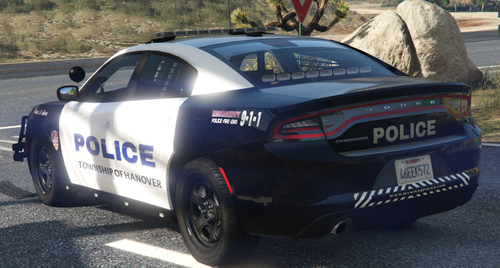 Just a Preview, i'm working on it, keep in mind this is in no way a professional work and is an unfinished product, i do this as a hobby and when i have a free time
- 6 comments
- 1 review
-
-
- 1
-
-
Glad you like it, i will be working on a Morris county sheriff soon, as for now, no Lore friendly
- 6 comments
- 1 review
-
-
-
-
-
-
-


