


ohnogames
Members
-
Joined
-
Last visited
Everything posted by ohnogames
-
what plug ins do you have installed on the lspdfr file?
-
I showed up to a car fire and when Fire Dept was taking too long I try to extinguish it my self and end up getting burnt but just so happen the firefighters got there and they put me out. I guess as I was trying to extinguish the fire I might have sprayed a ped with it and as the medic is trying to give me a medkit this guy comes running and sucker punch the shit out of me, needless to say that was the end of my duty 😂
-
You can just delete your mods file and do a new one
-
Hello everyone if you are reading this is because you are having problems like I used to where the game would crash out of nowhere, at launch or when going on duty I took the time to install each plug in that is famous or I personally use (By themselves, or in combination with others) one by one and run the game after each install to determine which one was crashing my game. I believe this is the best sets of plug in that do NOT make your game crash and still give enough good of a game play to fully enjoy LSPDFR!! I would like to disclose this necessarily means it will work for you and I do recommend you back up any originals files as I am not responsible for anything that happen to your game files!! With that said let's jump into it!!! If you are here for lincoln 18 problem scroll down towards the end... LOL Let's start with Scripts; 1. BasicCruiseControl by ThruZZd (I am planning on uninstalling it as it seems to make my FPS drop) 2. Realistic Speed Radar by rushlink Plugins; 1. BodyCam by Sebo 2. ClearTheWayV by timnboys 3. DashCamV by PieRGud 4. Enhanced Vehicle Actions by holexion 5. EUPMenu by PieRGud 6. KTFDO by khorio 7. Spotlight by alexguirre 8. ALPRLite by BejoIjo (He has this mod on his website) 9. CompuLite by BejoIjo (He has this mod on his website) 10. Interaction+ by Phaxol 11. K9 Partner by NoNameSet 12. MoreRadioChatter by AkASlow 13. Smart Radio by Albo1125 14. SimpleCallouts by BejoIjo (He has this mod on his website) 15. StopThePed by BejoIjo (He has this mod on his website) 16. Super Callouts & Events by SuperPyroManiac 17. Traffic Policer by Albo1125 18. Ultimate BackUp by BejoIjo (He has this mod on his website) 19. Vocal Dispatch by turbofandude 20. ELS by Lt.Caine 21. PLD by Lt.Caine 22. SimpleTrainer by jaak327 23. EUP 8.1 by Alex_Ashfold 24. EUP Config by Alex_Ashfold Next step is completely optional but keep in mind some of these next steps was part of me trying out my game to make sure it did NOT crash and I feel like these we vital steps to keep it from happening; Set up of INI files, I will only list actuals changes that were made I won't post the while INI file so if you interested on these set ups if it does not show up bellow just skip over it... BodyCam: (I did this because when use the TrainerV I would switch off the BodyCam layout and I was thinking it was not working but it was just that, this does NOT affect the came crashing wise) --Manual Toggle Key-- ManualKey=NumPad9 CompuLite: OpenComputerKey=Q Interaction+: PursuitUpdatesReportTraffic=false SuperCallouts: (I only did the alien one for realism and the fire one because I always find my game lagging when I am out on that call) Fire = false Aliens = false SuperEvents: (Same with this one) CarFire = false TimeBetweenEvents = 60 Ultimate BackUp: IsCode2SirenLightsOn=no (If you have ELS this will make prisoner transport show up with lights only) For graphics and brighter ELS I use NVR and I can not quiet remember what setting I am using but keep in mind NVR makes your ELS look weird at curtain time of the day. I know this might not really matter but having too many DLC Packs installed was making my game crash at launch. Mainly it was with Cars DLC packs however I think I might have some fault on this one, I have NOT tested out that theory yet I'll update you guys once I do. However RCA DLC for signs was making my game crash when I drove by areas with plenty of billboards. (Like I said I tried this out to make sure it was a reason) Not bashing anyone but down bellow I will put a list of know plugins that like I've said crash my game (Tested) 1. Officer Status Plug In 2. Call Out Manager 3. Force A Call Out 4. Arrest Manager (Only if using Ultimate Back Up at the same time, but honestly Arrest Manager is pointless with Ultimate Back Up being out) 5. Cop Holster (I know this one is very weird but it really happen it was NOT a every time thing but once removed the game has NOT crashed at all) \ 6. Computer+ (This one is more of a making my game lag not so much of making it crash) 7. Variety Call Outs 8. Entity Zapper 9. LSPDFR+ (This one should not make your game crash however if you are using CompuLite there is a possibility it might if you are not disregard) Now let's jump to sound: Not much to talk about here but make sure the vehicles file does NOT exceed 15MB as some files will not play or so I have heard but never actually encountered it, I have several audio files for sirens, gun sounds and a cuff sound one. Vocal dispatch LINCOLN 18 problem kind of fixed: What I did was looked up the audio files and copy the files I wanted to be called (ex. I use Charles 12 so I copied Charles and 12, Deleted Lincoln and 18 and renamed my copies to Lincoln and 18) like this when they are played over the dispatch as much as she wants to call me Lincoln 18 she has no option but to use Charles 12 *Evil Laugh* HAHAHAHA Realist Radar Gun shooting instead of getting speed; This one is kind of tricky because despite popular believe the actual file name for the marksman pistol is WEAPON_SINGLESHOT, NOT WEAPON_MARKSMANPISTOL so with that being said make sure you go to Traffic Policer INI file and change SpeedgunWeaponAsset from whatever it is to SpeedgunWeaponAsset=WEAPON_SINGLESHOT Like I stated before this might be my case however some of these might not work for you or might still make your game crash, also some of the one that make my game crash might run just fine in other people computers... Look at this as more of a guide or perhaps tips but for me this have been tested and this is deff the way to go in my case. If you have more plug ins or call outs that you believe might be crashing your game post them down bellow we can have a discussion about. ONCE again I have nothing against the plug ins that are crashing my game or are in any way speaking bad of them, they simply just do not work for me. If this helps you in any way please if you see anyone or hear of anyone having troubles with the game reefer them to this file as I my self had the hardest time trying to figure out what was wrong with my game and not many people were willing to help me out, they just thought I was stupid or was doing something wrong. If you have any more questions feel free to post them down bellow, also remember if your game keeps crashing as much as it sucks the best route to go is installing a fresh version of the game and installing each plugin/scripts/dlc/mods one by one and running the game and going on duty in between each install like this you can catch the plug in or whatever it is that is making your game crash as it will clearly be the last file you installed that is causing problems (sometimes some plugins do NOT get along with other plugins so you will have to choose between which plugin you want). Much Love, OhNoGames (Jan Marquez)
-
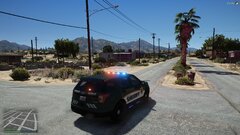 I did one similar, I have VIC,, Silverado, FPIU and Tahoe you more than welcome to take them and do modifications to it!! This look great!
 -
-
 Arrest manager honestly is useless since Ultimate back up does everything and more, only thing you might miss out on is more jails but if I’m not mistaken LSPDFR it self added more jail points because I see a lot of them when I’m playing Oh and officer status that mf will destroy your game!! Vocal dispatch works fine without it
- 546 comments
- 103 reviews
-
I have, Ultimate BackUp Simple CO PeterU Stop The Ped Traffic Policer Smart Radio lspdfr+ super co & events Vocal dispatch Dashcam bodycam ktfdo clear the way Interacrion+ Natural Vision CompuLite alpr lite cruise control (plain on removing it makes my game lag) real radar and some sound files I know for a fact this plug ins make my game crash: Force a call out call out manager cop holster arrest manager if I have stop the pest installed variety call outs that one where you delete cars with the tazer If you mess too much with the INI file of ultimate backup it can crash while on duty if your game is crashing at launch, try making the load plug ins wait longer by holding shift while launching RHP If your computer is not all that powerful be mindful of how many plug ins and scripts you have at the same time. Also I noticed if I install too many dlc packs my game tend to crash. *This is my experience and other people might have some of these plug ins working* if you not using some of them all the time I recommend taking them out as they will be running in the background taking up memory. Install everything I have and run the game and go on duty, then install one by one of any extra you want and launch the game and go on duty after installing one the news ones I found that’s the best way to figure out what’s crashing your game. Remember some plug ins have similar features to other and both of them trying to do the same thing at the same time might crash your game. Hope it helps!! Feel free to shot me a message I can give you more details of how my game is set up and help you with INI files. I know how frustrating it is my game didn’t work until week before last after the casino update and there isn’t that many people willing to help a fellow lapdfriang out lol
- 546 comments
- 103 reviews
-
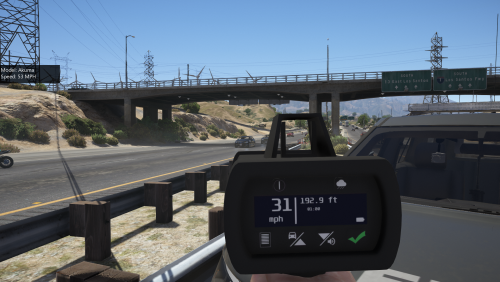 To everyone having the trouble of the Radar Gun still fires bullets instead of actually reading the speed, make sure you go to the Traffic Policer INI file and scroll down to *//This determines which WeaponAsset is used for the speedgun.* Right under there you need to change the SpeedgunWeaponAsset from "WEAPON_MARKSMANPISTOL" to "WEAPON_VINTAGEPISTOL" ... This should solve the problem! I Attached a snapshot bellow in case you need visual guidance !
- 79 comments
- 17 reviews
-
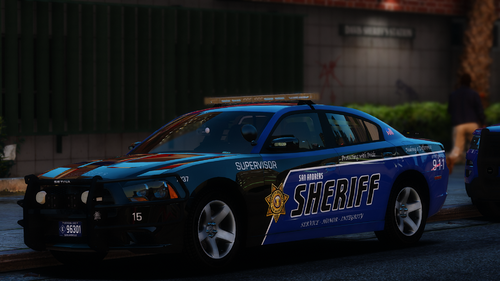 I use the skins with Tactical Dunot packs the almost all of them work and his cars are great
- 48 comments
- 12 reviews
-
-
No it can’t be, I run 4.4 and I have this pack, smart radio, and lspdfr+ running and everything is fine. I did had to ForceDuty to get my radio set up with the PeterU plug in and the game did crashed once I was done setting up my buttons but, I restarted the PC and launched the game and everything seems to be working fine so far!
- 546 comments
- 103 reviews
-
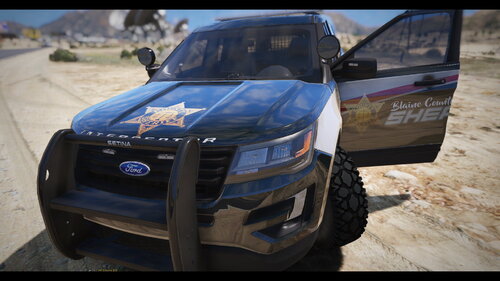 Super Sexy!!!
 -
.thumb.png.180e1e1b34c0d9e530cde88c2e4609f6.png) Done deal!! Enjoy!
Done deal!! Enjoy! -
No problems! Thx for the feedback! I know you were interested on the Vic. Let me know if you like that one or rather have the colors swapped
-
 I found a way around it, I do it by changing the texture names on openIV. Ex. I change the name of the texture I’m gonna use for that shift to the name of the main file before I launch the game
- 138 comments
- 36 reviews
-
Fusion & Vic will be uploaded shortly. Also I will be fixing the explorer skin to reflect the curve on the white part. The county has a reversed skin as well the white parts being green and the green being white. Let me know if you guys are interested on those as well.
-
Yeah ill make sure I add it to the list
-
They changed the graphics, and yes they are green that's my fault. I'm actually color blind and had a very hard time picking the right color. Once my friends gets home he's going to help me out pick out the right one. Stay tuned for the update
-
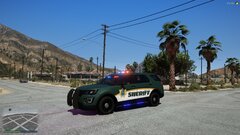
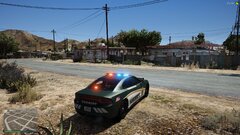
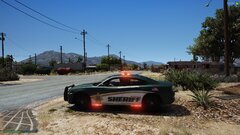
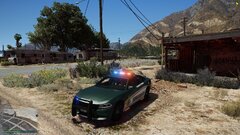
Bringing you this skin pack based of Osceola County out in Florida. Cars used for this skin pack; *Do Not Redistribute or Upload to any other sites. *Do not send these files to anyone. *Do not release anywhere. *Do not claim as your own. *Do not rip or dismantle pieces of the skin. *Please give proper credits and/or link to this original download *I am not responsible for your game or PC.


.thumb.png.180e1e1b34c0d9e530cde88c2e4609f6.png)
