Snakepit92
Members
-
Joined
-
Last visited
Everything posted by Snakepit92
-
-
 Basically when you install too many custom sirens and the folder gets too large, it just mutes all vehicle noises in game. This makes that folder smaller by muting non essential sounds. This is better then deleting them because this way the game doesn't think files are missing.
- 9 comments
- 8 reviews
-
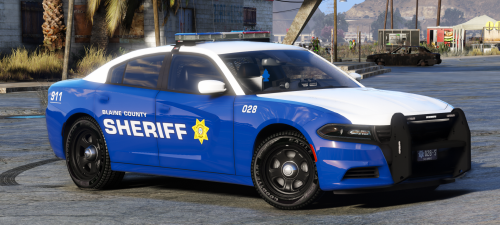
 Blaine County Sheriff's Office mini pack. Based on the old Alberta Sheriff's livery. Vehicles 2015 Dodge Charger 2013 Ford FPIU 2015 Chevy Tahoe 2015 FPIS 2018 Chevy Silverado 2011 Ford Crown Victoria Vehicle Models: Charger, FPIU, Tahoe, FPIS Silverado CVPI Crown Victora
 -
-
Thanks man. I'd done some stuff like this but never knew about that batch processor to really speed it up. Very handy!
-
I had to knock my graphics settings down to make it stable. Even though I have a great computer and can run stock GTAV on ultra all day long, these mods just didn't seem to want to play nice
-
Have a scripthook installed? That's the step I always forget when I reinstall ELS
-
ELS needs a scripthook. The one I linked too works great for me. Edit oh you're the guy I was pming yesterday. Nevermind!
-
Do you have a Scripthook as well? That's the step I always seem to miss whenever I do a clean install. http://www.dev-c.com/gtav/scripthookv/
-
I really like this pack. I use the Taurus and Tahoe personally but I'm sure the Chargers are just as high quality
-
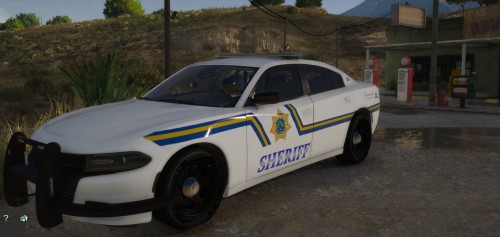
 "The Alberta Sheriffs Branch is the largest and most versatile provincial sheriff service in Canada." "Alberta Sheriffs are provincial peace officers with jurisdiction over the province of Alberta" https://en.wikipedia.org/wiki/Alberta_Sheriffs_Branch
- 8 comments
- 1 review
-
Where I live the Sheriff's are a state wide organization, not just a county. Who cares anyway, these are fictional. Looks awesome too
- 8 comments
- 1 review
-
-

- 1
-
-
I made a siren tutorial and made a text file with the file names and whatnot. Here ya go
-
I thought the RCMP used the Whelen CemCom mostly but that sounds like a Federal Signal SS2000
-
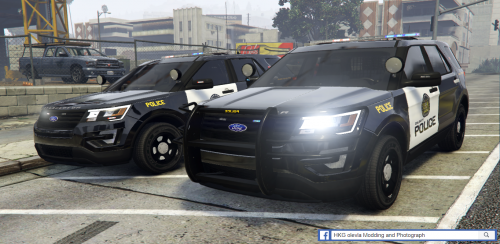 Looks good! I have a small tip though, where the slogan is on the side, CPS uses small diamond shapes rather than hyphons. I just did a CPS inspired pack yesterday and used alt 4 to make a ♦ and it turned out well
 -
-
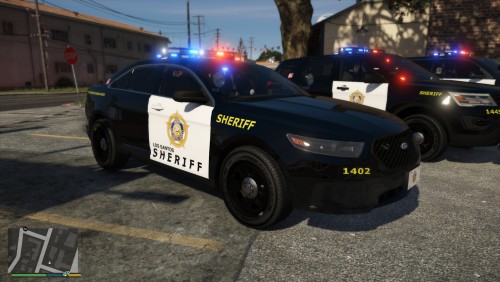 The Los Santos Sheriffs Department was facing budget cuts. Rather than cut back service, an area of opportunity to save money was to re-think their livery. Following the trend that Canadian police departments have been following in the last few years, the LSSD decided to save money by purchasing black cars, wrapping just the front door, and using minimal decals. This cut the cost of applying a livery to a new car by 80%. Here's my attempt at an LSSD skin. All my previous textures were of smaller police departments that not many other people on LCPDFR seemed to bother with, but I decided to try my hand at this one now. Based on the Calgary Police Service. Vehicles: 2016 FPIU 2016 FPIS 2015 Tahoe Future: Add a Charger Vehicle Models 2015 Tahoe, 2016 FPIU and FPIS all from this great pack
 -
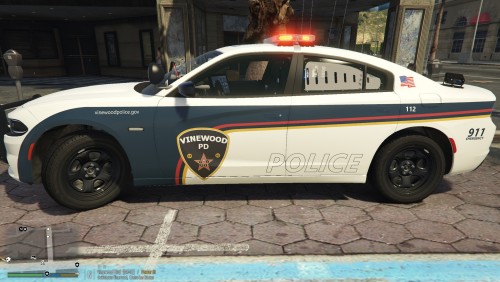 Vinewood Police Department. Design and colour scheme based off of the Saskatoon Police Service There wasn't many VWPD cars out there so decided why not try and make my own! Vehicles: 2016 FPIU 2016 FPIS 2018 Charger Known Bugs: License Plate on the Explorer blurs in and out. Unfortunately this is a bug with the vehicle model so there is nothing I can do about it Vehicle Models 2018 Charger, 2016 FPIU and FPIS all from this great pack
 -
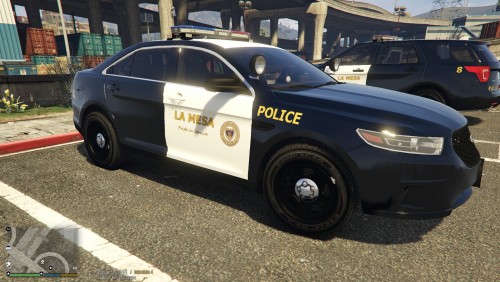 La Mesa Police Department. Based off of the San Marino Police Department. There wasn't many LMPD cars out there so decided why not try and make my own! Vehicles: 2016 FPIU 2016 FPIS Vehicle Models 2016 FPIU and FPIS both from this pack
 -
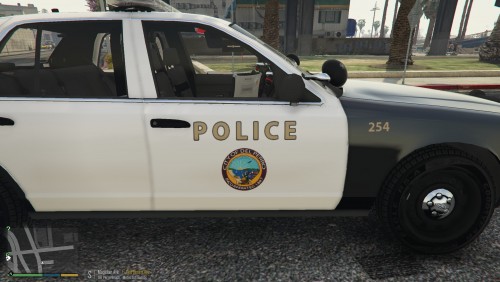 Del Perro Police Department. Loosely based off of the Long Beach Police Department, but I added a few extra touches. My first vehicle skin since I'm trying to add each police department into my game. There wasn't many DPPD cars out there so decided why not try and make my own! Vehicles: 2011 CVPI 2014 FPIU 2016 FPIU 2016 FPIS Features: Each vehicle has multiple skins and units #'s. Including Supervisor and Traffic Enforcement textures Future: Add 15 Charger and 13 Tahoe Known Bugs: On the '16 FPIU the rear drivers side door handle is white while all other handles are black. Unfortunately this is a bug with the model and not the skin, so there's nothing I can do. Vehicle Models Bxbugs123's awesome 2011 Crown Victoria Police Interceptor Thehurk's fantastic 2016 Ford Police Interceptor Utility 2014 FPIU and 2016 FPIS from t0y's awesome LSPD pack
- 1 review
-
-
- 1
-
-
-
-
 Really? Even when they're not responding to anything and just sitting in normal traffic? Thats interesting
- 965 comments
- 158 reviews
-
-
Installed some custom vehicle sounds and sirens, but vehicles sounds were muted in game because the folder was too large. Quickly created some dead air files to make the folder smaller, decided to share to save anyone else the time of having to do it themselves. Enjoy! Mutes the silly clown sounds
- 9 comments
- 8 reviews
-
-
-

- 9
-