


Ahmed4696
Members
-
Joined
-
Last visited
Everything posted by Ahmed4696
-
Turns out STOPTHEPED was causing the issue, thank you everyone!
-
Please see RAGEPLUGINHOOK file attached. Any help appreciated! Thank you. RagePluginHook.log
-
Using the default Visualsettings file resolved the visual problems and the traffic stop issue by simply removing Rich's police enhancement files. However, I am uncertain about the cause of the third problem, where activating the siren causes nearby vehicles to halt. When I hit the circle button on my controller (for toggling siren sounds), the cars around me, including police vehicles, come to a stop and remain stationary. This is incredibly frustrating - during a police chase, when I press the circle button to switch to a faster siren sound, the suspect's car slows down and stops, ruining the gameplay. I then need to press circle again to restore the usual flow. Any assistance would be greatly appreciated.
-
Yeah, FPS drops have honestly been one of the longest-running issues with LSPDFR. You’ll find tons of posts about this—even I posted about it years ago. There’s no real fix; it’s just how the mod is. Like mike406 said, the more plugins you run, the worse the performance gets. Some plugins affect performance more than others, so it's worth testing them individually to see which ones tank your FPS the most. And yeah, it doesn’t matter if you’ve got a high-end rig—people with insane specs still experience FPS drops when going on duty. I’ve got a pretty weak setup myself (GTX 1060), and I get around 25–30 FPS in the city. But despite that, my game runs very smoothly with minimal lag (you'd think I have a top-of-the-line graphic card LOL). A lot of that comes down to how your visual mods, LSPDFR settings, and graphics settings are configured. There’s no magic fix for the FPS, but you can make the game feel smoother even with low frame rates.
-
Same boat as you. I used to run LSPDFR a lot and could fix just about anything, but I’m rusty now. Anyway, I recently came back to it and ran into a similar issue—GTA V updated automatically, and suddenly nothing would launch. I had a ton of stuff packed into my mods/update folder that I didn’t want to lose. I tried bringing all my old modded files back (like common/data, dlclist.xml, etc.), but the game would crash on the loading screen every time. No error, just a hard shutdown. What I ended up doing: I copied the full, clean, updated update folder from the game directory into the mods folder to replace the old one. Then I downloaded and reinstalled most of my previous mods—NaturalVision R, AI behavior mods, gameconfig, visualsettings.dat, etc. I avoided dragging over old files wholesale—almost every one of them was crashing the game, probably due to version mismatch or broken references after the update, I don't know. The only old file that didn’t break anything was my visualsettings.dat, oddly enough. So yeah, unfortunately, I couldn’t salvage most of my old setup. Reinstalling fresh was faster than testing a hundred files one by one. It also helped because a lot of older mods are broken now or need updates anyway. Just my take—but I get not wanting to start from scratch; I didn't; I spent two days trying to figure out the broken files one by one before giving up! P.S. After replacing the update folder in the mods directory, I still had all my old DLC add-on vehicle packs in place. Once the gameconfig and core mods were back in, I could finally edit the dlclist.xml again without crashes. I added back all the lines for my custom police cars/addon DLC pack, and everything loaded fine—got all my old vehicles working again.
-
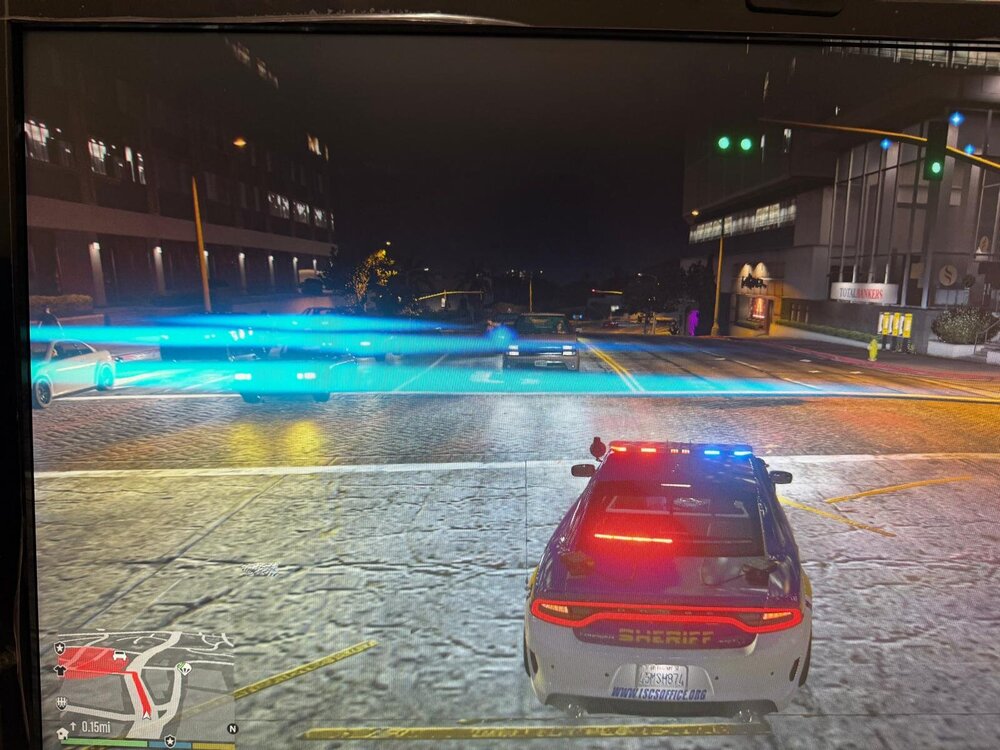
I'm running GTA V with LSPDFR and have a few problems I could help sort out. 1. Headlight Glare / Bloom Issue After switching between NaturalVision Evolved and NaturalVision Remastered, I’ve been stuck with a bad glare issue where headlights produce a flat, horizontal bloom or glare, almost like a broken lens flare. This happens both day and night. Here's a screenshot: What I installed: First: NVE with Reshade shaders, performance boost, and brighter emergency lights. Game lagged, so I uninstalled NVE with OIV and deleted Reshade files manually. Then installed NVR, followed by reinstalling the same performance boost and brighter emergency lights from NVE. Even though I’m no longer running NVE or Reshade, the headlight glare effect stayed. Emergency lights aren't even that bright, so it’s just the headlight issue now. Any idea which mod/file might still be causing this? 2. Traffic Yielding Broken After Rich’s Enhancements Before installing Rich’s Police Enhancements, traffic would slow down and slightly move over when I pulled a vehicle over—typical LSPDFR behavior. After installing Rich’s mod, that changed. Rich’s mod adds its own traffic-yielding system. I figured that was overriding the ELS traffic control setting (ElsTrafCtrlOn=false in ELS.ini). I then disabled the traffic yield option in Rich’s config to get things back to default. Now, I get no yielding at all. Cars just keep driving like nothing is happening, close enough to hit me. I’m trying to bring back the original traffic behavior, where cars would at least slow down and shift lanes a bit. Does anyone know what controls that or how to reset it? 3. Siren Button (Circle) Making AI Cars Stop or Float Last issue: when I press the Circle button (PS4 controller, siren yelp), the AI car I'm facing stops moving, or sometimes floats upward slightly. Happens even with no lights on—just the yelp sound. Pressing Circle again makes the car drop back to the ground or start moving. This is especially annoying since I use Circle often for other functions (e.g. in Simple Trainer). Any idea what’s causing this? Possibly a mod conflict or keybind issue? If you’ve seen any of these or have a fix, let me know. Appreciate the help.
-
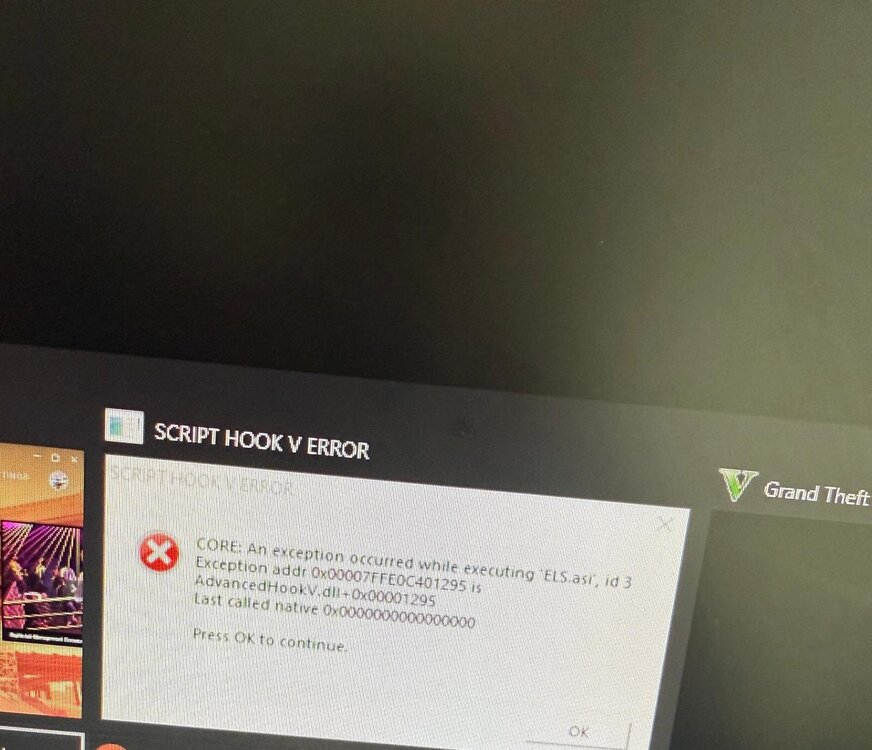
Got LSPDFR working with an updated RageNative, but still getting the error pop for scripthookV, please see image. ELS is not working properly, just two lights are on already at all times on the car and the effect of turning on lights is there, but no actual lights and can't hear the siren too. Also attached an updated Ragepluginhook file log, looks like there are other errors in there as well, but I don't remember at this time how to fix them. Please and thank you for your help! RagePluginHook.log
-
Hey everyone, So came back to LSPDFR after a long time. I installed a new copy of GTA V, new lspdfr everything, but I copied over the old mods folder and ELS and plugins (and stuff) from the old GTA I used to play on. First issue: When the game is loading, I get a blank screen and the error pop-up sound "Script Hook V Error—exception occurred...executing ELS.asi... blah blah.....AdvancedHookV.dll....." But I try alt + F4 to get out of this stuck screen, go back to the desktop, and GTA is still on, so I click it on again, and everything is working... as far as I know. Then, I go to police station and try going on duty, the game crashes. I've attached the log file (I think this is the correct one). Any help is appreciated. Don't want to start all over one by one. RagePluginHook.log
-
Rename your mods folder to _mods.
-
Updated LSPDFR and make sure you have the latest version of RageNativeUI If that does not work, try this: Launch GTA normally without the RPH launcher. Either when the game is starting or when the game window pops up (alt+tab), then lauch RagePluginHook launcher.
-
Do you hear the light switches when you activate the lights? Do you hear the siren on your car? Could you also maybe attach a screenshot of a police car with emergency lights on, just to get a clear picture. One solution I know and as you stated above is to go into OpenIV > tools > ASI Manager and uninstall ASI loader as well as OpenIV.ASI. Following that, reinstall both of those back, close everything, and restart your PC. This usually solves issues with ELS.
-
Oh so it was RageNativeUI like I suggested above. Yeah, again I'm not at expert at this but I noted some problems associated with RageNativeUI multiple times in the log file, so I suggested you update it. I was surprised that did not work earlier for you, but hey, at-least it worked now. Thanks for updating me and no problem! 🙂
-
Upload your RagePluginHook file - it is a text document located in your main GTA V directory.
-
Upload your RagePluginHook file - it is a text document located in your main GTA V directory.
-
Post your RagePluginHook log again
-
Alright I am not an expert but lets try something. To confirm, you were able to go on duty like did you try pulling people over? After reviewing your log file, it seems to me as if you were never able to go on duty. So, go ahead and disable your Plugins folder by renaming it _Plugins Once disabled, try loading in to GTA/LSPDFR, go on duty, and see if it is working; see if you can pull people over (or any other police "task") to make sure you are on duty. If the game does not crash, it likely means you have faulty plugins/callouts. Let me know what happens after disabling the Plugins folder and we will go from there!
-
That's correct, but you don't have to use pastebin, you can simply attach the text document or any file with your post. Anyway, I see you're running LSPDFR 0.4.8, try updating to LSPDFR 0.4.9 - the latest version, see if this resolves your issue.
-
Try removing Felony stop and make sure you have the updated version of RageNativeUI. Let me know if this work!
-
Upload your RagePluginHook log file - its a text document located in your main GTA V directory.
-
Try removing ambient AI callouts & wilderness callout, and try again.
-
No problem! 🙂
-
List all of the plugins you're using. It will be helpful to just post your log file located in your Gta 5 main directory.
-
I'm not an expert, but try removing chill callouts from your plugins and try again.
-
Hey all, So I have been using the "gameconfig for Limitless Vehicle" (I think the 2.5x traffic and 2.5x peds one) for a while with no issue. Anyway, I now want the stock version gameconfig or either the 1x traffic and 1x ped due to fps drop. Every time I replace my current gameconfig with either the stock one or any other gameconfig version, my game crashes while on the loading screen. I can't figure out the reason as to why it is crashing as I am simply just changing the gameconfig to the base version. I've attached my gameconfig file if someone can help out. If someone could also either teach me or change my gameconfig's settings for me to the stock gta traffic, that'd be greatly appreciated as well. I've figured out the settings myself and fixed it! gameconfig.xml
-
You forgot to upload your crash log. Upload the text document labeled "RagePluginHook" located in your GTA V directory.



