


SenorCapitan
Members
-
Joined
-
Last visited
Everything posted by SenorCapitan
-
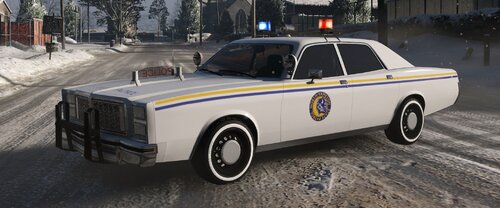 This will replace the LSPD K-9 greenwood livery. It is recommended that EMF is used to install this. This was just something I made while bored, it's not great, but it'll get the job done. I may update it at an later date if I feel up to it. It is recommended that EMF (Easy Mods Folder) is installed first and used to replace the livery of the greenwood. Grand Theft Auto V > mods > update > x64 > dlcpacks > EMF > dlc.rpf > x64 > vehicle_mods.rpf Otherwise, place it here: Grand Theft Auto V > mods > update > x64 > dlcpacks > mp2024_01 > dlc.rpf > x64 > levels > mp2024_01 > vehiclemods > polgreenwood_mods.rpf Credit: Me, Rockstar Games
 -
What is your plugin timeout threshold?
-
Nope, just gotta wait for it to be updated. Alternatively, you could remove SHV and play without it till it gets updated.
-
The files cannot be uploaded here due to copyright laws.
-
It depends on when Alexander updates it, it could be out tomorrow, or a few days from now, there is no ETA.
-
Rage Plugin Hook wurde noch nicht aktualisiert, sobald es aktualisiert wird, wird LSPDFR es in eine aktualisierte Version von LSPDFR aufnehmen, also warten Sie einfach, bis LSPDFR aktualisiert wird, und alles, einschließlich RPH, sollte darin enthalten sein. Wenn LSPDFR aktualisiert wird, empfehle ich die manuelle Installation. Übersetzt aus dem Englischen.
-
The game has been updated to "3274" as of today. Versions cannot be uploaded due to copyright.
-
Wait for SHV to update...
-
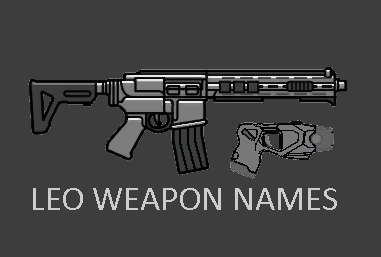 What do you mean by replace? I haven’t touched GTA in a while so I don’t even remember how or what I put in the help file but it’s possible the weapon name is located in a different lang file if that’s even what the extensions are, don’t remember but if you haven’t already or if I didn’t specify in the help file, search for lang files and look through each one for the name of the weapon your attempting to replace the name for and if you find it elsewhere from the file you edited then just copy and pasta the edited name to the stock one found. Additionally it could be a blocked starting character which is a thing mentioned in the help text.
- 12 comments
- 1 review
-
Assuming you’re speaking of the weapons not included in the help file, yes, you’d just need to find the name for each weapon via various lang files then add them to mine. Additionally I do plan on adding as many of the in-game weapons to the help file as I can find, providing changing the name for those specific weapons works.
- 12 comments
- 1 review
-
-
This is something I could certainly do, you'd have to tell me what weapon the beanbag shotgun replaces/uses provide it doesn't add it's own weapon which I assume it doesn't, I don't use it so Im not aware. 👍
- 12 comments
- 1 review
-
This file will change the names of the listed weapons below, this is for those people like me who look at the little things while on patrol. Edited Weapon Names Combat Pistol Replaced With "Glock" Pistol Replaced With "Beretta" Stun Gun Replaced With "Taser" Nightstick Replaced With "Police Baton" Marksman Pistol Replaced With "LiDAR Gun" This will ONLY changes the names of the listed weapons in the weapon wheel. I have included a guide on changing the weapon names yourself, although that does not mean I will stop updating this mod. I apologize for the lack of description. Installation is located within the "README" In addition to this file, I recommend the following for a better play experience 😀 LiDAR Gun Icon Functional Radar Gun Script Weapon Icons If you use the "Help" file I provided for your own mod then please credit me. Change Log 1.0.1 Adds support for the listed weapons. Golf Club = Fire Axe Carbine Rifle = AR-15 Pump Shotgun = Remington 870 SMG = MP5 Heavy Sniper = Barrett M82 Sniper Rifle = M40A5 Includes a "Help" oxt file for you to add your own custom names. Change Log 1.0.2 Adds support for the less-lethal beanbag shotgun. Suggested by @Halomaster Designs
- 12 comments
- 1 review
-
-

-

- 5
-
-
This is the one I use: https://www.gta5-mods.com/misc/gta-5-gameconfig-300-cars and it also suggests you install a heap adjuster: https://www.gta5-mods.com/tools/heap-limit-adjuster-600-mb-of-heap Try downloading GeForce Experience and optimizing your game from there then lunch and try.
-
Can you provide a new log?
-
It would be named mods in the same location as your GTA.exe
-
Try running RPH with only LSPD:FR and EUPMenu only, disable the others on startup and don’t load the others and see how it runs and also upload a screenshot of your “Grand Theft Auto > lspdfr” path as well as your “Grand Theft Auto > Plugins” path and we will go from there.
-
I’ve had that same issue before and I had to update it, unfortunately I’m not sure if that would fix your issue and you’ve probably tried reinstalling RPH or at least replacing RPH’s files with new ones. Can you try and launch GTA via the R* Launcher and this time dont hook RPH and see if it starts? And also PoliceSmartRadio is outdated.
-
Try naming your mods folder from “mods” to “_mods” and attempt to launch via rage. In screenshot 2, does it crash or just infinity load?
-
And this is why i mentioned you lol. Ty! 😀
-
If your using EUP try removing it and trying the swat backup thing again. Someone else had a similar issue and removing EUP resolved it, but @Charlie686 would be the most help with this I would say.
-
What's is that "1" that actually loads? And could you link a photo of the inside of you plugins/lspdfr folder and ensure everything it's up to date.
-
Try naming your mods folder from "mods" to "_mods" and report back.😁
-
Are you launching the game via RagePluginHook (clicking RagePluginHook.exe)? And is it loading LSPDFR on start up? (you can determine this by running ragepluginhook and holding shift after clicking or double clicking it). Hope it helps!😀
-
It's definitely texture loss caused by something. Have you tried removing the cars or at least some of them? Maybe trying a game config, couldn't hurt. Is it just in areas like paleto and LS?


