



X.Gona.Git.Ya
Members
-
Joined
-
Last visited
Everything posted by X.Gona.Git.Ya
-
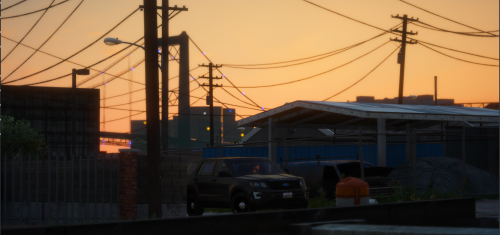 Awesome model. HQ interior. Gonna create a livery for it and I'll post pics in a few days. Only thing that could be better would be if it was reflective. So i got my livery on it and started checking out the lights and setups. Several things I would change, some personal preference to make it better but others are issues.
- 22 comments
- 3 reviews
-
-

- 1
-
-
-
I need to find out the name for sahp peds so i can make sure the proper ped spawns in my sahp vehicles. In my sheriff cars, this ped, <driverName>S_M_Y_Sheriff_01</driverName> spawns. thanks
-
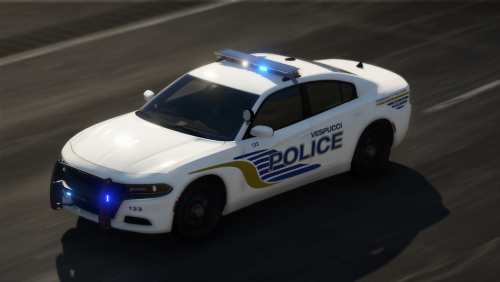 @Prod Love the car. But i have run into an issue. I add my livery to the vehicle in Sheriff_Hi(my slot) under chrg_sign_1 I place my livery. No issues. I then scroll down and under Reflective, I add my reflective livery. No issues. Under Sheriff+Hi (again MY SLOT) i see a chrg_sign_1 and a Reflective for 2 more liveries. So i add the same liveries here. In game, my liveries have a very small but noticable whitish line around the words AND the words on the front fender have partially duplicated themselves and show on the hood. I used the exact same livery for all four places. What could be the issue? Here is link to images
- 25 comments
- 15 reviews
-
Looks good. Sheriff text looks to high n u should consider making Blaine county a bit smaller n just one line. U see that of irl cars n looks good.
-
U looking for livery help or full model help?
-
What do u mean edit the back mirrors? Like remove them or just retexture?
-
Are u looking for lapd or lspd n bcso?
-
Out at the jail, at courthouse, at property room, etc
-
I have a png for an original privately made LSPD badge I created. U r welcome to use that if u want
-
Indecent exposure call Code 1 backup call- we get that alot here on suspicious person call, Petty theft, domestic, etc Shots fired officer down call Check well being call Assist another agency call- Em's or fire requests backup
-
In your els vehicle file, scroll down until u see Coronas. This section should list headlight, tailight, etc. Set the value to 0 to turn them off
-
Would love to c templates for each uniform so we can make em for specific departments. I've been making badges n patches lately n need a good place for them to shine. 🙂 Would love to see a mic over shoulder that clips center mass n a body can. I was working on a Axon 3 body cam but can't find any good pics yet
-
There is a script, data collector, I think. It finds n allows u to set specific equipment, agencies, backups etc. Pretty neat. My issue is finding where specific outfits r located
-
 Thanks for the model. very nice. I did notice that in stage 2 lights, only the left side lights up. U have to go to stage 3 to get all the rears, right and left to work. Question about the reflective skin.. So i made a reflective skin, my only complaint is that my black letters on the car don't reflect. white does just fine. the badge reflects just fine. I am curious if black just doesn't reflect? Any help would be appreciated.
- 60 comments
- 37 reviews
-
thanks. I figured as much but didn't want to screw something up. Thanks I will try this I did what u suggested and it worked out fine. thanks again
-
Sorry, i was looking at the pics on my phone. Now that i am on my desktop i can clearly see the greenish tint on the pants. hmm weird. These are custom pieces not included in EUP, am i correct? Do u want to share them and i will load them on my end and see if same green tint shows. Easiest way to eliminate visual problems?
-
do u have a picture of one and on what vehicle model?
-
Make sure u r exporting at 4096x4096 as a png. Check it in the game because openiv will downscale it in the preview window
-
Lots of videos on YouTube. Once u download a vehicle from lspdfr, make sure it gas a template included. This is the file u r customizing. Then u will upload this into openiv. The best tutorials I have used are from Albo1125,. Modding gta series
-
Don't know if u found a answer yet but I download real badges online n then find the appropriate vest, shirt, etc, export it from openiv as a png then import to Photoshop n add my badge then reupload this file to openiv. Takes trial n error to get placement right but works good
-
How did I fix it?
-
Check the vehicle meta and make the diffusetint line is set to this, "<diffusetint = 0x00FFFFFF />"
-
It most likely will b a els issue. If u go inside your police els file, there is a section where u can make the headlights, tail lights, reverse lights, etc wig wag. I think it's under the Corona section. Change the pattern to anything above 0. I think mine is currently at 12 n it mimics strobes
-
Your meta shows police7 but it's game name is police. Change that to police7. I had same issue n it was my meta. I find it easier to copy police meta n just change the names to police7 or whatever. If that doesn't work look at Albo1125 tutorials on lspdfr. Great tutorials on installing addon cars

