Genze
Members
-
Joined
-
Last visited
Everything posted by Genze
-
-
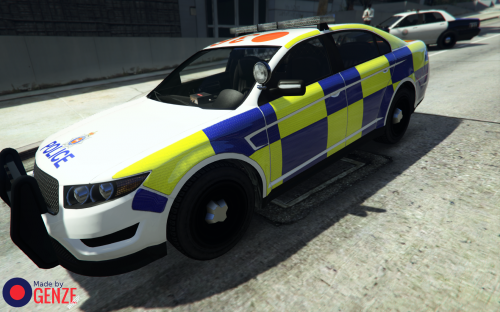 This file includes a texture for the Police Interceptor by Lt.Caine. The texture is based off Surrey Police vehicles, here in the UK. It's the first texture I have made for GTAV and the first I've uploaded here for a very long time. Let me know what you think about it, there is always room for improvement/more! I've done a lot of thinking for this one, which has resulted in a lot of head hurting. Hopefully it's paid off. How to install: Firstly download and install Lt.Caine's Interceptor (http://www.lcpdfr.com/files/file/8329-v-interceptor-default-type/), follow his instructions, then: 1) Open OpenIV. 2) Go to "update/x64/dlcpacks/patchday4ng/dlc.rpf/x64/levels/gta5/vehicles.rpf”. 3) Activate 'Edit Mode' and open up "police3.ytd" and replace "pol3_sign_1" with my texture "POLICE3_Surrey_Police_Texture.png". (NOTE: Replace 'pol3_sign' 2, 3 and 4 if you want every car to spawn with the British Police Texture.) Save and exit the texture viewer. 4) Exit OpenIV. 5) Play GTA5, lots. Enjoy the battenburg markings. Unfortunately, its not edible.
- 2 comments
- 2 reviews
-
-

- 2
-
-
Sorry for no response, been away on holiday. I have fixed the problem... it was a corrupted save file. Started a new save and it was fine. Never occurred to me. Thanks to all who helped.
-
In this pack there are two vehicle textures that I made for personal use, however I believe that others may want use these textures as well, so I have uploaded them here. There is one texture for the 06 Impala and one for the Charger. At his time, I am making more textures in the same style for CVPI, Tahoe and Bearcat. These should be released soon. ----------------------------------------------------------------------------------------------------------------------------------------------------------------------------------------------------------------- This pack may NOT be redistributed anywhere else without the author's permission. Under no circumstances may you open the contents of this archive and redistribute the individual files inside it. I accept no responsibility for any damage caused to your installation or PC during the installation, use, or removal of these addons. As with all GTA IV mods, please back up your original files before installing modifications. Have fun!
- 2 comments
- 4 reviews
-
@TheWhiteEagle: I just have GTA IV. @Break: Yeah I have tried copying over the original file for WeaponsInfo.xml and weapons.img, but I still get the crash. I can use the other shotgun and there is no problem. Still looking for a mod to prevent cop cars giving you a shotgun. Both to stop my problem, but also so I can choose to only have an Assault Rifle on my character, instead of having to have both. It breaks my immersion having too large weapons, but that may just be me.
-
Every time I switch to the Combat Shotgun (the one you get from Police Vehicles), my game freezes and then crashes. The problem occurs even after a complete reinstall of my game. If anyone knows a fix, that would be great! If not, I was wondering if there was a mod that prevented you being given the shotgun when you enter a police vehicle, that way I will never need to use the Combat Shotgun and so will prevent a crash. If such mod does not exist, does anyone feel up to the challenge of making a script that prevents being given a shotgun when you enter a police vehicle? Thanks in advance.
-
I know this is not really related but, how is 0.95 as you are a tester. Is it much better??? And i hope you are correct, because I do not want to wait 13hours, even 5! :woot: